
Upload a photo
PNG, JPG or WebP · up to 10 MB
Choose a photo to generate a video.
A red cloak, a winter path and a quiet face reveal
Turn one portrait into a Red Riding Hood video: a red cloak, a snowy forest, grey wolves and a hood-down reveal. Create your own cinematic fairy-tale scene.
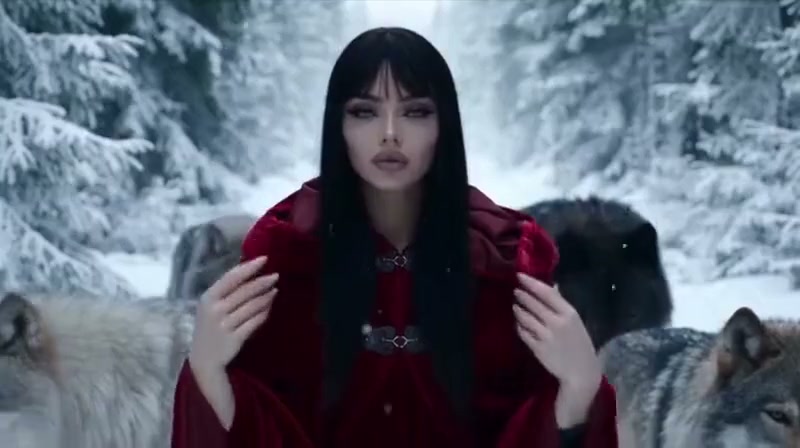
This Red Riding Hood interpretation trades a chase for a calm, cinematic procession. A red-cloaked figure walks through a snowy pine forest with grey wolves nearby, and the camera gradually brings the face into view. The reference moves from a distant figure on a long white path to a close portrait framed by a dark red hood, then an uncovered face. Your uploaded portrait supplies the main identity for a new winter fairy-tale scene.
Best for
- Use this for a winter character introduction
- a dramatic portrait reveal or a short storybook-style edit. The contrast between a red cloak and pale snow does most of the visual work. Keep the sequence focused on a slow walk and a single reveal rather than adding a pursuit
- a fight or several different locations.
Make your Red Riding Hood video
Choose your photo
Choose one sharp portrait with the eyes, hairline and facial shape visible. A waist-up or standing image gives the cloak a useful starting silhouette. Avoid scarves, hands or very dark shadows covering the face. If you already have a prepared red-cloak forest image, use it to guide the setting; an ordinary portrait can instead guide a newly imagined scene.
Generate with the template
The preset builds a red-cloak winter scene around your portrait and guides a slow walk, a gentle camera approach and a hood-down reveal.
Review and download
Check that the same face appears as the hood opens, that the red fabric follows the shoulders and that the wolves remain distinct from each other and the main subject. Watch the walk for sliding feet and the reveal for changing hair or facial shape. A slow approach with a short, steady ending is easier to read than several abrupt camera changes.
Red Riding Hood creative direction
Use this reference direction as a starting point in custom-prompt mode. The template runs fixed instructions; remixing is a separate workflow, not an edit to the preset.
Use the uploaded portrait as the visual identity reference for one recognizable main subject, preserving the facial features, hair colour and general appearance. Dress the subject in a deep red hooded cloak over a simple dark outfit and establish a quiet snow-covered pine forest path. Begin at medium full-body distance rather than an extreme aerial shot. The subject walks slowly toward the camera while two distinct grey wolves calmly walk nearby, one on each side with a little space between all three figures. Use a smooth, restrained backward camera move, then gently tighten the framing toward the upper body. The subject stops, lifts both hands to the hood edges and lowers the hood just enough to reveal the same face and hair, ending with a calm look toward the lens. Add light falling snow and soft winter illumination. Keep the cloak, faces and animal anatomy coherent. No chasing, attacks, extra wolves appearing, text, logos or abrupt cuts.
Before you create
Do I need a photo with a red cloak and wolves?
No. A clear portrait can guide a new scene with a red hooded cloak, snow-covered trees and grey wolves. A prepared scene image gives more control over the starting composition. This is a fictional fairy-tale treatment of one uploaded subject, not a reconstruction of an event or a combination of several uploaded portraits.
Can I change the creative direction?
The preset uses fixed instructions. Copy the reference direction into custom-prompt mode to adapt it; this does not change the preset itself.
What video output should I expect?
The default length is 12s (reference ratio 800/448). The output follows your uploaded photo's aspect ratio and suits Use this for a winter character introduction, a dramatic portrait reveal or a short storybook-style edit. The contrast between a red cloak and pale snow does most of the visual work. Keep the sequence focused on a slow walk and a single reveal rather than adding a pursuit, a fight or several different locations..
Step into your winter fairy-tale scene
Choose a clear portrait, generate the forest walk and review the face, cloak and wolves before downloading your scene.