
Upload a photo
PNG, JPG or WebP · up to 10 MB
Choose a photo to generate a video.
Glowing veins and a letter-tunnel reveal
Make a Meri Nas Nas Mein AI video from an arm photo. Animate warm glowing veins and a letter-tunnel reveal, then explore your romantic visual edit in ReelAI.
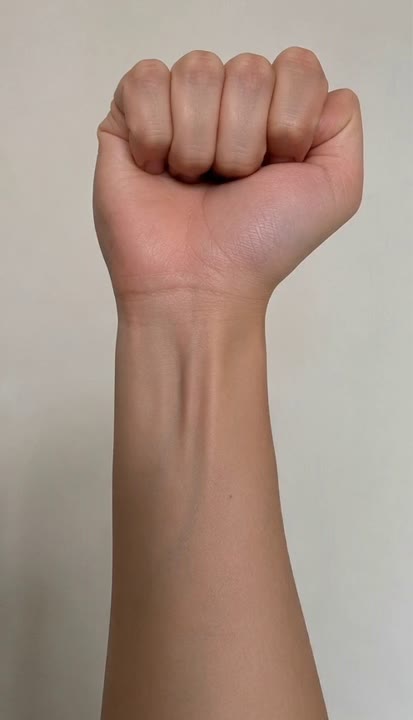
Meri Nas Nas Mein turns an ordinary wrist close-up into a romantic glowing-vein edit. Light travels along the forearm before the camera moves toward a bright point and enters an abstract tunnel. The preset uses a simple capital A motif so the sequence has a clear ending without requiring a separate text field. Skin texture, a watch, or a bracelet provide visual continuity between the real arm and the imagined interior. This is a light-and-camera effect, not a portrait dance. A short, uncluttered composition works well for a personal message or an atmospheric story insert.
Best for
- Glowing-vein edits
- Romantic letter visuals
- Wrist close-up transitions
Animate your Meri Nas Nas Mein edit
Choose your photo
Use a sharp photo showing one wrist and part of the forearm against a quiet background. Keep the skin evenly lit and avoid a crop that cuts directly through the wrist. No face is needed for this effect.
Generate with the template
Add your wrist photo and select Generate video. The fixed direction introduces a warm light pulse and a simple letter motif; a different initial belongs in a separate custom-prompt submission.
Review and download
Watch the direction of the light pulse, the outline of the wrist, and the transition into the tunnel. Check that the glowing branches stay beneath the skin and that any letter shape remains readable rather than multiplying into clutter.
Direction for the orange-red light trail
Use this reference direction as a starting point in custom-prompt mode. The template runs fixed instructions; remixing is a separate workflow, not an edit to the preset.
Animate the reference image of a human wrist and forearm into a glowing-vein visual. Preserve the skin tone, wrist position, watch, and sleeve. Begin with a steady close-up. Fine orange-red light slowly travels beneath the skin from the wrist toward the forearm, forming a delicate branching pattern without injury. Move the camera closer to one bright point and dissolve into an abstract warm tunnel with a few floating capital A shapes. Keep the final composition uncluttered. Use a smooth continuous transition and gentle pulses of light. No wounds, extra hands, subtitles, or additional text.
Before you create
Can I choose a different letter for the glowing-vein effect?
The preset uses a fixed capital A motif; it does not include a letter-entry control. To try another initial, copy the creative direction into custom-prompt mode and replace that letter before submitting a new video. A single large initial is a clearer creative target than a full name or a sentence.
Can I change the creative direction?
The preset uses fixed instructions. Copy the reference direction into custom-prompt mode to adapt it; this does not change the preset itself.
What video output should I expect?
The default length is 8s (reference ratio 414/720). The output follows your uploaded photo's aspect ratio and suits Glowing-vein edits, Romantic letter visuals, Wrist close-up transitions.
Bring your arm photo into the effect
Start with one evenly lit arm photo and turn a wrist close-up into a warm, glowing-vein transition with a clear visual ending.