
Upload a photo
PNG, JPG or WebP · up to 10 MB
Choose a photo to generate a video.
A quiet gift delivery seen from the doorway
Create a Santa Caught on Camera AI video from one porch or room photo. Bring Santa into the scene for a gift delivery and a quiet shush in a fixed camera view.
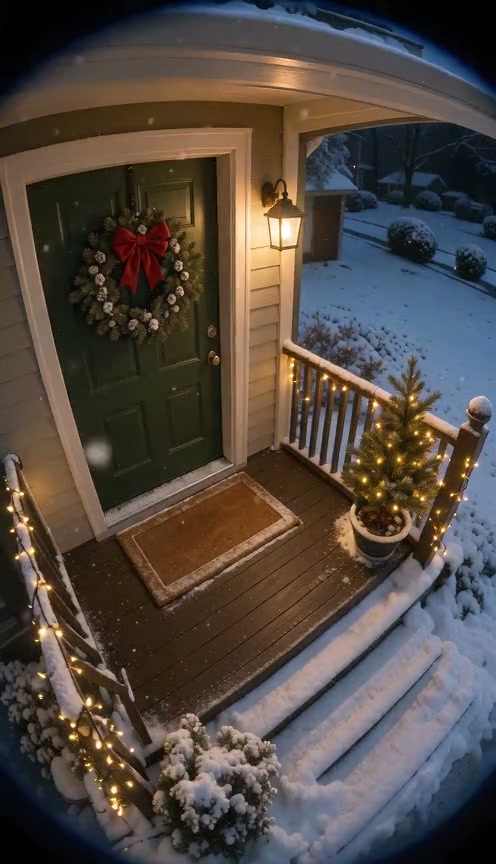
The Santa Caught on Camera idea turns an ordinary doorstep into a short Christmas visit. A fixed, wide view lets the delivery tell the story: a visitor arrives, a parcel reaches the floor, and a finger-to-lips gesture closes the moment. The reference clip shows a snowy porch with a green front door, warm decorations and Santa placing a wrapped present before leaving. It is a third-party example of the scene, not footage produced through ReelAI. Start with one empty porch or room photo. The prompt brings the character in from the edge, using the picture as the setting for the delivery. Visible floor space gives the parcel somewhere to land, while an open edge makes the entrance and exit easier to follow. A restrained camera look suits the joke better than a dramatic zoom.
Best for
- Christmas doorstep clips
- festive home-camera scenes
- gift-delivery stories
Turn your home photo into a Christmas visit
Choose your photo
Upload one clear photo of an empty porch or room, with the floor and an open route from one edge visible. A wide view beside the front door or near a Christmas tree works well. Remove app controls and timestamps from screenshots so the scene itself fills the frame.
Generate with the template
Upload the empty porch or room photo and select Generate video. The preset guides Santa into the scene to place a parcel and notice the camera.
Review and download
Check that the door, railings and furniture stay in place while the character moves. The gift should remain a single object as it reaches the floor. Watch the raised finger and beard for merging, and choose a take with a smooth exit rather than a sudden disappearance.
Set down a gift, shush and step away
Use this reference direction as a starting point in custom-prompt mode. The template runs fixed instructions; remixing is a separate workflow, not an edit to the preset.
Use the uploaded empty porch or room photo as the visual setting. Preserve the main architecture, furniture, decorations and viewpoint. Hold the camera completely fixed like a home security camera. Introduce one Santa Claus in a red coat, white beard and boots from an open edge of the frame, carrying one wrapped gift. He takes a few natural steps, lowers the parcel onto a clear patch of floor, straightens and notices the lens. He briefly raises one finger toward his lips, smiles, then turns and walks back toward the edge. Keep movement continuous, lighting consistent and objects stable, with subtle camera grain. No other visitors, duplicate parcels, sudden disappearance, camera zoom, timestamps, text or logos.
Before you create
Can I use only a photo of my empty room?
Yes. Use an empty room or porch photo with enough space for a visitor to enter and leave a gift. The prompt introduces Santa and guides the delivery within that scene. Placement, room detail and gestures vary with the input and selected model, so review the take before sharing it.
Can I change the creative direction?
The preset uses fixed instructions. Copy the reference direction into custom-prompt mode to adapt it; this does not change the preset itself.
What video output should I expect?
The default length is 8s (reference ratio 496/864). The output follows your uploaded photo's aspect ratio and suits Christmas doorstep clips, festive home-camera scenes, gift-delivery stories.
Create your festive doorstep moment
Choose a home-camera view, create a festive visit and download the take you like.