
Upload a photo
PNG, JPG or WebP · up to 10 MB
Choose a photo to generate a video.
A close rodeo grapple with clear body contact
Upload one prepared rodeo photo for a Steer Wrestling AI video. Guide a compact cowboy-and-steer grapple on arena dirt, then review your 12-second action clip.
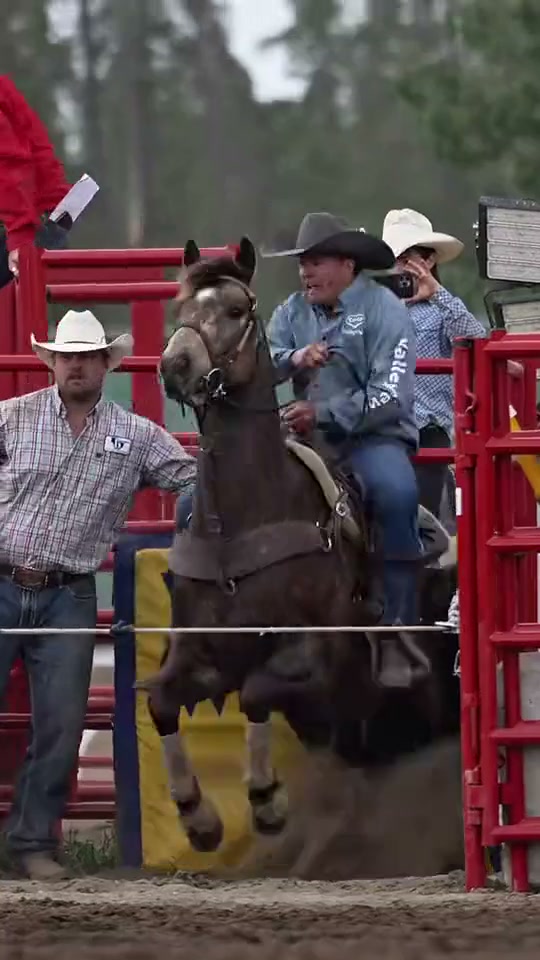
Steer Wrestling brings a rodeo's close physical action into a short visual direction. The bound reference begins beside red arena gates with a cowboy riding out near a steer, catches the rider stretched sideways during the grapple and ends with the animal down on the dirt beside him. Those frames show a complete sporting sequence with horses, assistants and changing body positions. This page concentrates on one already-prepared cowboy-and-steer contact pose, using a small grounded movement rather than requiring the entire horse exit, dismount and takedown. Preserve the arena texture and tense close framing while keeping the featured person's appearance visible.
Best for
- Use the rodeo setting for a cowboy persona
- an exaggerated sports reaction or a brief action portrait with a clear central pair. The grip and the steer supply the subject; extra riders and spectators can stay in the background. A moment of held balance followed by one short shift gives the scene direction without turning it into a whole competition run.
Prepare your cowboy-and-steer action frame
Choose your photo
Prepare one image with the featured adult already beside the steer on arena dirt, with arms positioned near the existing head-and-shoulder contact. Show the person's face, both forearms, the animal's head and enough of its legs to explain their footing. Keep the bodies distinct and the grip visible. An ordinary cowboy headshot or a distant rider on horseback does not contain the complete starting arrangement for this compact grapple.
Generate with the template
Start from the existing contact pose and choose one compact weight shift rather than a horse exit, long dive and full takedown.
Review and download
Inspect the arms and the steer together. The hands should stay connected to the same forearms, the animal's horns and ears should keep their positions, and the feet should remain related to the dirt surface. Look for a steady face as the cowboy shifts weight, then check the steer for a changing leg count. Choose the version with readable contact and a stable finish rather than the largest possible fall.
Guide one grounded shift and a stable finish
Use this reference direction as a starting point in custom-prompt mode. The template runs fixed instructions; remixing is a separate workflow, not an edit to the preset.
Animate the prepared Steer Wrestling image while preserving the featured adult's recognizable face, cowboy clothing and hat, together with the same steer's coat, horns and proportions. Keep the existing grounded head-and-shoulder contact pose on arena dirt. The adult makes one small sideways weight shift and lowers a knee slightly while maintaining the visible grip; the steer takes one short stabilizing step and turns its head a little within that contact. Finish with both bodies clearly supported and their faces separate. Use a steady medium-wide arena view. Keep the background gates still without adding a horseback jump, forced complete takedown, extra limbs, changing horns, new foreground riders, generated signage or camera cuts.
Before you create
Can one image recreate the full horseback dismount and takedown?
The source demonstrates that longer sequence, but this direction starts from a prepared close-contact scene and asks for one short grappling movement. It does not promise the original athlete's timing, a precise airborne dismount or a complete competition result. To explore a longer edit, prepare individual starting scenes for different moments and review them separately instead of expecting one portrait to supply every transition.
Can I change the creative direction?
The preset uses fixed instructions. Copy the reference direction into custom-prompt mode to adapt it; this does not change the preset itself.
What video output should I expect?
The default length is 12s (reference ratio 540/960). The output follows your uploaded photo's aspect ratio and suits Use the rodeo setting for a cowboy persona, an exaggerated sports reaction or a brief action portrait with a clear central pair. The grip and the steer supply the subject; extra riders and spectators can stay in the background. A moment of held balance followed by one short shift gives the scene direction without turning it into a whole competition run..
Create your short steer-wrestling scene
Upload one complete rodeo contact image with separate limbs, a visible grip and clear ground beneath the central pair.