
Upload a photo
PNG, JPG or WebP · up to 10 MB
Choose a photo to generate a video.
A flex and a curled hand make the heart
Create a bicep heart video from one photo. Flex one arm, curl the other hand into the heart shape, then review and download your own short clip in ReelAI.
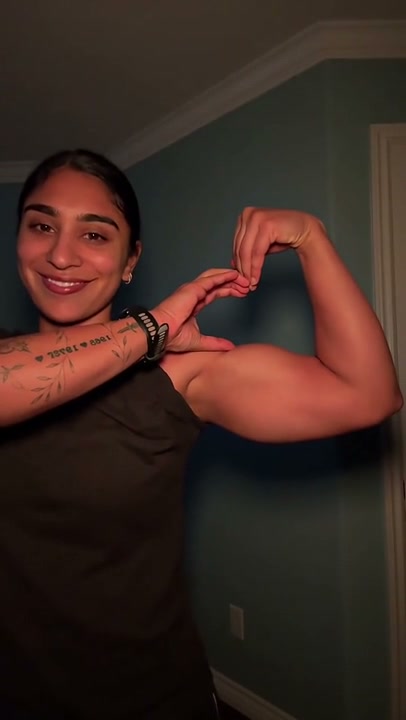
A bicep heart is a heart shape made by flexing one upper arm and curling the opposite hand against its inner edge. The arm supplies one curve while the thumb and fingers help close the outline. This photo-to-video preset brings that gesture into one continuous portrait shot, moving from relaxed arms to a clear final hold. It is different from a two-hand heart or an overhead heart: the hand stays beside the flexed arm. Your uploaded photo supplies the person, outfit and starting setting. The preview and close-up are third-party pose references, not verified ReelAI results or a promise of identical motion. This is a hand-placement effect, not a muscle-growth transformation.
Best for
- Photo-to-video pose Reels
- playful gym greetings
- reaction replies
- portrait posts
Reference examples
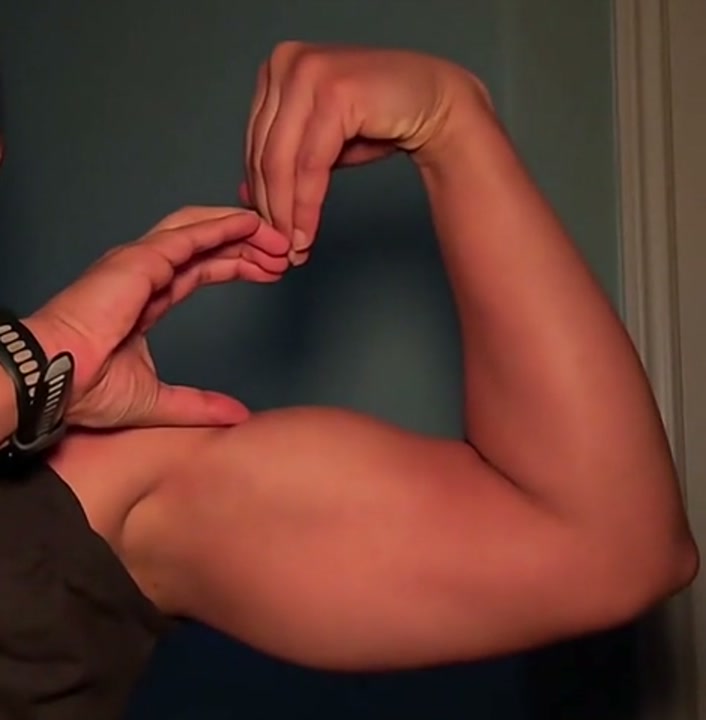
Reference looks for Bicep Heart AI Video Generator. Your result depends on your photo, model and settings.
How to make your bicep heart from a photo
Choose your photo
Choose one sharp photo of a single adult, framed from head to waist with both shoulders, elbows and hands visible. A short sleeve or sleeveless top helps the arm curve read clearly. Leave space beside the raised elbow and avoid a phone covering the hands or a crop that cuts off the forearm. A bicep heart picture that already shows the completed pose can also be a starting frame for a smaller angle-adjustment-and-hold variation.
Generate with the template
Upload your waist-up photo and select Generate video. The prepared bicep heart direction raises one arm, curls the opposite hand beside the upper arm and holds the heart with a small smile, using your starting appearance as the visual guide.
Review and download
Look at the silhouette, not just the flex. The curled hand and upper arm should form one readable heart rather than two disconnected shapes. Follow each wrist through the movement, check that the fingers stay distinct and make sure the elbow does not switch sides. The arm should retain the build in your photo instead of inflating. Prefer a clear final hold over a take with a fast camera move or fingers covering the heart's opening.
One flex, connected hands and a clear final hold
Use this reference direction as a starting point in custom-prompt mode. The template runs fixed instructions; remixing is a separate workflow, not an edit to the preset.
Animate the single adult in the uploaded waist-up photo into one clear bicep heart gesture. Preserve the recognizable face, hairstyle, clothing, natural arm build and starting room. Use a steady front-facing camera with both shoulders, elbows and hands visible. Begin with relaxed arms and a small smile. Lift one upper arm to the side and bend its elbow so the forearm rises beside the head. Curl that wrist inward, with the fingers pointing gently downward. Bring the opposite hand across the chest, rest its thumb near the upper edge of the flexed bicep and curve its fingers toward the raised hand. Adjust the hands until their curves and the upper arm frame one recognizable heart-shaped opening above the bicep. Hold the completed pose with a relaxed smile, a natural blink and a small breath so the hand-to-arm connection remains readable. If the starting photo already contains the completed heart, preserve it and use only a slight angle adjustment and hold. Keep five distinct fingers per hand, consistent wrists and natural joint bends. No enlarged muscles, added tattoos, extra limbs, floating heart graphics, chest-level two-hand heart, overhead heart, captions, logos, lyrics or spoken catchphrases.
Before you create
Can I make a bicep heart picture or pic with this preset?
This preset creates an MP4 video from one photo rather than a separate still-image export. For a bicep heart pic, pause your downloaded clip on its clearest pose and save that frame with your video editor. Keep both arms visible in the input so the hand placement has a useful guide. One person's photo is enough; you do not need a partner photo or a motion-reference upload.
Can I change the creative direction?
The preset uses fixed instructions. Copy the reference direction into custom-prompt mode to adapt it; this does not change the preset itself.
What video output should I expect?
The default length is 7s (reference ratio 406/720). The output follows your uploaded photo's aspect ratio and suits Photo-to-video pose Reels, playful gym greetings, reaction replies, portrait posts.
Make your bicep heart video
Choose a clear portrait, guide the flex and review the heart silhouette. Download the take with the clearest hand-to-arm connection, then add your own caption or chosen sound.