
Upload a photo
PNG, JPG or WebP · up to 10 MB
Choose a photo to generate a video.
Make the height and the rebound readable
Upload one prepared jump scene for a High Altitude Trampoline AI video, dropping toward a distant trampoline and aiming for a dramatic rebound in ten seconds.
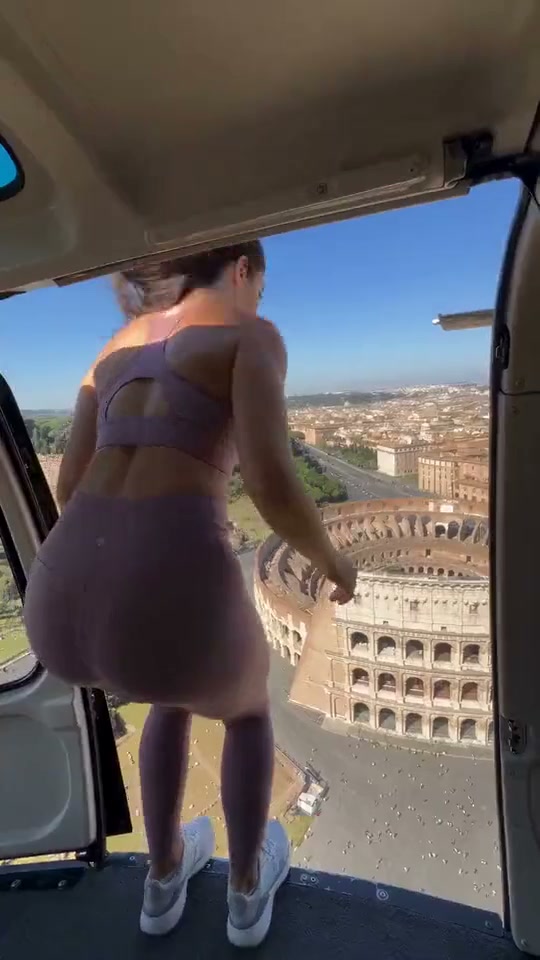
High Altitude Trampoline AI is an impossible drop-and-rebound scene. The starting point is far above a tiny trampoline, and the visual surprise is the return toward that same high ledge or aircraft after the bounce. The scale needs to be clear before the movement begins: a visible edge, open air and a small landing target below give the viewer a way to follow the stunt. Media.io's discovery page did not expose a usable primary clip, so this page uses a same-topic video explicitly bound by MakeViral. Its reviewed frames show an athletic adult at a helicopter doorway above Rome, a downward view toward the Colosseum area and a final pose hanging from the helicopter skid. The reference is already an AI-stunt interpretation, not a filmed physical demonstration. For your version, prepare the starting scene in one image with the subject, the elevated platform and the distant trampoline visible. Keep the composition to one jumper and one bounce target, with a camera angle that makes the path readable.
Best for
- Try the trampoline effect for an impossible-stunt short or a surreal travel-view post. A helicopter doorway
- a high platform or a cliff can establish the height; choose one setting rather than combining several locations in the same short direction.
Prepare an impossible trampoline scene
Choose your photo
Prepare one full-body jumper scene with the starting edge and a clear view down toward one trampoline. Keep the arms and legs separate, shoes visible and the landing target unobstructed. A close cropped selfie cannot establish that whole spatial layout.
Generate with the template
Upload a complete starting scene showing one full-body jumper, the elevated edge and one distant trampoline beneath it.
Review and download
Check the jumper's body scale during the descent and rebound, then inspect the contact with the trampoline and the return direction. Reject extra trampolines, an unexplained second jumper or a body that changes shape as it becomes smaller in the distance.
Direct one drop and one rebound
Use this reference direction as a starting point in custom-prompt mode. The template runs fixed instructions; remixing is a separate workflow, not an edit to the preset.
Animate the single prepared high-platform image into a High Altitude Trampoline AI stunt interpretation. Preserve the adult jumper's face, outfit, shoes and proportions, the platform and the one visible trampoline below. Use one continuous wide view that keeps the direction of travel understandable. The subject makes a small departure from the edge, descends toward the center of the trampoline, compresses it briefly and rebounds upward toward the starting level. Keep the same adult throughout the changing scale and maintain coherent limbs. Let the target remain fixed rather than following the jumper. Treat the full rebound as the requested creative action. No second jumper, duplicate landing target, body morphing, new city landmarks, text, rapid cuts or original-audio request.
Before you create
Will High Altitude Trampoline AI reproduce the full reference jump?
The preset asks for a new short drop-and-rebound interpretation from one prepared scene. The exact landing, camera path and return are motion targets to inspect, not accepted results. The supplied helicopter reference comes from the same-topic MakeViral page because the discovery page had no usable bound primary video.
Can I change the creative direction?
The preset uses fixed instructions. Copy the reference direction into custom-prompt mode to adapt it; this does not change the preset itself.
What video output should I expect?
The default length is 10s (reference ratio 540/960). The output follows your uploaded photo's aspect ratio and suits Try the trampoline effect for an impossible-stunt short or a surreal travel-view post. A helicopter doorway, a high platform or a cliff can establish the height; choose one setting rather than combining several locations in the same short direction..
Try your high-altitude jump direction
Use a clear starting composition to explore the drop-and-rebound effect, then inspect the motion path in the finished clip.