
Upload a photo
PNG, JPG or WebP · up to 10 MB
Choose a photo to generate a video.
Solo footwork inside a color-shifting light box
Make a Hotline Bling AI dance video from one photo. Put yourself or your pet inside a glowing, color-shifting studio cube for a relaxed solo dance preview.
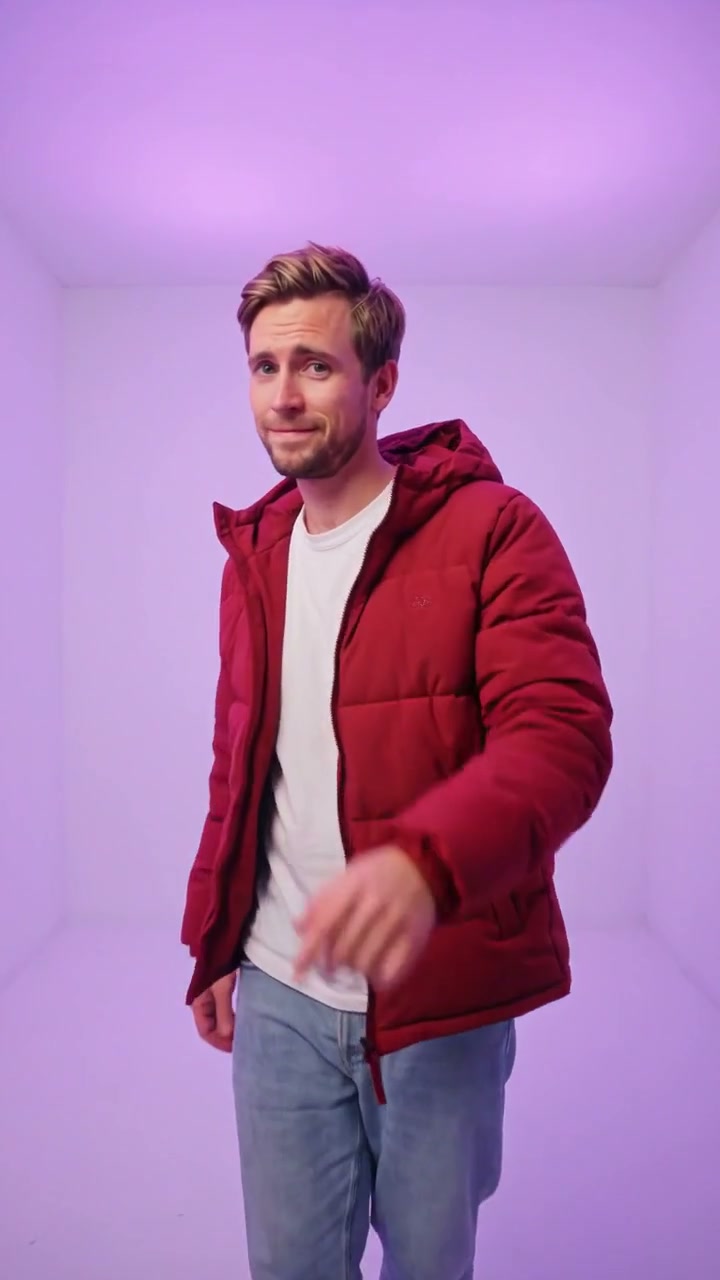
Hotline Bling Dance places a solo performer inside a minimalist, shadowless studio cube where the seamless walls cycle softly through warm amber, mint teal and violet light. In the reference clip, a bearded performer in a red puffer jacket, white tee, jeans and tan boots steps and gestures casually as the framing moves from a full-body stance to a closer waist-up view. This preset uses your uploaded image to stage a clean, color-shifting studio routine around your own appearance or pet.
Best for
- Use Hotline Bling Dance for streetwear lookbooks
- casual reaction reels or playful pet portraits that stand out against a clean
- glowing studio backdrop where simple side steps and hand accents carry the rhythm.
Stage your glowing color-room dance
Choose your photo
Choose one full-body or knee-up standing picture with clear separation around the arms and a recognizable jacket, hoodie or coat. Even illumination on the face helps the Hotline Bling Dance studio glow complement your natural features without harsh shadows.
Generate with the template
Keep the seamless color-shifting cube, relaxed side steps and gentle camera approach, or adjust the framing before generating.
Review and download
Check that the ambient wall colors shift smoothly from amber to teal and violet without distorting skin tones or coat markings. Watch the fingers during the casual gestures and confirm the shoes stay planted on the studio floor.
Direct the light shift and relaxed side steps
Use this reference direction as a starting point in custom-prompt mode. The template runs fixed instructions; remixing is a separate workflow, not an edit to the preset.
Create a Hotline Bling Dance studio video using the single person or pet in the uploaded image. Preserve their recognizable face, hairstyle or fur pattern, jacket and body proportions. Place the performer inside a minimalist, seamless rectangular light-box room whose walls shift smoothly from warm amber to mint teal and soft violet. Begin in a full-body view with relaxed side steps, a gentle shoulder bounce and casual open-hand gestures, then push the camera smoothly into a medium waist-up view ending on a warm smile. Keep hands, feet and studio geometry clean in one continuous shot without text or logos.
Before you create
Does Hotline Bling Dance copy the official music video or song?
No. This preset creates a new studio-box visual animation guided by your uploaded image and the creative instructions. It does not bundle copyrighted audio or paste your face onto existing footage.
Can I change the creative direction?
The preset uses fixed instructions. Copy the reference direction into custom-prompt mode to adapt it; this does not change the preset itself.
What video output should I expect?
The default length is 10s (reference ratio 720/1280). The output follows your uploaded photo's aspect ratio and suits Use Hotline Bling Dance for streetwear lookbooks, casual reaction reels or playful pet portraits that stand out against a clean, glowing studio backdrop where simple side steps and hand accents carry the rhythm..
Step into the glowing studio cube
Upload one standing portrait or pet image to create a glowing Hotline Bling Dance studio clip.