
Upload a photo
PNG, JPG or WebP · up to 10 MB
Choose a photo to generate a video.
Laid-back bounce and cap-brim swagger on the beat
Upload one photo for a Just a Lil Bit Dance AI video. Guide the laid-back cap-touch gesture, knee bounce and smooth side step in a 12-second dance clip.
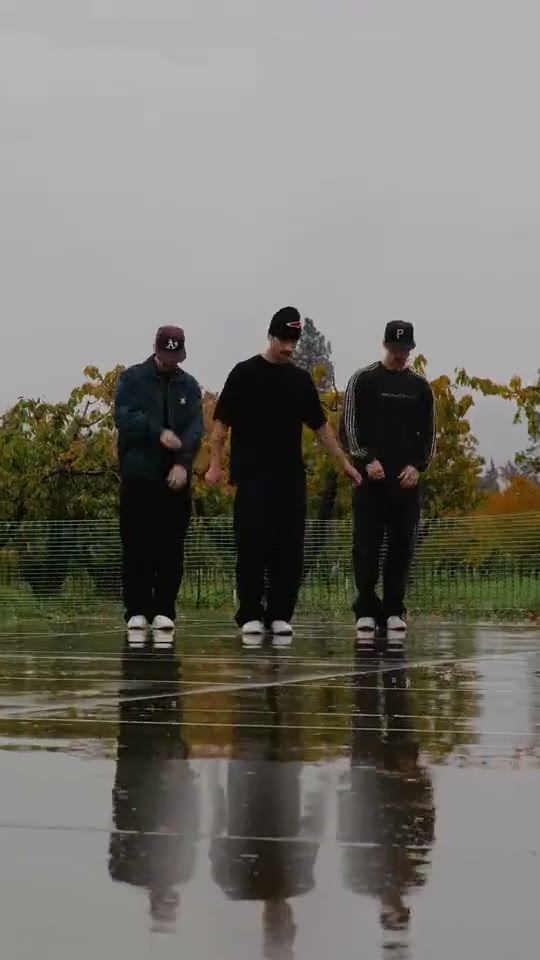
Just a Lil Bit Dance AI focuses on minimal, heavy-beat confidence rather than fast acrobatics. The bound reference clip shows three men in dark streetwear and baseball caps on a rain-slicked outdoor court, stepping forward together with one hand lifted near the face and the other arm angled out. This Just a Lil Bit Dance AI direction captures that relaxed knee bounce, cap-touch gesture and unhurried side step from a single uploaded full-body photo.
Best for
- A streetwear fit check
- a crew photo on a basketball court
- or a solo laid-back hip-hop groove with Just a Lil Bit Dance AI
- where a low-key nod and hand gesture carry the whole rhythm.
Generate a Just a Lil Bit Dance AI video from one image
Choose your photo
Upload one full-body standing image with visible shoes and open ground ahead. If you want the three-person crew look from the Just a Lil Bit Dance AI reference, all dancers must already appear in that single photo with clear gaps between their shoulders and arms; a solo portrait works just as well.
Generate with the template
Run the Just a Lil Bit Dance AI direction to animate a slow knee bounce, a raised hand near the cap brim and a steady side step.
Review and download
Verify that the raised hand stops cleanly near the brow or nose without merging into the face or cap visor. If your starting image has multiple people or wet-ground reflections, check that each person in the Just a Lil Bit Dance AI clip keeps their own jacket and footing.
Guide the slow knee bounce and cap-touch gesture
Use this reference direction as a starting point in custom-prompt mode. The template runs fixed instructions; remixing is a separate workflow, not an edit to the preset.
Animate the standing performer or group already present in the uploaded full-body image for a Just a Lil Bit Dance AI inspired groove. Preserve every recognizable face, cap, jacket, trousers and wet-pavement or street background. Begin with a laid-back knee bounce in place. Raise one hand smoothly toward the cap brim or nose level while extending the other arm for balance, then take one synchronized side step and settle into a cool nod. Keep shoes planted on the ground, bodies separated and the camera steady. No new people, swapped outfits, text overlays or audio claims.
Before you create
Can Just a Lil Bit Dance AI combine three separate friend photos into one court video?
No. This preset animates a single input image. To make a group Just a Lil Bit Dance AI clip, upload one photo where your friends already stand side by side, or use a solo full-body portrait for a one-person version. The reference video demonstrates the rhythm and gesture style.
Can I change the creative direction?
The preset uses fixed instructions. Copy the reference direction into custom-prompt mode to adapt it; this does not change the preset itself.
What video output should I expect?
The default length is 12s (reference ratio 540/960). The output follows your uploaded photo's aspect ratio and suits A streetwear fit check, a crew photo on a basketball court, or a solo laid-back hip-hop groove with Just a Lil Bit Dance AI, where a low-key nod and hand gesture carry the whole rhythm..
Put your photo into Just a Lil Bit Dance AI
Start with a full-body street or court portrait and animate a cool Just a Lil Bit Dance AI groove.