
Upload a photo
PNG, JPG or WebP · up to 10 MB
Choose a photo to generate a video.
One press, a soft rebound, and a wobble
Create a Squishy AI video from one object photo. Animate a gentle press, a soft rebound, and a glossy wobble to build a satisfying squeeze effect in ReelAI.
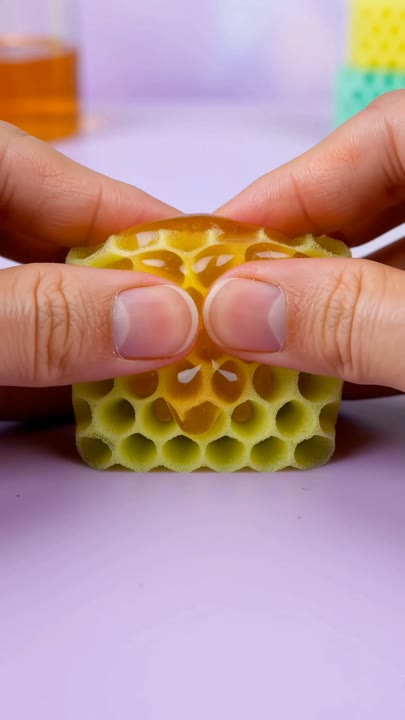
Squishy AI makes a familiar object behave like a soft silicone toy. A small press changes the silhouette, then the surface rebounds with a gentle wobble that gives the clip its satisfying finish. This preset uses one object, one hand, and a clean tabletop so the deformation stays easy to follow. The original color and outline remain the visual anchors through the squeeze. Start with a plush toy, a simple product, or another clearly framed object rather than a busy scene. Use the result for a playful product insert, a soft-body animation experiment, or a short visual reaction.
Best for
- Soft-body product inserts
- Squish-and-rebound loops
- Playful toy animations
Create your Squishy AI squeeze
Choose your photo
Choose one object with a clear outline and a simple background. Show the whole shape with space around its edges. Avoid transparent clutter, several overlapping products, or a crop that hides the surface where the hand should press.
Generate with the template
Upload the object photo and select Generate video. The prepared direction introduces one hand and one gentle press, then lets the object regain its shape without changing the camera or adding a second action.
Review and download
Watch the surface under the fingertip, the return to the starting shape, and the final wobble. The same object should remain recognizable, with no duplicated hands, detached pieces, or a sudden change from silicone into liquid.
Direction for the soft silicone surface
Use this reference direction as a starting point in custom-prompt mode. The template runs fixed instructions; remixing is a separate workflow, not an edit to the preset.
Animate the single object in the reference image into a soft, satisfying squish. Preserve its main colors, silhouette, and recognizable details. Place it on a clean tabletop under diffuse studio light. One hand enters from the side, presses gently into the upper surface, and pauses while the object compresses like glossy silicone. The hand withdraws and the object slowly regains its shape with two small wobbles. Keep the camera fixed and the tabletop stable. Show one clear press-and-release cycle, not multiple material changes. No torn surfaces, extra hands, liquid spills, captions, or added logos.
Before you create
Does Squishy AI include a particular ASMR recording?
The preset directs the visible press and rebound; it does not request a particular ASMR recording. Review the generated audio separately if sound matters to your edit. A simple object and one slow squeeze give you a clear visual moment to work with, whether you keep the output sound or edit it later.
Can I change the creative direction?
The preset uses fixed instructions. Copy the reference direction into custom-prompt mode to adapt it; this does not change the preset itself.
What video output should I expect?
The default length is 10s (reference ratio 406/720). The output follows your uploaded photo's aspect ratio and suits Soft-body product inserts, Squish-and-rebound loops, Playful toy animations.
Give your object a satisfying squeeze
Pick a clean object photo and create a short squeeze-and-rebound animation. Review the contact point and the return to the original silhouette before downloading.