
Upload a photo
PNG, JPG or WebP · up to 10 MB
Choose a photo to generate a video.
The straight-face pause and cheek-squish smile
Upload one photo for a Talk to Me Doja AI video. Guide the hands-on-cheeks pose, a bright smile and a gentle shoulder sway in a playful 12-second clip.
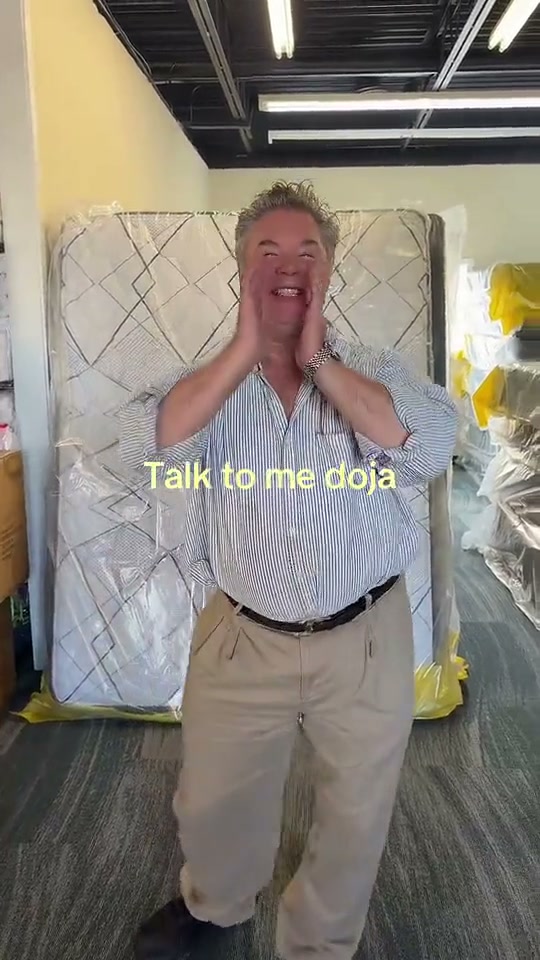
Talk to Me Doja turns a straight-faced pause into an exaggerated cute reaction. The reference begins with a man standing seriously in a mattress store, then changes as he presses both palms against his cheeks, closes his eyes and smiles. Anime reaction cutouts appear around the later sway. Your version takes the face-framing gesture as its visual hook: a brief wait, hands lifting toward the cheeks and a warm, slightly embarrassed smile. Keep the camera close enough to read the expression while leaving the elbows in view. The short performance works through that change of mood rather than a complicated dance routine.
Best for
- A playful reply to a friend
- a sudden change from serious to delighted
- or a lighthearted portrait post where the expression carries the joke. Talk to Me Doja suits a simple shop
- bedroom or office background with the person clearly separated from furniture. Choose a picture with a relaxed mouth and open space around the shoulders so the cute pose has somewhere to develop.
Make your own Talk to Me Doja reaction
Choose your photo
Use one sharp adult portrait framed from the head to the hips. Keep both arms visible and the hands away from the face in the starting image. Front-facing light makes it easier to follow the smile when the palms move upward. Avoid sunglasses, a hand already covering the eyes or a tight crop through the elbows. The original setting can stay; you do not need to recreate the mattress store.
Generate with the template
Review the brief serious pause, the hands lifting toward the cheeks and the small smiling shoulder sway before generating.
Review and download
Watch the fingertips where they approach the cheeks and check that both eyes remain coherent during the smile. The hands should frame the face rather than hide it or merge into the skin. Look for a smooth change from the opening pause to the sway, with shoulders staying level. A small, readable expression is more useful here than a fast full-body turn or a large camera move.
Direct the cheek pose and gentle sway
Use this reference direction as a starting point in custom-prompt mode. The template runs fixed instructions; remixing is a separate workflow, not an edit to the preset.
Animate the single adult in the uploaded portrait for a Talk to Me Doja inspired reaction. Preserve the recognizable face, hairstyle, clothes, skin tone and original background. Begin with a relaxed straight face and a brief still pause. Raise both hands slowly so the palms frame the lower cheeks, keeping fingers distinct and eyes unobstructed. Let the expression brighten into a broad natural smile, then add a small side-to-side shoulder sway without moving the feet out of frame. Keep elbows separated from the torso and use a fixed medium camera. Finish with the smile held clearly. No copied GIFs, text, sudden cuts, extra people or soundtrack request.
Before you create
Does Talk to Me Doja add the anime GIFs and original song?
This preset directs a new photo-led performance around the cheek pose, smile and small sway. It does not copy the reference's GIF layout, caption timing or recording. Those details belong to the inspiration clip rather than the preset's output promise. You can add stickers, a caption and your chosen soundtrack separately after reviewing the animation, while keeping the face gesture visible.
Can I change the creative direction?
The preset uses fixed instructions. Copy the reference direction into custom-prompt mode to adapt it; this does not change the preset itself.
What video output should I expect?
The default length is 12s (reference ratio 540/960). The output follows your uploaded photo's aspect ratio and suits A playful reply to a friend, a sudden change from serious to delighted, or a lighthearted portrait post where the expression carries the joke. Talk to Me Doja suits a simple shop, bedroom or office background with the person clearly separated from furniture. Choose a picture with a relaxed mouth and open space around the shoulders so the cute pose has somewhere to develop..
Try the Talk to Me Doja photo direction
Start with one clear waist-up portrait and make the change from a straight face to an exaggerated cute reaction.