
Upload a photo
PNG, JPG or WebP · up to 10 MB
Choose a photo to generate a video.
Small eye movements with a dry final stare
Create a Misanthropy meme AI video from one clear portrait. Animate a quick left-right side-eye, a brief pause and an unimpressed final look with your face.
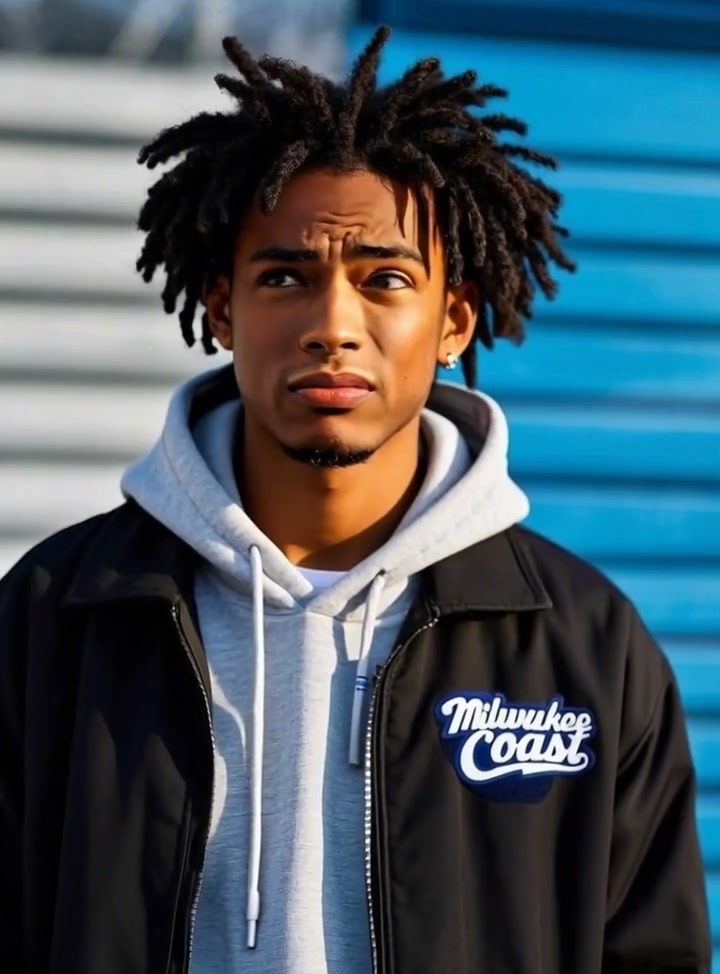
Misanthropy Meme lets a tiny change of expression do most of the work. The reference holds a close portrait of a young man in a dark jacket and grey hoodie against blue-and-white siding. His eyes shift sideways, his mouth tightens and the final expression is skeptical and direct. There is no large body movement or elaborate background reveal. A single clear portrait gives the eyes, eyebrows and mouth enough room to carry the reaction. This direction uses a fixed camera and a short sequence of glances, keeping the setting quiet so the closing look lands cleanly.
Best for
- A dry reaction post
- an original-character expression study or a portrait meme where a wordless pause supplies the joke. Start from a neutral face if you want a visible change at the end. A simple chest-up composition makes the small eye and brow movements readable without relying on subtitles.
Animate your portrait's side-eye reaction
Choose your photo
For a Misanthropy meme, upload one front-facing head-and-shoulders portrait with both eyes open and clearly visible. Keep hair, glasses reflections and hands away from the pupils. Even light across the face helps the gaze stay consistent. A slight natural head angle is fine, but a full side profile leaves too little room for the left-right reaction.
Generate with the template
Review the left-right gaze and short closing pause while keeping the head movement small and the background stable.
Review and download
Watch both pupils together as the glance changes direction. The eyebrows and mouth should move with the expression while the face shape remains steady. Check that the eyes do not look in different directions and that the closing pause lasts long enough to read as one deliberate reaction.
Direct the glance, pause and closing expression
Use this reference direction as a starting point in custom-prompt mode. The template runs fixed instructions; remixing is a separate workflow, not an edit to the preset.
Animate the single person or original character shown in the uploaded portrait. Preserve the recognizable face, hairstyle, clothing, skin tone or character markings and the existing background. Hold a fixed chest-up camera. Begin with a neutral expression, move both eyes together in a quick glance to one side and then the other, pause briefly and settle into an unimpressed direct look with a small brow and mouth change. Keep the head mostly still, pupils aligned and facial proportions coherent. One continuous shot with no new characters, text, background replacement or cuts.
Before you create
Does the character need to move their whole head?
Keep the head mostly still and let the eyes, eyebrows and mouth carry the sequence. Small natural motion can help, but a large head turn may hide the gaze. The preset generates a new visual reaction from your portrait; it does not transfer the reference person's exact timing or voice.
Can I change the creative direction?
The preset uses fixed instructions. Copy the reference direction into custom-prompt mode to adapt it; this does not change the preset itself.
What video output should I expect?
The default length is 5s (reference ratio 720/974). The output follows your uploaded photo's aspect ratio and suits A dry reaction post, an original-character expression study or a portrait meme where a wordless pause supplies the joke. Start from a neutral face if you want a visible change at the end. A simple chest-up composition makes the small eye and brow movements readable without relying on subtitles..
Make your Misanthropy meme reaction video
Use one clear portrait to create a compact, expression-led reaction with your own recognizable appearance.