
Upload a photo
PNG, JPG or WebP · up to 10 MB
Choose a photo to generate a video.
A real performer and a twin that stays drawn
Upload one prepared image for a Doodle Dance Partner AI video. Animate you and your flat sketch twin with a shared hand lift and sway in a 5-second clip.
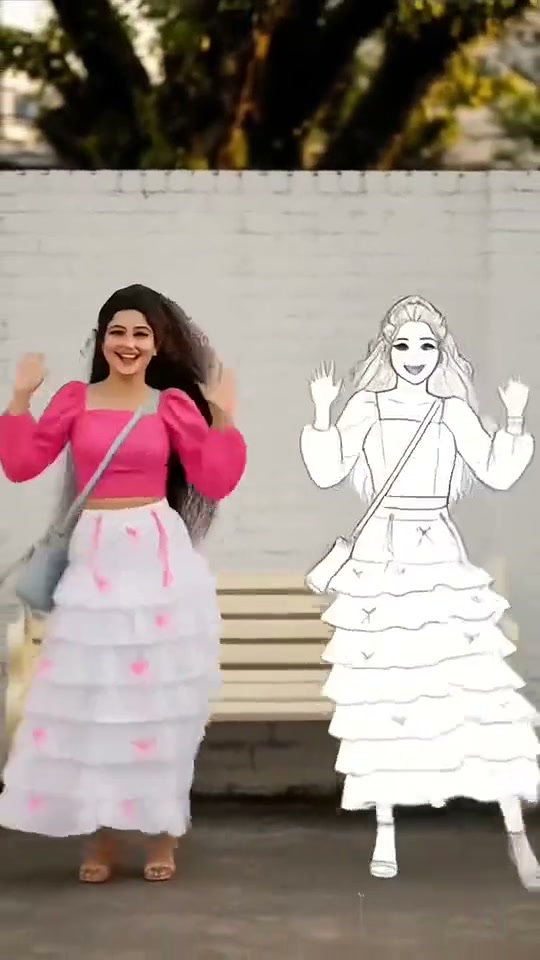
Doodle Dance Partner places a photographic performer beside a flat illustrated version of the same person. In the reference, a woman in a pink top and tiered skirt reacts as a white-filled cartoon copy approaches. They lift their hands, turn toward the camera and move together in front of a brick wall. The drawing keeps black contours, white interiors and a simplified outline of her clothes. Prepare both figures in one image for this direction, then animate a shared hand lift and small sway. The contrast between fabric and ink should remain visible from the opening frame to the final pose.
Best for
- An outfit portrait with an illustrated companion
- a playful sketch duet or a mixed-media post where the flat copy mirrors the real person's silhouette. Doodle Dance Partner is distinct from a realistic clone reveal: the illustrated figure should stay visibly drawn. A plain wall
- pavement or studio floor gives both versions a common setting while making the white-filled shape easy to separate from the live-action clothes and skin.
Animate a prepared person-and-sketch scene
Choose your photo
Upload one prepared scene showing the real adult and their own flat sketch twin side by side. Include full bodies, visible hands and a little floor space between them. Match the drawing's hair and major outfit shapes to the real person, but keep the inside white and the contours simple. This preset animates the supplied composition; it does not include a separate tool for drawing or placing the twin from a lone selfie.
Generate with the template
Review a small shared hand lift and side-to-side sway while keeping the illustrated twin flat, white-filled and separate.
Review and download
Check the drawing throughout the hand lift. Its white fill should remain opaque, the black edges should stay attached to the same silhouette and no skin or cloth texture should appear inside it. The real person's face must remain photographic and recognizable. Watch the space between both sets of hands so the figures do not merge. A small synchronized sway is enough to make the shared scene feel active.
Guide the shared hand lift and small sway
Use this reference direction as a starting point in custom-prompt mode. The template runs fixed instructions; remixing is a separate workflow, not an edit to the preset.
Animate the real adult and the flat doodle twin already arranged side by side in the uploaded image. Preserve the adult's recognizable face, hairstyle, outfit and photographic texture. Keep the twin a flat opaque white illustration with simple black contours that match its existing hair and outfit outline. Both figures raise their hands once, make a small shared side-to-side sway and settle facing the camera. Keep feet on the same floor, bodies separated and hands coherent. The drawing must remain drawn throughout, without becoming a second realistic person. Use a fixed full-body camera, no newly drawn characters, text, glow that hides faces or scene changes.
Before you create
Will this draw the Doodle Dance Partner from an ordinary photo?
Prepare the person and sketch together in the starting image. This direction uses the existing single-image animation flow and does not add an automatic illustration or compositing step. The bound reference is a short sketch-duet clip, while the requested output is a five-second animation of your prepared scene. Keep both figures clearly separated before uploading so their visual styles have a stable starting point.
Can I change the creative direction?
The preset uses fixed instructions. Copy the reference direction into custom-prompt mode to adapt it; this does not change the preset itself.
What video output should I expect?
The default length is 5s (reference ratio 540/960). The output follows your uploaded photo's aspect ratio and suits An outfit portrait with an illustrated companion, a playful sketch duet or a mixed-media post where the flat copy mirrors the real person's silhouette. Doodle Dance Partner is distinct from a realistic clone reveal: the illustrated figure should stay visibly drawn. A plain wall, pavement or studio floor gives both versions a common setting while making the white-filled shape easy to separate from the live-action clothes and skin..
Create your Doodle Dance Partner duet
Bring one prepared photograph-and-sketch composition to life with a brief duet and a clear final pose.