
Upload a photo
PNG, JPG or WebP · up to 10 MB
Choose a photo to generate a video.
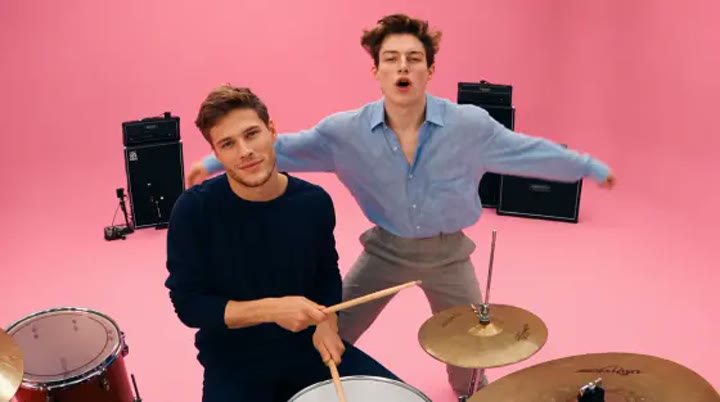
Two performers in a bright pink studio
Create an APT Duo inspired AI video from one prepared studio image. Explore a singer-and-drummer moment in pink, then review your short performance on ReelAI.
APT Duo draws its visual identity from a pink studio, a microphone, and a drummer sharing the frame with a singer. This version uses one complete scene image so the instruments and both people are already placed before animation begins. A restrained tap, a shoulder bounce, and a quick glance give the pair something to do without compressing a music video into several seconds. The camera stays wide to keep the roles easy to follow. Try the result as a playful band introduction, a partner-performance concept, or a bright visual accent in your own music edit.
Best for
- Pink-studio introductions
- Partner performance concepts
- Playful band edits
Create an APT Duo performance
Choose your photo
Prepare one image containing both performers, the microphone, and a clearly shaped drum kit. Keep the sticks separate from the face and drum rims. Show each person's hands and use different clothing colors to make the roles easy to distinguish.
Generate with the template
Generate one performance clip using the complete pink-studio image. The direction keeps the singer and drummer in their established positions and uses a small tap and shoulder bounce rather than an extended routine.
Review and download
Check that the sticks meet the drum rather than passing through it. Watch each face during the shared glance and make sure the microphone stays beside the singer. Add the music in your editor if you need a particular track.
Direct the drum tap and shared glance
Use this reference direction as a starting point in custom-prompt mode. The template runs fixed instructions; remixing is a separate workflow, not an edit to the preset.
Animate the singer and drummer already visible together in the single uploaded image. Preserve each person's face, outfit, and position in a bright pink studio. Keep the drum kit behind the seated drummer and a microphone beside the standing singer. Ask for one restrained drumstick tap, a small shoulder bounce from the singer, and a quick shared glance. End with both looking forward. Hold a steady medium-wide camera, keep the instruments coherent, and avoid switching roles, adding performers, generating written lyrics, or using rapid close-ups and cuts.
Before you create
Does APT Duo create a singer and drummer from separate uploads?
The preset takes one prepared image with both roles already in the scene. It does not combine two separate portraits or transfer a reference performance. Keep the instrument positions clear in your image, then review hands, sticks, and faces in the generated clip. The original song is not provided by this direction.
Can I change the creative direction?
The preset uses fixed instructions. Copy the reference direction into custom-prompt mode to adapt it; this does not change the preset itself.
What video output should I expect?
The default length is 12s (reference ratio 720/404). The output follows your uploaded photo's aspect ratio and suits Pink-studio introductions, Partner performance concepts, Playful band edits.
Bring your prepared band scene to life
Place the singer and drummer together in one clear studio image, then explore a short pink-room performance with a small tap and a shared glance.