
Upload a photo
PNG, JPG or WebP · up to 10 MB
Choose a photo to generate a video.
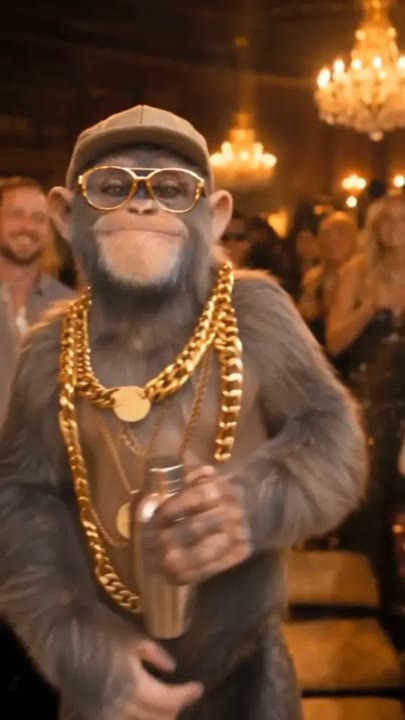
Warm party light and a confident gesture
Create a Drake Burning Bridges-inspired AI video from one photo. Try a chandelier-lit party, relaxed gestures, and a confident camera look in a new performance.
Drake Burning Bridges AI edits are recognizable for their warm party setting and conversational gestures. This template takes that visual idea into a new single-person scene: the lead looks across the room, points with an open hand, and turns back toward the camera. Chandeliers and blurred guests establish the party without asking the model to preserve a large cast. The direction is an original interpretation, not a replacement of the performer in the reference music video. It suits a party reaction, an expressive portrait animation, or a short character entrance that relies on attitude rather than a long routine.
Best for
- Chandelier party edits
- Gesture-led portrait performances
- Confident reaction clips
Create a Drake Burning Bridges-inspired video
Choose your photo
Choose one waist-up portrait with the face and shoulders unobstructed. A visible hand is useful for the pointing gesture. Avoid a tight face crop or a group photo if you want one clear party lead.
Generate with the template
Upload your portrait and select Generate video. The prepared direction builds a warm party scene around one pointing gesture and a camera-facing finish, without replacing a performer in existing footage.
Review and download
Check the pointing hand has a natural shape, the lead remains distinct from background guests, and the face stays recognizable during the turn. The camera drift should be gentle enough to keep the gesture and final look readable.
Drake Burning Bridges party-scene direction
Use this reference direction as a starting point in custom-prompt mode. The template runs fixed instructions; remixing is a separate workflow, not an edit to the preset.
Use the person in the reference image as the single lead in a warm chandelier-lit party scene. Preserve their recognizable face, hairstyle, and clothing. Keep background guests softly out of focus without distinct identities. Begin with the lead looking across the room, then make one open-handed pointing gesture and a small amused head turn toward the camera. Finish with a relaxed shoulder sway and steady eye contact. Use a slow medium-shot camera drift, warm highlights, and natural hand movement. Create an original party-performance interpretation rather than copying a music-video sequence. No named song, precise lip-sync, captions, or additional featured performers.
Before you create
Does Burning Bridges replace Drake in the original music video?
No. This preset generates a new party-style scene from your photo using fixed creative instructions. It does not edit the original clip, transfer its exact gestures, or request its song. The reference preview communicates the mood and setting; your output is a separate interpretation built around one subject.
Can I change the creative direction?
The preset uses fixed instructions. Copy the reference direction into custom-prompt mode to adapt it; this does not change the preset itself.
What video output should I expect?
The default length is 12s (reference ratio 404/720). The output follows your uploaded photo's aspect ratio and suits Chandelier party edits, Gesture-led portrait performances, Confident reaction clips.
Make your own party entrance
Choose a clear waist-up portrait and create a warm party performance with an expressive gesture, a small head turn, and a confident closing look.