
Upload a photo
PNG, JPG or WebP · up to 10 MB
Choose a photo to generate a video.
A heart made by a hand and the waistline
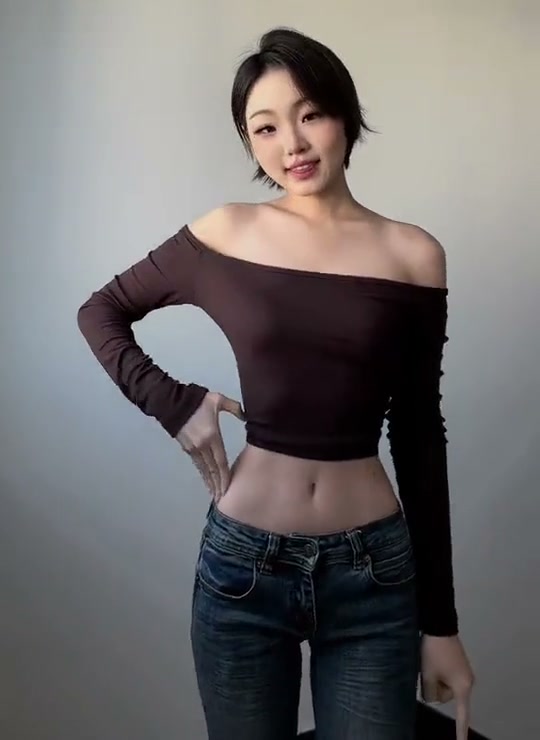
Upload one waist-up photo for a Waist Heart AI video. Guide a curved hand against your side, a small smile and a steady 9-second pose with your face in view.
Waist Heart is a pose where one curved hand and the side of the torso complete the outline of a heart. The reference shows a woman in a dark off-shoulder top and jeans, moving from a fingertip near her chin to a hand resting at her waist. Her face remains visible while the final shape sits below the ribs. The appeal is the small empty space made by the thumb, fingers and waistline. The Waist Heart direction uses a restrained turn and a held pose so that space has time to read. Keep the person's natural proportions and existing clothing, then guide the hand into place rather than asking for a different body shape.
Best for
- A reply to a Bicep Heart post
- a short portrait message or a friendly pose challenge with a clear face and hand. A fitted or simply outlined top makes the side of the torso easier to see. Choose a calm background and soft even light
- allowing the gesture and expression to carry the scene without a wardrobe transformation or a moving camera.
Frame the face, free arm and hips
Choose your photo
Upload one sharp image from the head to at least the hips, with one arm free and the side of the waist unobstructed. Separate the fingers from hair, bags and loose fabric. A slight three-quarter stance can leave useful space for the C-shaped hand. The first frame should show enough of the torso for the whole heart outline; a face-only selfie will crop away the defining pose.
Generate with the template
Keep the torso proportions, guide one C-shaped hand to the waist and hold the outline clearly beside the face-led portrait.
Review and download
Look at the gap between the fingers and the body, not just the smile. The curved hand should form a single readable outline without extra fingertips or an elbow bending through clothing. Compare the torso width before and after the movement to catch unwanted reshaping. Check the face, wrist angle and hand contact through the final hold, keeping the camera level and the gesture gentle.
Guide the curved hand and quiet hold
Use this reference direction as a starting point in custom-prompt mode. The template runs fixed instructions; remixing is a separate workflow, not an edit to the preset.
Animate the single adult in the uploaded waist-up or full-body portrait. Preserve the recognizable face, hairstyle, outfit and natural body proportions. Keep the camera steady. The subject turns slightly to show one side of the waist, lifts the free forearm and curves the thumb and fingers into a relaxed C shape. Rest that curved hand gently beside the waist so the open hand and torso outline suggest a heart. Hold the pose with a small smile and a very subtle sway. Keep all fingers distinct, the wrist natural and the other arm relaxed. Do not narrow the waist, add fingers, change clothing, crop the hips, add captions or cut to another shot.
Before you create
How is a Waist Heart different from a Bicep Heart?
A Bicep Heart combines a flexed arm with the opposite hand. A Waist Heart uses one curved hand against the side of the torso. The direction here centers on that hand-and-waist pose, with a small turn and a smile. Use a photo that includes the hips and the free arm so the shape can remain visible without changing the subject's natural build.
Can I change the creative direction?
The preset uses fixed instructions. Copy the reference direction into custom-prompt mode to adapt it; this does not change the preset itself.
What video output should I expect?
The default length is 9s (reference ratio 540/740). The output follows your uploaded photo's aspect ratio and suits A reply to a Bicep Heart post, a short portrait message or a friendly pose challenge with a clear face and hand. A fitted or simply outlined top makes the side of the torso easier to see. Choose a calm background and soft even light, allowing the gesture and expression to carry the scene without a wardrobe transformation or a moving camera..
Make your Waist Heart pose video
Start with a waist-up or full-body portrait and create a small, readable heart gesture around your own pose.