
Upload a photo
PNG, JPG or WebP · up to 10 MB
Choose a photo to generate a video.
Your solo moment under concert lights
Use the Talk Dirty Dance AI Video Generator for a concert-style solo from one photo. Add stage lights, shoulder bounce and short steps to your performance edit.
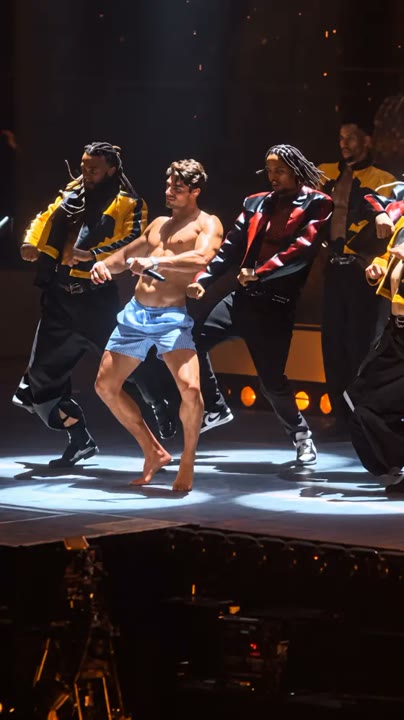
The Talk Dirty Dance AI Video Generator puts your subject under concert lights for a short, energetic solo. Shoulder bounces, a small side step and clear arm accents build toward a confident center-stage pose. A blurred audience and moving light beams provide atmosphere without turning the frame into a complicated ensemble scene. The effect interprets the performance energy through one uploaded portrait; it does not replace a concert lead inside existing footage or reproduce backup dancers' exact timing. Use it for stage-style introductions, confident reaction edits and a music-themed Reel centered on your own performer.
Best for
- Concert-style portrait introductions
- energetic dance reactions
- stage-performance Reels
Create your center-stage dance clip
Choose your photo
Choose one full-body adult with the face, hands and shoes visible. Leave space around the elbows for the arm accents. Avoid dark source photos where the outfit blends into the background or a crop hiding the feet.
Generate with the template
Upload your standing photo and generate the concert-style solo. The effect guides a shoulder bounce, side step and low arm accents before the final pose, with stage lighting kept secondary to your face.
Review and download
Check the supporting feet during the side step and the hands during each arm accent. Stage lights should pass behind or around the subject without erasing facial details, and the final pose should remain centered.
Shoulder bounce and clear arm accents
Use this reference direction as a starting point in custom-prompt mode. The template runs fixed instructions; remixing is a separate workflow, not an edit to the preset.
Create an energetic solo stage performance using the single adult in the uploaded photo. Preserve their recognizable face, hairstyle, build and outfit details. Place them under sweeping concert lights on a simple stage with a softly blurred audience beyond. Animate a small shoulder bounce, a short side step and two clear low arm accents, then finish in a confident center-stage pose. Keep the full body visible with grounded movement and a restrained camera push. Suggest Talk Dirty concert-dance energy without exact routine transfer. No backup choreography, pyrotechnics near the subject, copied lyrics, captions or duplicate limbs.
Before you create
Will the Talk Dirty Dance video include the full concert crew?
This Talk Dirty Dance version creates a new solo performance from one portrait, with concert lights and a blurred audience. It does not reproduce a full crew's choreography or include the original song. The short shoulder-and-step sequence gives you a clear performance moment that you can combine with your chosen music after downloading.
Can I change the creative direction?
The preset uses fixed instructions. Copy the reference direction into custom-prompt mode to adapt it; this does not change the preset itself.
What video output should I expect?
The default length is 12s (reference ratio 404/720). The output follows your uploaded photo's aspect ratio and suits Concert-style portrait introductions, energetic dance reactions, stage-performance Reels.
Put your portrait in the spotlight
Choose a clear full-body portrait and create a stage-performance take. Review the lights, hands and footwork, then download the clip with the strongest center-stage finish.