
Upload a photo
PNG, JPG or WebP · up to 10 MB
Choose a photo to generate a video.
A pet entrance with a room-stopping pause
Make a Then I Walk In AI video from a prepared pet-at-the-party photo. Add a short entrance, a turn toward the camera and a confident pause with ReelAI.
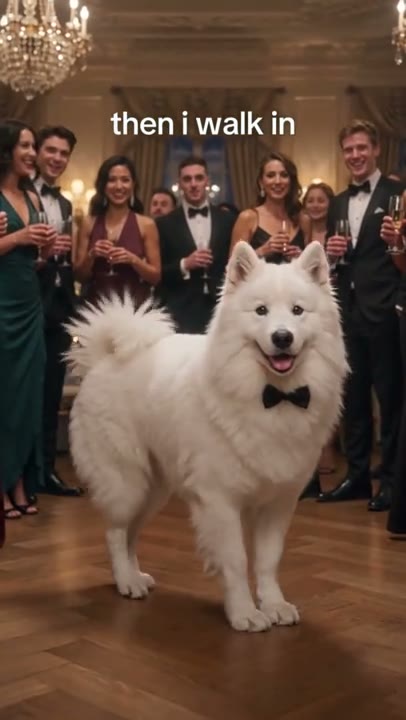
Then I Walk In gives a pet the room's attention without a long setup. The reference follows a white dog in a bow tie through a ballroom entrance, past a corridor of guests and into a front-facing pose. This version uses a short walk, a small turn toward the lens and a deliberate pause as the payoff. Your uploaded image needs to establish the pet, open doorway and party setting together; a plain pet portrait is not the same starting scene. The third-party preview supplies the entrance idea, not proof of a ReelAI result. Keep any exact meme wording for your own edit so the video direction can concentrate on the pet's movement.
Best for
- Pet grand-entrance memes
- party invitations
- confident reaction Reels
Make your Then I Walk In pet entrance
Choose your photo
Prepare one full-body image of your pet at an open party or ballroom doorway. Leave a clear strip of floor between the pet and the camera, with guests or decorations already placed to the sides. Show all four paws and put a bow tie or other desired accessory in the starting image.
Generate with the template
Upload your prepared doorway scene and select Generate video. The direction guides the pet a short distance into the aisle, turns it toward the camera and finishes with a steady, confident pose.
Review and download
Watch each paw meet the floor during the short entrance. The pet should remain the same size and keep its coat and accessory while turning. Check that the doorway and guests stay in place and that the final pose does not develop extra legs or a sliding tail.
Two short steps, a turn and a confident look
Use this reference direction as a starting point in custom-prompt mode. The template runs fixed instructions; remixing is a separate workflow, not an edit to the preset.
Animate the single dog already positioned in the open ballroom doorway in the supplied scene. Preserve its face, ears, coat, body proportions and bow tie, together with the doorway, floor and guests already visible along the aisle. The dog takes two short, natural steps into the open center, turns its head and body a little toward the camera, then pauses with all four paws grounded and a cheerful relaxed expression. Let the tail sway once. Keep the guests in their existing positions with only subtle background reactions. Use a steady low-to-medium camera that keeps the complete dog and its paws visible. Maintain the starting room and light. No new guests, exact identity replacement, doors passing through the dog, jumps, rapid camera cuts, captions or on-screen text.
Before you create
Can Then I Walk In build the whole party from a plain pet photo?
Use a prepared image that already places your pet at the entrance you want. This preset animates that scene into a short arrival and camera-facing pause; it does not offer a separate party-image creation step. Guests remain background figures from the scene rather than separately uploaded identities.
Can I change the creative direction?
The preset uses fixed instructions. Copy the reference direction into custom-prompt mode to adapt it; this does not change the preset itself.
What video output should I expect?
The default length is 8s (reference ratio 406/720). The output follows your uploaded photo's aspect ratio and suits Pet grand-entrance memes, party invitations, confident reaction Reels.
Let your pet make an entrance
Choose your pet-at-the-party image and create the entrance. Review the paw contact, doorway and finishing turn, then download the take that lands the joke.