
Upload a photo
PNG, JPG or WebP · up to 10 MB
Choose a photo to generate a video.
Your own retro microphone moment
Turn one photo into a Rick Roll video with a retro microphone, brick arches and relaxed side steps. Create your own take on the familiar dance scene on ReelAI.
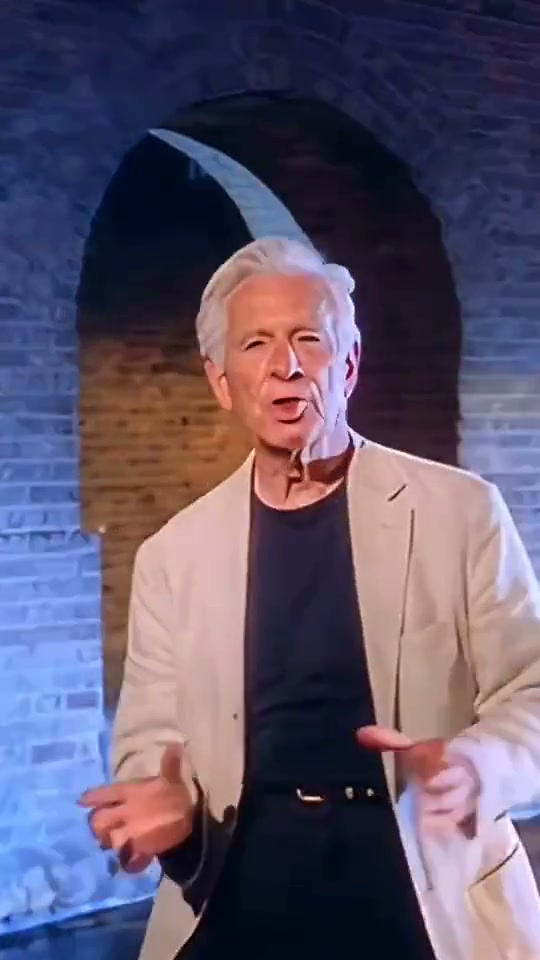
Rick Roll gives your portrait a retro microphone performance with an immediately recognizable visual setup. The source preview shows a silver-haired man in a light blazer moving in front of blue-lit brick arches, with a close-up cut between wider views. This version keeps one continuous brick-arch scene so your character has room for a small side step, a shoulder sway and an easy hand gesture at the mic. It uses the appearance in your photo instead of changing you into the source performer.
Best for
- Choose this direction for a lighthearted reveal
- a familiar internet-joke reaction or a retro outfit clip. The microphone and arches do most of the visual work
- so the performance can stay relaxed. Keep the joke in the scene or your own caption rather than asking the model to render readable text.
Make a Rick Roll portrait video
Choose your photo
Use one well-lit portrait that shows the face and at least the upper body. A knee-up or full-body image gives more guidance for the side steps. Keep hands visible if they should gesture near the mic. The preset can introduce the retro set, while a prepared stage image offers more control over the starting framing.
Generate with the template
Use the brick-arch set and relaxed side steps, then adjust the lighting or performance energy without adding extra shots.
Review and download
Check the mouth, eyes and hair during the sway, then inspect the fingers and microphone stand. The mic should stay in front of the performer rather than crossing through the face. Keep the brick pattern and light direction stable as the subject makes the small step.
Retro performance direction
Use this reference direction as a starting point in custom-prompt mode. The template runs fixed instructions; remixing is a separate workflow, not an edit to the preset.
Use the uploaded photo to preserve one person's recognizable face, hairstyle, clothing and proportions. Establish a simple retro performance space with blue-lit brick arches and one plain silver standing microphone. Frame the performer from the knees upward with enough room for both hands. Start with a relaxed look toward the camera, make a small side step and gentle shoulder sway, then add one compact hand gesture beside the microphone and finish facing forward. Let the camera move in only slightly while keeping the same continuous scene. Preserve the mic stand, fingers, face and brickwork throughout. Keep mouth movement natural rather than reciting particular words. No replacement celebrity identity, second singer, multi-location montage, text, logos or specified song lyrics.
Before you create
Does Rick Roll change my outfit or appearance?
The direction keeps the face, hair and outfit from the uploaded image and places that character in a retro set. A blazer or vintage styling is optional; choose it in your starting photo if it matters. This is a new microphone-and-dance scene, without a promise to recreate the original recording, exact singer or music-video edit.
Can I change the creative direction?
The preset uses fixed instructions. Copy the reference direction into custom-prompt mode to adapt it; this does not change the preset itself.
What video output should I expect?
The default length is 12s (reference ratio 540/960). The output follows your uploaded photo's aspect ratio and suits Choose this direction for a lighthearted reveal, a familiar internet-joke reaction or a retro outfit clip. The microphone and arches do most of the visual work, so the performance can stay relaxed. Keep the joke in the scene or your own caption rather than asking the model to render readable text..
Take your place at the microphone
Start with a clear portrait and make a familiar retro performance with your own appearance.