
Upload a photo
PNG, JPG or WebP · up to 10 MB
Choose a photo to generate a video.
An oversized fish and a deliberately steady rhythm
Make a Fish Cutting Meme AI video from one prepared kitchen image. Animate a giant fish and measured cleaver chops for your own precise entries reaction clip.
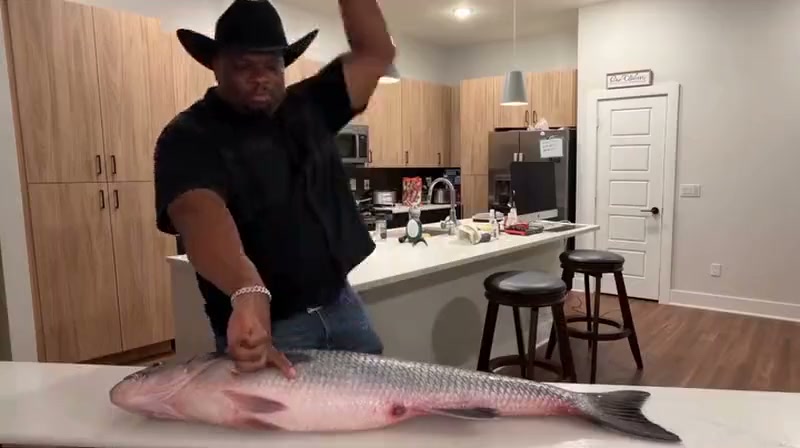
The Fish Cutting Meme makes a very particular visual joke: an oversized fish lies across a kitchen counter, and a confident cook brings a cleaver down in measured, repeatable cuts. The reference shows a man in a black cowboy hat and black shirt working in a modern kitchen. The wide frame keeps the entire fish, both hands and the counter visible as he lifts and lowers the blade. This third-party clip is inspiration, not a generated ReelAI result. For this preset, the uploaded image should already contain the cooking setup. A clear prepared scene lets the motion focus on the grip, cleaver and fish instead of inventing the whole kitchen from a tight selfie. The direction simplifies the sequence to a few controlled chops, suitable for a precise entries reaction edit.
Best for
- Precise entries memes
- oversized food comedy
- kitchen reaction videos
Animate a prepared fish-cutting scene
Choose your photo
Upload one prepared scene showing a character behind a kitchen counter, a large fish laid sideways on the surface and a cleaver already held above it. Keep the whole fish and both hands in view. A plain portrait does not provide the setup this motion needs.
Generate with the template
Upload the prepared kitchen image and select Generate video. The preset focuses the action on a few controlled cleaver chops within that scene.
Review and download
Watch the hand holding the cleaver and the point where the blade meets the fish. The handle should stay in the same grip, cuts should remain in the fish and the counter should stay still. Choose a take with a readable rhythm instead of a bending blade or duplicate fingers.
Lift the cleaver, make the cut and reset
Use this reference direction as a starting point in custom-prompt mode. The template runs fixed instructions; remixing is a separate workflow, not an edit to the preset.
Animate the prepared kitchen scene in the uploaded image. Preserve the existing character's recognizable face, clothing, kitchen, counter, giant fish and cleaver. Keep the camera in one steady wide view with the fish fully inside the frame. The character maintains a confident focused expression, lifts the cleaver a short distance, makes two or three deliberate vertical cuts into the fish and raises the same blade back to the starting position between cuts. The other hand stays clearly visible away from the cutting point. Keep the cleaver rigid, the handle in the same grip and the fish anchored on the counter. Small separated portions may settle in place after each cut, without bouncing or multiplying. The movement should feel rhythmic and readable, not a speed montage. No camera cuts, extra utensils, additional characters, captions, logos or dramatic splashes.
Before you create
Can I make the fish-cutting effect from an ordinary selfie?
For this version, prepare a single kitchen scene with your character, the fish and the cleaver before uploading. The preset animates that existing setup; it is not a face-swap or automatic kitchen-compositing workflow. A wider image makes the chops easier to follow.
Can I change the creative direction?
The preset uses fixed instructions. Copy the reference direction into custom-prompt mode to adapt it; this does not change the preset itself.
What video output should I expect?
The default length is 10s (reference ratio 800/448). The output follows your uploaded photo's aspect ratio and suits Precise entries memes, oversized food comedy, kitchen reaction videos.
Make your own precise entries clip
Start with the fish and cleaver in place, create the measured chopping motion and download a favorite take.