
Upload a photo
PNG, JPG or WebP · up to 10 MB
Choose a photo to generate a video.
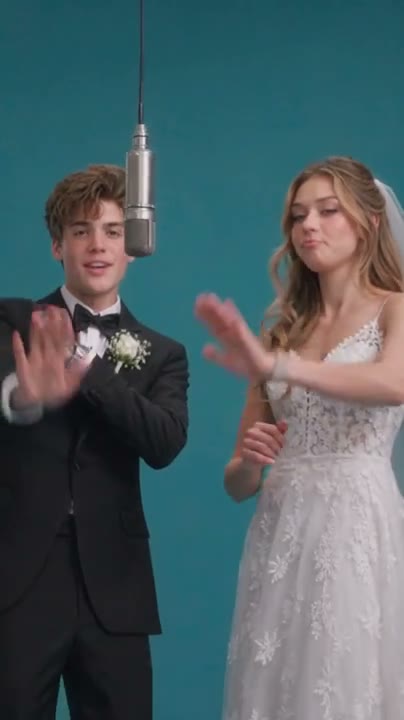
Two performers sharing one hanging microphone
Create a 58th Floor AI video from one prepared two-person studio photo. Trade small gestures beneath a hanging mic, share a glance and review it in ReelAI.
58th Floor uses a stripped-back performance scene: two people, one suspended microphone and a flat teal backdrop. The chosen reference shows a wedding-dressed pair trading expressions and gestures, with close-ups and wider studio views. This preset keeps the shared-mic idea in one steady shot. The two people in your starting image take turns gesturing, nod to one another and finish with a brief shared glance. It does not recreate an artist's identity or transfer the source's vocal performance. Start with both people and the microphone already arranged so the animation can focus on their interaction.
Best for
- Two-person studio Reels
- wedding-duo performance portraits
- shared-microphone reaction clips
Create your 58th Floor studio scene
Choose your photo
Upload one prepared image containing both adults in the studio composition, with clear, separate faces and a visible hanging microphone. Keep enough space around their shoulders and hands for small gestures. A teal background and the desired outfits should already be present. This preset takes one scene image, not two separate identity uploads.
Generate with the template
Add your prepared two-person studio image and select Generate video. The direction gives each performer a turn with a small hand gesture and nod, then brings them into a shared glance without changing camera angles.
Review and download
Check each person throughout the alternating gestures: faces should stay distinct, hands should remain attached to the correct arms and neither performer should switch sides. The microphone and cable should hold their shape and position. Prefer a clear shared glance over a take with exaggerated mouth shapes or faces drifting into one another.
An alternating exchange in one steady shot
Use this reference direction as a starting point in custom-prompt mode. The template runs fixed instructions; remixing is a separate workflow, not an edit to the preset.
Animate the two adults already standing together beneath the hanging microphone in the supplied teal-studio image. Preserve both distinct faces, hairstyles, outfits and body proportions, along with the microphone, cable and plain studio background. Use one steady medium-wide front view that keeps both performers and the microphone visible. The performer on the left makes a relaxed hand gesture near chest height while the other watches and nods. Let the right performer answer with one small open-palm gesture, then have both sway lightly and share a brief glance before facing forward. Keep the gestures sequential with natural hands and modest mouth movement, without synchronized lyrics. Maintain each person's side of the frame and a stable distance to the microphone. No face swapping, new people, costume changes, camera cuts, branded lettering, captions or reproduced song lyrics.
Before you create
Does 58th Floor combine two selfies and reproduce the rap?
Use a single prepared picture of both people beneath the microphone. This preset animates that existing scene rather than composing two separately uploaded identities. It guides an original exchange of gestures, nods and glances; it does not include the original song, an artist's voice or exact lyric-synchronized mouth movements. Add your chosen sound separately when editing the finished clip.
Can I change the creative direction?
The preset uses fixed instructions. Copy the reference direction into custom-prompt mode to adapt it; this does not change the preset itself.
What video output should I expect?
The default length is 12s (reference ratio 404/720). The output follows your uploaded photo's aspect ratio and suits Two-person studio Reels, wedding-duo performance portraits, shared-microphone reaction clips.
Bring your shared-mic portrait to life
Prepare both people, their outfits and the hanging mic in one image. Review faces, hands and microphone stability, then download the exchange you prefer.