
Upload a photo
PNG, JPG or WebP · up to 10 MB
Choose a photo to generate a video.
A solo challenge with a playful finish
Create a JISOO Addicted Dance AI video from one full-body photo. Try a playful solo routine with hand gestures, hair movement and a camera-facing finish.
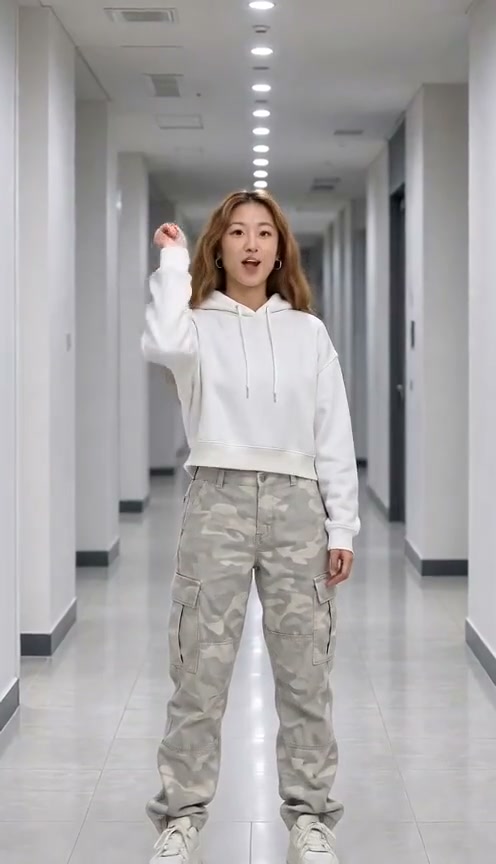
The JISOO Addicted challenge mixes direct gestures with a relaxed, camera-facing performance. This preset takes that idea into a solo clip: a point toward the lens, a small bounce, one hand lifting past the head, and a playful finishing pose. The reference shows a woman in a white cropped hoodie and patterned trousers dancing in a bright hallway. She reaches toward the camera and ends with her hands beneath her chin. It is an inspiration clip, not a result generated by ReelAI. Your uploaded image sets the person, clothing and starting composition. A wider portrait gives the arms enough space without forcing the camera to invent the rest of the body. Use a simple hallway or studio background if you want a similar setting, and keep the movement focused on one dancer.
Best for
- Solo dance edits
- hallway challenge videos
- playful portrait performances
Turn a full-body portrait into a dance
Choose your photo
Use one full-body photo of a single person, facing the camera, with both hands visible and space above the head. Keep the feet inside the frame. Even light and a plain background make the gesture easier to follow. A tight selfie leaves too little room for the dance.
Generate with the template
Upload the single-person photo and select Generate video. The preset guides a short solo routine while keeping the image as the visual starting point.
Review and download
Watch the hands through the point and overhead gesture. Check that the face remains recognizable, the arms do not duplicate, and the person stays in the same outfit. The last pose should hold clearly rather than turn into a sudden cut or a second dancer.
Point, bounce and finish facing the camera
Use this reference direction as a starting point in custom-prompt mode. The template runs fixed instructions; remixing is a separate workflow, not an edit to the preset.
Animate the single person already visible in the uploaded full-body photo. Preserve their recognizable face, hairstyle, clothing and the existing setting. Keep one dancer in a fixed vertical camera view. Begin with a small knee bounce, point one hand toward the lens, sweep that hand upward beside the head with a slight hair movement, then bring both hands forward in a playful loose claw gesture. Finish with both palms framing the chin and a small smile. Use comfortable natural joint motion and keep feet grounded. The gesture sequence is an original solo interpretation, not an exact choreography transfer. No new people, outfit changes, cuts, text or logos.
Before you create
Does this recreate the original JISOO choreography and song?
This preset guides an Addicted-inspired solo dance from one photo. It does not transfer the original performance or bundle its song. The timing and gestures vary with the input and selected model. If you want a matching setting, prepare the photo in that scene before uploading it.
Can I change the creative direction?
The preset uses fixed instructions. Copy the reference direction into custom-prompt mode to adapt it; this does not change the preset itself.
What video output should I expect?
The default length is 10s (reference ratio 496/864). The output follows your uploaded photo's aspect ratio and suits Solo dance edits, hallway challenge videos, playful portrait performances.
Try your own hallway dance
Choose a portrait with room to move, create a take and download the version you like.