
Upload a photo
PNG, JPG or WebP · up to 10 MB
Choose a photo to generate a video.
An easy groove at the center of the party
Turn one photo into a Charme dance video with easy side steps, loose shoulders and a lively street-party crowd. Put your subject at the center of the groove.
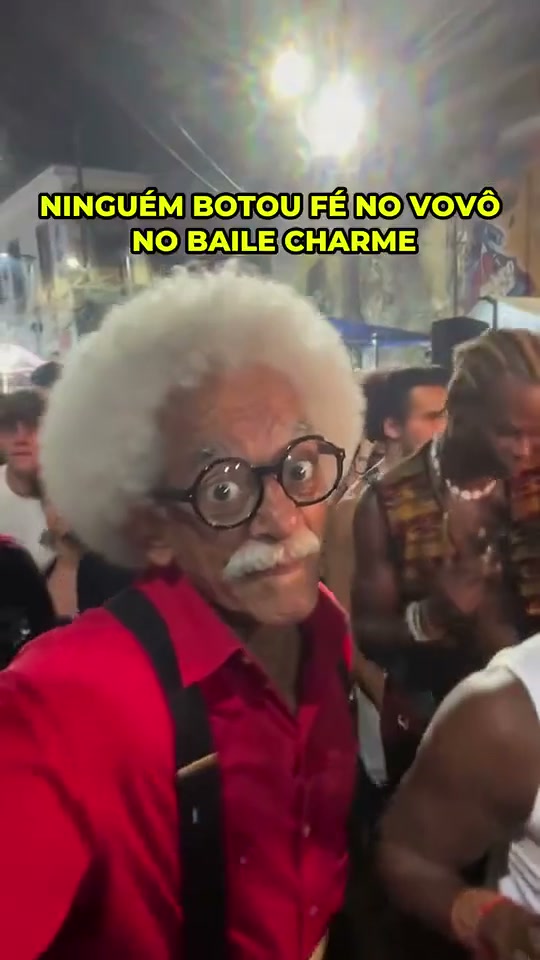
Charme is about an easy, social groove rather than a big stunt. Small weight shifts, loose shoulders and relaxed hand gestures give the lead dancer space to enjoy a crowded street-party setting. The reference features a white-haired man in glasses, a red shirt and black suspenders dancing among an animated crowd at night. This preset creates a new lead performance from one photo, using a lively background without turning everyone into a synchronized dance troupe.
Best for
- Choose this for a laid-back character edit
- a family-portrait remix or a subject whose expression makes the party feel spontaneous. A relaxed older character works as naturally as a younger lead. The focus is the subject's shoulders
- hands and easy footwork
- with the crowd supplying atmosphere rather than competing for the main role.
Make a Charme dance video from one photo
Choose your photo
Use one clear standing photo with the face, shoulders, arms and as much of the body as possible visible. Keep hands out of pockets and avoid a tight face-only crop. A simple outfit with visible sleeves and a clear silhouette helps the model carry the shoulder sway and low hand movements into the crowd scene.
Generate with the template
The preset guides relaxed shoulders, short side steps and low hand gestures while building a lively street-party setting around your subject.
Review and download
Look for one consistent lead face and outfit, relaxed elbows and believable weight shifts from side to side. Check that nearby background people do not merge into the dancer's arms or cover the face. The best result keeps the groove small and readable, with the lead staying in the foreground instead of disappearing into the party.
Charme street-party direction
Use this reference direction as a starting point in custom-prompt mode. The template runs fixed instructions; remixing is a separate workflow, not an edit to the preset.
Use the uploaded photo as the reference for one recognizable lead subject, preserving the face, hairstyle and outfit. Establish a warm evening street-party atmosphere with soft overhead lights and an out-of-focus crowd around the edges. Keep the lead clearly separated in the foreground and framed from at least the knees upward. Start with a relaxed smile, shift weight gently from one leg to the other and add short side steps. Let the shoulders roll softly while the elbows stay loose and the hands make low, easy gestures in front of the torso. Add one small raised-hand accent, then settle back into the relaxed sway. Keep the lead's movement modest, the face visible and the background people casually reacting rather than copying a synchronized routine. Use a steady eye-level camera with only a slight natural drift. Maintain the same face, outfit and number of lead subjects throughout. No captions, logos, dramatic kicks, crowd collisions or rapid cuts.
Before you create
Will Charme copy the original crowd and choreography?
No. Your photo guides a new lead dancer, and the prompt establishes a new street-party atmosphere. The reference crowd, its captions, the exact choreography and its soundtrack are not transferred. If you want to retain a particular setting, start from one already-composed scene showing your subject with enough space to move.
Can I change the creative direction?
The preset uses fixed instructions. Copy the reference direction into custom-prompt mode to adapt it; this does not change the preset itself.
What video output should I expect?
The default length is 12s (reference ratio 540/960). The output follows your uploaded photo's aspect ratio and suits Choose this for a laid-back character edit, a family-portrait remix or a subject whose expression makes the party feel spontaneous. A relaxed older character works as naturally as a younger lead. The focus is the subject's shoulders, hands and easy footwork, with the crowd supplying atmosphere rather than competing for the main role..
Put your subject in the Charme spotlight
Upload a clear standing photo, generate your dance and review the lead's face, hands and separation from the crowd.