
Upload a photo
PNG, JPG or WebP · up to 10 MB
Choose a photo to generate a video.
A snap that changes the scene
Create an Abra Kadabra inspired AI video from one photo. Explore a snap gesture and a magical lookalike entrance, then review your short dance clip on ReelAI.
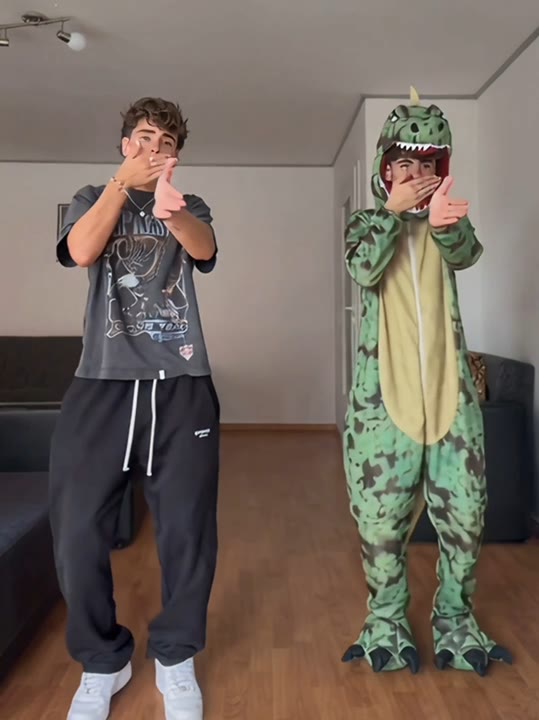
The Abra Kadabra concept turns a small hand gesture into a visual surprise. One dancer begins alone, a snap suggests the change, and a contrasting lookalike appears for a short shared movement. This interpretation uses a glowing silhouette rather than assigning a second friend's identity, keeping the scene within a single-photo workflow. A fixed camera makes the appearance easier to read and leaves room for the two shapes to separate. Try it as a playful dance introduction, a fantasy version of your own portrait, or a quick visual transition before a longer edit.
Best for
- Magic dance introductions
- Lookalike reveals
- Playful transition edits
Create an Abra Kadabra reveal
Choose your photo
Choose one full-body dancer with a visible raised hand and empty space beside the body. Keep both feet in frame and avoid mirrors. A simple wall provides a clear place for the contrasting silhouette to appear.
Generate with the template
Generate one video with this reveal direction selected. It asks for a short hand gesture, a contrasting silhouette, and one shared arm movement while leaving the camera in a fixed position.
Review and download
Check the snapping hand first, then the space between the dancer and the silhouette. Look for a stable face and separate limbs during the shared gesture. Keep the cleanest reveal rather than expecting a perfectly synchronized two-person routine.
Direct the lookalike entrance
Use this reference direction as a starting point in custom-prompt mode. The template runs fixed instructions; remixing is a separate workflow, not an edit to the preset.
Animate the single dancer in the uploaded image with a playful magic-reveal performance. Keep the face, outfit, and room recognizable. Begin with a small shoulder bounce and a hand raised for a finger snap. As the hand lowers, let a softly glowing lookalike silhouette appear beside the dancer, wearing contrasting colors. Give the pair one simple outward arm gesture before the silhouette fades. Keep the camera fixed, both figures comfortably separated, and the floor visible. Use gentle movement and clean lighting without captions, added spectators, or rapid camera cuts.
Before you create
Can Abra Kadabra add a specific friend from another photo?
This preset accepts one image for a solo dancer and does not assign a second uploaded identity. The figure beside the dancer is a generated lookalike silhouette, not a separately cast friend. Use a clear solo photo with empty space beside the body, then review the reveal and keep the two shapes visibly separated.
Can I change the creative direction?
The preset uses fixed instructions. Copy the reference direction into custom-prompt mode to adapt it; this does not change the preset itself.
What video output should I expect?
The default length is 11s (reference ratio 540/720). The output follows your uploaded photo's aspect ratio and suits Magic dance introductions, Lookalike reveals, Playful transition edits.
Give your dancer a magic moment
Start with a clear dancer photo and explore a playful appearance beside your subject, using a simple gesture to introduce the change in your edit.