
Upload a photo
PNG, JPG or WebP · up to 10 MB
Choose a photo to generate a video.
A tiny stem becomes the whole joke
Create a Flower Nose AI video from one portrait. Turn a puzzled close-up into a playful daisy reveal, then hold the flower toward the camera with ReelAI.
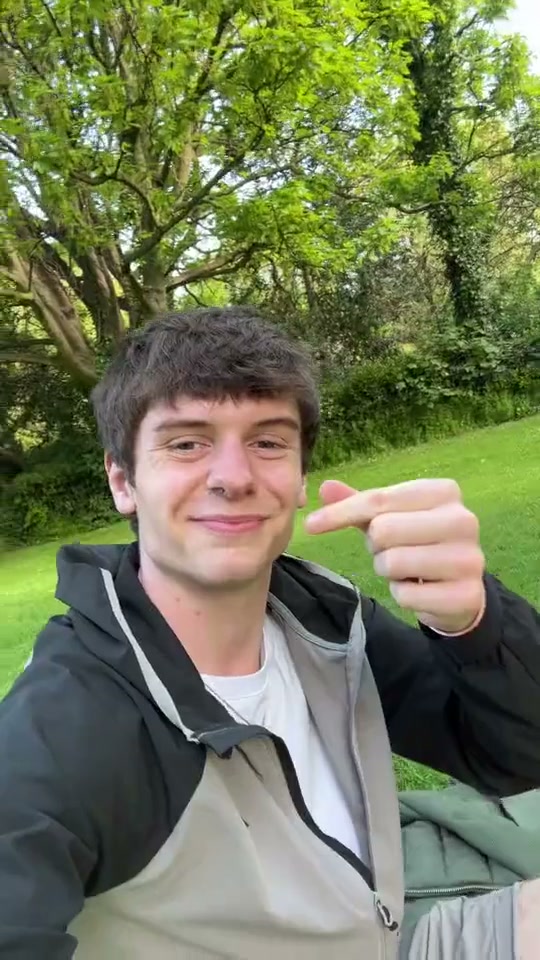
The Flower Nose trend turns a small facial reaction into a visual punchline. A person notices a green stem near the nose, gives it a careful pull and presents a little white flower to the viewer. Our inspiration preview shows a man filming himself outdoors, pinching the stem and holding the daisy beside his face. This preset uses your still image to guide a new close-up rather than replacing a person inside that reference film. Choose a portrait with an uncluttered background and keep the hand close to the face without covering both eyes. A small surprised expression followed by a relaxed smile makes the reveal easy to read on a phone.
Best for
- Playful portrait memes
- flower reveal reactions
- lighthearted greeting clips
Create your flower reveal
Choose your photo
Use one clear chest-up portrait with the face facing the camera. A prepared image with a small stem beside one nostril and a hand nearby gives the flower reveal a stronger starting point. Leave room above the shoulders for the daisy.
Generate with the template
Add your portrait or prepared flower scene, review the direction and generate a new close-up video.
Review and download
Watch the fingers and stem during the pull. The flower should remain a single object, the face should stay recognizable and the hand should move away without passing through the nose or eyes. Choose a take with a readable final bloom.
Guide the pull, pause and daisy reveal
Use this reference direction as a starting point in custom-prompt mode. The template runs fixed instructions; remixing is a separate workflow, not an edit to the preset.
Animate the person in the uploaded portrait in one continuous close-up. Preserve recognizable facial features, hair and clothing. A small green flower stem rests beside one nostril. The person glances down with a puzzled expression, gently pinches the stem between two fingers, draws it away in a slow clear motion and reveals one small white daisy. End holding the flower next to the face with a slight smile. Keep fingers separate, nose shape stable and the flower outside the face. Use soft outdoor light and a stationary camera. No text, logos, cuts, extra hands or duplicated flowers.
Before you create
Does the Flower Nose preset include the original song?
The preset creates the visual flower reveal rather than adding a particular song. Choose the sound you want after downloading. A clear face and space beside the cheek help keep the daisy and expression easy to see, while the photo guides the appearance of your new clip.
Can I change the creative direction?
The preset uses fixed instructions. Copy the reference direction into custom-prompt mode to adapt it; this does not change the preset itself.
What video output should I expect?
The default length is 11s (reference ratio 540/960). The output follows your uploaded photo's aspect ratio and suits Playful portrait memes, flower reveal reactions, lighthearted greeting clips.
Give your portrait a floral punchline
Choose a clear face, leave room for the flower and turn a small gesture into your next reaction clip.