
Upload a photo
PNG, JPG or WebP · up to 10 MB
Choose a photo to generate a video.
Let one accessory introduce the new look
Upload one prepared street photo for a POV Outfit Transition AI video. Guide a foreground accessory, one outfit reveal and a confident 9-second fashion pose.
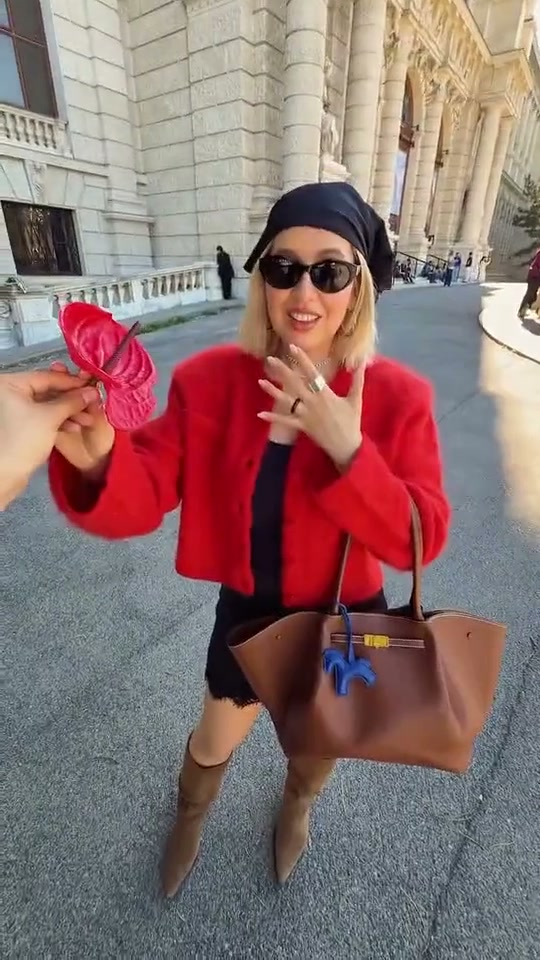
POV Outfit Transition makes an accessory the link between the viewer and a new outfit. In the reference, a hand holds a small item in a stone-lined street, another item appears under an arcade and the final view reveals a woman in a red jacket, black headscarf and sunglasses holding a red accessory. The original moves through several locations and looks. This direction takes one item and one reveal so the result stays centered on your chosen person. Prepare a single street composition with the subject, the foreground hand and the accessory already arranged. A short movement toward the lens can briefly cover the scene before the coordinated outfit appears in the same place.
Best for
- An accessory-led outfit post
- a travel-fashion portrait or a short before-and-after styling moment. A distinctive scarf
- hat or small bag gives the reveal an obvious visual cue. Choose a background with readable paving or architectural lines so a fixed viewpoint feels deliberate. One strong palette change usually reads more clearly than a sequence of unrelated destination looks.
Animate your prepared fashion POV scene
Choose your photo
Upload one prepared image showing the person in the street and a separate foreground hand holding one accessory. Keep the faces, fingers and item fully visible with clear space between them. The hand should not cover the subject's eyes in the first frame. This page uses the whole composition as one input; it does not combine separate location, hand, garment and identity uploads.
Generate with the template
Keep one foreground item, a brief visual cover and a single outfit reveal in the same street composition.
Review and download
Follow the accessory as it approaches the camera and check that its outline survives the reveal. The foreground hand must remain distinct from the subject's hands. Review the face, headwear, jacket hem and bag strap when the look changes. Look at straight edges in the street as well: a stable doorway or pavement pattern helps show whether the camera has drifted unexpectedly.
Guide the accessory and one outfit reveal
Use this reference direction as a starting point in custom-prompt mode. The template runs fixed instructions; remixing is a separate workflow, not an edit to the preset.
Animate the prepared street image while preserving the subject's recognizable face, hairstyle, proportions and position. Keep the foreground hand and its single accessory separate from the person's body. Move the accessory gently toward the lens for a brief partial visual cover, then lower it to reveal one coordinated new outfit inspired by that item's color and material. Finish with the subject giving a relaxed fashion pose and looking toward the camera. Retain the same street, architecture and camera position. Keep fingers, accessory edges, clothing seams and bag straps coherent. One item and one wardrobe change; no location hopping, additional featured people, captions, logos or rapid montage.
Before you create
Will one generation create all six outfits and locations from the reference?
The direction is for one accessory and one coordinated look in a continuous street scene. The full inspiration video shows a multi-location editing format, which is useful for understanding the idea. For a longer wardrobe reel, make separate focused clips and assemble them later. Keep the subject and prop composition prepared in the single image used for each scene.
Can I change the creative direction?
The preset uses fixed instructions. Copy the reference direction into custom-prompt mode to adapt it; this does not change the preset itself.
What video output should I expect?
The default length is 9s (reference ratio 540/960). The output follows your uploaded photo's aspect ratio and suits An accessory-led outfit post, a travel-fashion portrait or a short before-and-after styling moment. A distinctive scarf, hat or small bag gives the reveal an obvious visual cue. Choose a background with readable paving or architectural lines so a fixed viewpoint feels deliberate. One strong palette change usually reads more clearly than a sequence of unrelated destination looks..
Make your POV Outfit Transition video
Start with a person-and-accessory composition and build a short fashion reveal around one clear styling cue.