
Upload a photo
PNG, JPG or WebP · up to 10 MB
Choose a photo to generate a video.
Your pet behind the arena decks
Create a DJ Cat AI video from one pet photo. Put your cat or dog behind the decks, add a small paw tap and a crowd-facing wave, then review the arena scene.
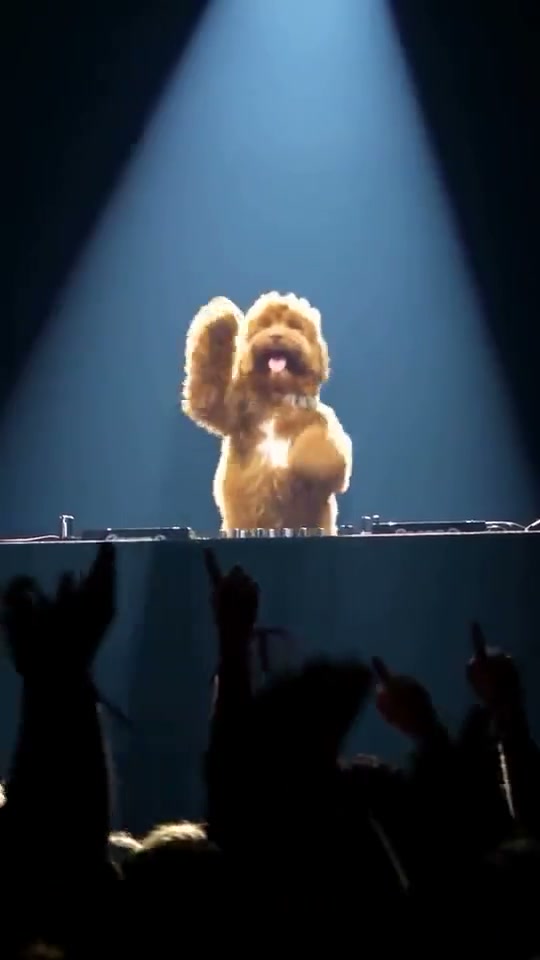
DJ Cat puts a pet at the center of an arena performance. The bound reference actually features a shaggy golden dog: a side view at the turntables, a wide spotlight shot and a raised paw over the crowd. Cats and dogs can supply the lead appearance for a new short version. The direction condenses the thirty-second highlight reel into one steady booth scene.
Best for
- A pet personality clip
- a party invitation or a mock headliner moment. A single paw on the controls and a clear face can carry the joke without rebuilding a whole concert edit.
Choose the pet for the DJ booth
Choose your photo
Choose one pet with its face, chest and front paws visible. A prepared image showing your pet behind decks gives the closest control layout. Keep ears and fur markings clear.
Generate with the template
Keep the booth steady and the performance short: one paw tap, a head bob and one raised-paw finish.
Review and download
Check muzzle, paws and ear shape through the head bob. The mixer should retain its shape, and a raised paw should separate cleanly from the controls and crowd.
Direct the paw tap and crowd wave
Use this reference direction as a starting point in custom-prompt mode. The template runs fixed instructions; remixing is a separate workflow, not an edit to the preset.
Create a DJ Cat-inspired arena scene using the pet in the uploaded photo. Preserve its species, muzzle, ears, fur colors and markings. Place it upright behind one stable DJ booth with two decks and a mixer, under a soft white spotlight. Begin with one front paw near a control, make a small tap and a gentle head bob, then raise that paw toward the distant crowd. Keep natural animal paws, consistent body proportions and the booth clearly separate from the pet. Use one continuous medium-wide view with soft audience silhouettes and phone lights. No human hands, original recording, exact concert cuts, readable branding or captions.
Before you create
Why does the DJ Cat reference show a dog?
The trend name covers pet-DJ scenes, while this page's bound reference is the golden-dog version. Your cat or dog guides a new interpretation; the original arena edit and its recording are not transferred into generation.
Can I change the creative direction?
The preset uses fixed instructions. Copy the reference direction into custom-prompt mode to adapt it; this does not change the preset itself.
What video output should I expect?
The default length is 12s (reference ratio 540/960). The output follows your uploaded photo's aspect ratio and suits A pet personality clip, a party invitation or a mock headliner moment. A single paw on the controls and a clear face can carry the joke without rebuilding a whole concert edit..
Give your pet the headliner spot
Bring a clear cat or dog photo and build a playful arena-DJ moment around it.