
Upload a photo
PNG, JPG or WebP · up to 10 MB
Choose a photo to generate a video.
Headphones on while the city rushes past
Upload one street-scene photo for a Demolition Walk AI video. Add a loose headphones strut against a busy city crowd and review your 12-second movie-style meme.
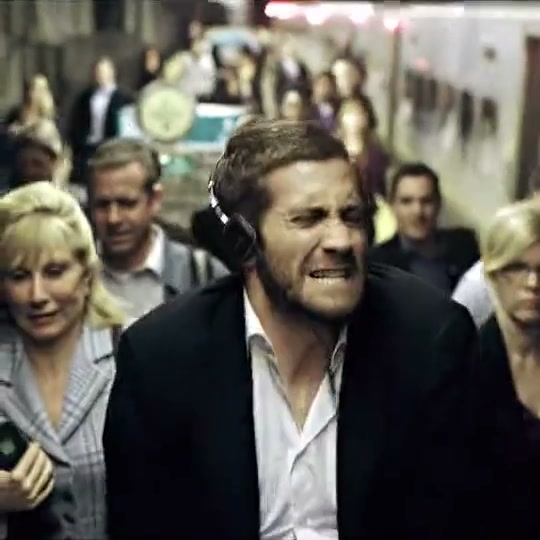
Demolition Walk puts an unbothered headphones performance in the middle of a city that keeps rushing past. The bound edit shows Jake Gyllenhaal in dark tailoring, an open white shirt and large black headphones, first among pedestrians and later moving along a street with vehicles behind him. It ends in a tighter view of his face. The title refers to the film's walking scene; there is no collapsing building or explosion in this reference. Your direction keeps the headphones, loose body rhythm and moving-city contrast, using your own prepared character rather than replacing the actor inside those movie shots.
Best for
- Demolition Walk works for a carefree reaction
- an off-duty mood or a contrast between private music and public bustle. Give the lead a small shoulder rhythm and an easy forward step while the surrounding city stays secondary. A few background pedestrians are enough to establish rush hour. Keep the subject readable instead of asking the scene to become a montage of traffic
- crowds and close-ups.
Prepare your city headphones scene
Choose your photo
Prepare one street image with the main person wearing headphones and framed from at least the knees upward. Make the hands, jacket and walking direction visible, with open space ahead. The background can contain softly separated pedestrians, but no one should overlap the lead's face or limbs. If sunglasses are part of your look, put them in the starting image so their shape remains consistent during movement.
Generate with the template
Keep the headphones and street composition, then choose a small shoulder bounce and two easy steps without changing camera angle.
Review and download
Check that the headphones stay seated around the same ears and do not turn into hair or glasses. The lead's feet and shoulders should move together, while the city background retains its original geometry. Review the face when the person tilts or turns, and watch the boundary between the jacket and nearby pedestrians. Choose an easy strut over a result where the crowd changes identities or a vehicle crosses the foreground unexpectedly.
Direct a loose strut through a steady street view
Use this reference direction as a starting point in custom-prompt mode. The template runs fixed instructions; remixing is a separate workflow, not an edit to the preset.
Animate the featured adult in the supplied Demolition Headphones Walk street image. Preserve their recognizable face, hair, clothes, headphones and any existing glasses. Use one steady front-three-quarter medium-wide shot. The person takes two easy steps, adds a loose shoulder bounce and briefly tilts the head as if absorbed in their own music, then settles into a relaxed forward-facing look. Keep the headphones attached to the ears and the jacket separate from nearby people. Let only modest background walking suggest the city's pace, without changing the road or buildings. No actor identity replacement, explosions, new vehicles crossing the lead, exaggerated dancing, generated lyrics or abrupt close-up cuts.
Before you create
Is Demolition Walk an explosion-walk effect?
The Demolition Walk reference is the headphones-and-city scene from Demolition. Its hook is a relaxed, slightly theatrical walk among ordinary pedestrians, not an explosion behind the subject. Keep the street, headphones and independent body rhythm in your starting image and direction. This creates a new short interpretation; the actor, film edit and original soundtrack are not supplied as the generated result.
Can I change the creative direction?
The preset uses fixed instructions. Copy the reference direction into custom-prompt mode to adapt it; this does not change the preset itself.
What video output should I expect?
The default length is 12s (reference ratio 540/540). The output follows your uploaded photo's aspect ratio and suits Demolition Walk works for a carefree reaction, an off-duty mood or a contrast between private music and public bustle. Give the lead a small shoulder rhythm and an easy forward step while the surrounding city stays secondary. A few background pedestrians are enough to establish rush hour. Keep the subject readable instead of asking the scene to become a montage of traffic, crowds and close-ups..
Create your unbothered headphones walk
Upload one complete city portrait with visible headphones, room to step and a clear outline around the main person.