
Upload a photo
PNG, JPG or WebP · up to 10 MB
Choose a photo to generate a video.
A full moon, a flash, and your witch reveal
Create a Ramalama Bang Bang witch AI video from a photo. Reveal your face on a moonlit broom after a camera flash and shape a playful Halloween edit in ReelAI.
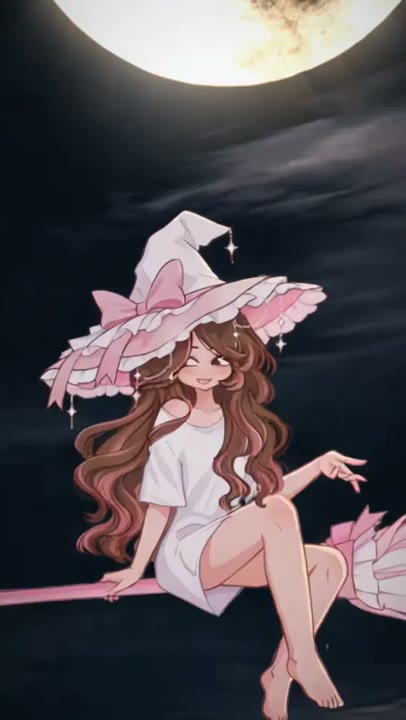
The Ramalama Bang Bang witch effect builds its surprise around a silhouette crossing the full moon. A flash reveals the familiar face on the broom, turning a distant spooky shape into a personal Halloween moment. This template keeps that contrast but simplifies the action into one rider, one broom, and a short reveal. It does not need a close-up of a photographer's phone or a sequence of dance poses to make the idea readable. A person or pet can lead the scene, with warm facial light, a pointed hat, and a gentle hover providing the closing image.
Best for
- Moonlit witch reveals
- Pet Halloween edits
- Broom-riding character intros
Create the moonlit broom scene
Choose your photo
Choose one person or pet with a clearly visible face and recognizable hair, ears, or markings. Leave space above the head for the hat. A simple background helps the moonlit silhouette remain separate from the original setting.
Generate with the template
Add the person or pet photo and select Generate video. The prepared scene moves from a moonlit silhouette to a flash-lit rider, keeping the action focused on the reveal.
Review and download
Check that the same rider appears before and after the flash. Inspect the broom's direction, seated pose, hat outline, and facial lighting. The reveal should be readable without a sudden extra rider or an unexplained camera cut.
Ramalama witch reveal direction
Use this reference direction as a starting point in custom-prompt mode. The template runs fixed instructions; remixing is a separate workflow, not an edit to the preset.
Use the reference photo as the appearance guide for one witch riding a broom against a large full moon. Keep the face, hair, or pet markings recognizable. Open on the rider in dark silhouette drifting slowly across the moon. A brief white camera-flash effect brightens the scene and reveals the rider's face beneath a pointed hat. Finish with a stable sideways seated pose on the hovering broom, a gentle fabric movement, and soft city lights below. Use one smooth camera push, not a complex dance. Keep one rider and one broom. No phone close-up, captions, or extra limbs.
Before you create
Is the Ramalama soundtrack included in this witch template?
The preset defines the moonlit visual reveal, not a particular song or a beat-matched edit. It does not request the Ramalama track. Review the generated clip first, then add your selected soundtrack and align the flash in your editor if you want a music-led version of the witch scene.
Can I change the creative direction?
The preset uses fixed instructions. Copy the reference direction into custom-prompt mode to adapt it; this does not change the preset itself.
What video output should I expect?
The default length is 12s (reference ratio 406/720). The output follows your uploaded photo's aspect ratio and suits Moonlit witch reveals, Pet Halloween edits, Broom-riding character intros.
Put your character on the broom
Choose your witch, keep the face visible in the source photo, and create a playful moonlit broom reveal for your next Halloween edit.