
Upload a photo
PNG, JPG or WebP · up to 10 MB
Choose a photo to generate a video.
The Enchantress Filter moonlit transformation
Create an Enchantress Filter AI video from one portrait. Explore a dark wipe, crescent crown, and moon-witch reveal, then review your fantasy clip on ReelAI.
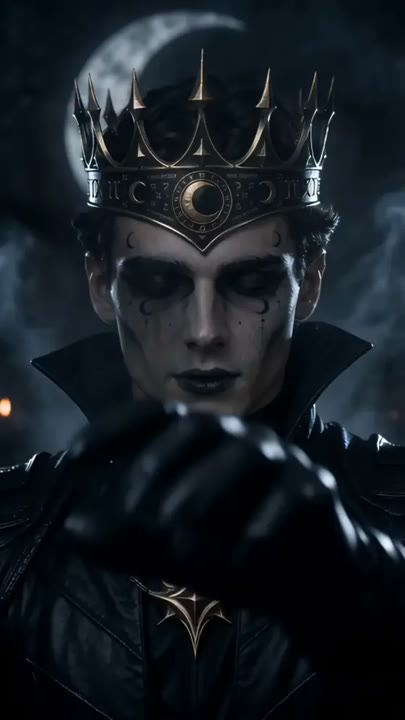
The enchantress reveal uses a simple visual trick: obscure the portrait for a moment, then bring the face back in a different fantasy look. A smoky hand shape crosses the foreground before a crescent crown, dark fabric, and a moonlit setting appear. The direction favors a clear transformation over a complicated hand-clasp sequence, keeping attention on the face and the costume reveal. It suits a Halloween introduction, a gothic character concept, or a short before-and-after edit. Your uploaded portrait guides the starting subject while the model interprets the magical details.
Best for
- Halloween reveals
- Moon-witch character ideas
- Gothic portrait edits
- Fantasy introductions
Create your Enchantress Filter reveal
Choose your photo
Choose a chest-up portrait with the forehead, hairline, and shoulders clearly visible. Leave space above the head for the crescent crown. Keep hands away from the face and avoid a dark background that hides the starting silhouette.
Generate with the template
Generate one transformation clip with this preset selected. The prepared direction moves from your original portrait through a dark wipe into a crescent-crown reveal, with the face kept near the center.
Review and download
Check that the face remains recognizable on both sides of the wipe. Review the crown's position, the eyes, and the edge of the dark fabric. A brief clean reveal is more useful than a long transition that obscures the subject.
Direction for the wipe and crescent crown
Use this reference direction as a starting point in custom-prompt mode. The template runs fixed instructions; remixing is a separate workflow, not an edit to the preset.
Transform the single subject from the uploaded portrait into a dark moon enchantress in one cinematic reveal. Begin with the original appearance in soft shadow, facing the camera. A smoky dark hand shape passes across the foreground to create a brief visual wipe. As it clears, reveal a gold crescent crown, layered dark fabric, subtle gothic makeup, and a softly glowing moonlit backdrop. Preserve recognizable facial features and keep the head centered. End with a calm, mysterious look. Use restrained motion, drifting mist, no captions, and no extra characters.
Before you create
Does the Enchantress Filter need a hand-clasp photo?
No. A clear chest-up portrait is enough for this direction. The preset uses a dark foreground wipe rather than requiring two hands to interlock, then asks for a moon-witch costume reveal. The exact crown, makeup, and transition are generated, so review those details when choosing the final moment to use.
Can I change the creative direction?
The preset uses fixed instructions. Copy the reference direction into custom-prompt mode to adapt it; this does not change the preset itself.
What video output should I expect?
The default length is 10s (reference ratio 406/720). The output follows your uploaded photo's aspect ratio and suits Halloween reveals, Moon-witch character ideas, Gothic portrait edits, Fantasy introductions.
Reveal your moon-witch character
Upload a chest-up portrait and explore a dark moon-witch transformation, using a short foreground wipe to introduce a crescent crown and a new fantasy look.