
Upload a photo
PNG, JPG or WebP · up to 10 MB
Choose a photo to generate a video.
The "Be gentle" butterfly glow-up portrait reveal
Upload one portrait for an I Want Wings AI video. Animate the polished butterfly glow-up pose, confident head tilt and pointing gesture in a 10-second clip.
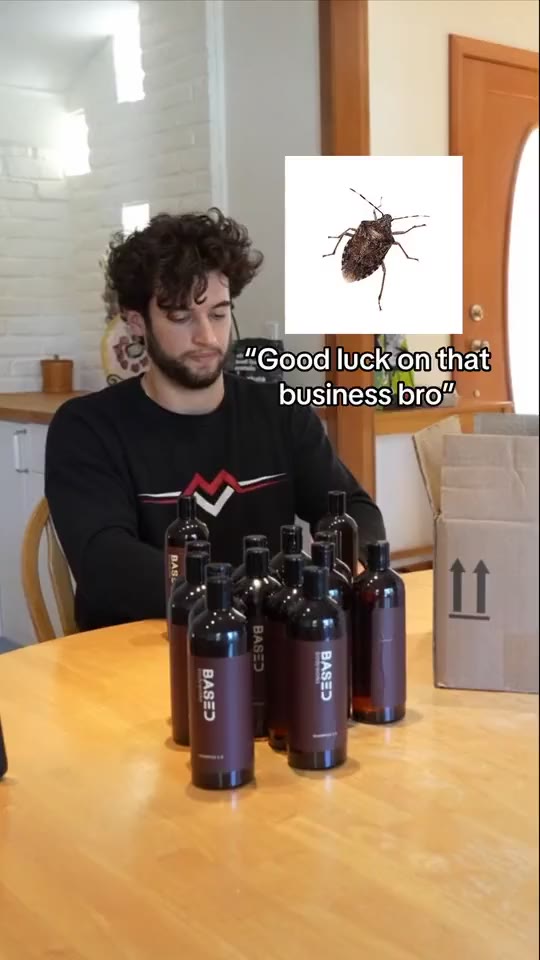
I Want Wings AI is built around the viral TikTok glow-up contrast that pairs an awkward "Eww, squish it" before slide with a sharply styled butterfly after shot. In the bound reference clip, a curly-haired creator sits casually behind product bottles in the opening slide before the reveal shows him in a tailored grey suit pointing calmly in a store aisle beside a blue butterfly graphic. This I Want Wings AI preset animates that composed, high-confidence "after" portrait moment from one uploaded photo.
Best for
- A founder or brand milestone post
- a sharp suit or dress transformation reel
- or the second half of an I Want Wings AI before-and-after carousel where a calm
- polished pose replaces a static photo.
Create an I Want Wings AI glow-up clip from one photo
Choose your photo
Upload one clear waist-up portrait showing your styled outfit, face and at least one visible hand. Good front lighting and a clean background let the I Want Wings AI head tilt and pointing gesture read like a finished editorial shot.
Generate with the template
Apply the I Want Wings AI preset to guide a poised gaze, a slight head tilt and a clean pointing gesture.
Review and download
Check the pointing hand and finger count as the arm rises, and make sure the collar, lapels and facial features remain crisp. Because I Want Wings AI relies on a polished portrait impression, avoid takes where the background warps or extra overlays appear.
Guide the composed glow-up gaze and hand gesture
Use this reference direction as a starting point in custom-prompt mode. The template runs fixed instructions; remixing is a separate workflow, not an edit to the preset.
Animate the single adult in the uploaded waist-up portrait for an I Want Wings AI inspired glow-up reveal pose. Preserve the recognizable face, hairstyle, tailored outfit and surrounding room or aisle setting. Begin with a composed, confident gaze toward the lens, add a slight head tilt and raise one hand smoothly to point toward the foreground or chest with a subtle self-assured expression. Keep the lighting warm, both hands anatomically clean and the background shelves or room steady without adding insect stickers, split-screen cuts or text overlays.
Before you create
Does I Want Wings AI attach giant angel wings or build the two-slide bug carousel?
Despite the sound name, the viral I Want Wings AI trend is a before-and-after glow-up format using bug and butterfly stickers rather than giant feathered wings. This preset animates one portrait into the confident "after" video clip; you can pair it with your own "before" photo in your social editor.
Can I change the creative direction?
The preset uses fixed instructions. Copy the reference direction into custom-prompt mode to adapt it; this does not change the preset itself.
What video output should I expect?
The default length is 12s (reference ratio 540/960). The output follows your uploaded photo's aspect ratio and suits A founder or brand milestone post, a sharp suit or dress transformation reel, or the second half of an I Want Wings AI before-and-after carousel where a calm, polished pose replaces a static photo..
Make your I Want Wings AI glow-up video
Start with one sharp waist-up portrait and animate a confident I Want Wings AI reveal pose.