
Upload a photo
PNG, JPG or WebP · up to 10 MB
Choose a photo to generate a video.
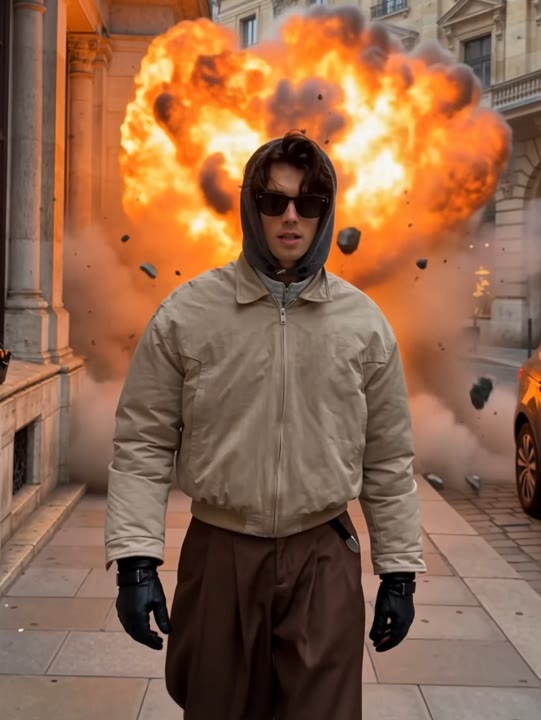
Keep walking while the background erupts
Use the Explosion Walk AI Video Generator for an action-movie moment from one photo. Walk calmly toward the camera as a distant fireball lights the road behind.
The Explosion Walk AI Video Generator builds its action-movie contrast around one simple choice: keep walking while the background erupts. Your subject approaches a low camera on an empty dusk road, with orange firelight outlining the clothing and smoke remaining in the distance. The face stays central as the framing moves toward a waist-up finish. This photo-to-video version avoids a complicated crouch, jacket gesture and final raised-arm sequence. Use it for a confident character entrance, a cinematic profile introduction or a reaction edit where the calm walk is funnier than the explosion itself.
Best for
- Action-hero entrances
- confident profile introductions
- cinematic reaction memes
Create your action-movie entrance
Choose your photo
Choose one adult with a clear face, visible outfit and enough body detail to establish a walk. Full-body or three-quarter images are useful. Avoid cropped shoes, crowded backgrounds or large objects blocking the shoulders.
Generate with the template
Add your standing portrait and generate the dusk-road scene. The effect guides a steady approach and a background fireball, keeping the lead facing forward and the camera low enough for a cinematic entrance.
Review and download
Check that the subject continues forward without turning back and that the fireball stays behind them. Watch for grounded steps, a clear face, stable clothing and smoke that does not hide the finishing expression.
A steady walk and a distant fireball
Use this reference direction as a starting point in custom-prompt mode. The template runs fixed instructions; remixing is a separate workflow, not an edit to the preset.
Create an action-movie walk using the single adult in the uploaded photo as the lead. Preserve their recognizable face, hairstyle, clothing and build. On an empty road at dusk, the subject walks steadily toward a low camera. A broad orange fireball blooms far behind them, followed by drifting background smoke. The lead keeps facing forward with relaxed shoulders and an unhurried stride. Let warm light outline the clothing without covering the face. Use one continuous shot ending at waist-up distance. No turning back, foreground debris, additional people, added text or duplicate limbs.
Before you create
Does the Explosion Walk preset need a reference video?
The Explosion Walk preset uses one photo and its own creative direction for a new scene with a calm forward walk and a distant fireball. It does not need a reference clip, but it also does not match a specific video's cuts, timing or jacket gestures. Review the fire placement and walking motion in your generated take.
Can I change the creative direction?
The preset uses fixed instructions. Copy the reference direction into custom-prompt mode to adapt it; this does not change the preset itself.
What video output should I expect?
The default length is 6s (reference ratio 540/720). The output follows your uploaded photo's aspect ratio and suits Action-hero entrances, confident profile introductions, cinematic reaction memes.
Make your own never-look-back moment
Choose a clear portrait and create your action-hero walk. Review the face, steps and background fire, then download the take with the strongest calm-versus-chaos contrast.