
Upload a photo
PNG, JPG or WebP · up to 10 MB
Choose a photo to generate a video.
The branch snaps, and the joke lands in the water
Make a Cutting the Branch AI video from one prepared scene image. Animate the chop, the snapping branch and a comic splash below, then download your clip.
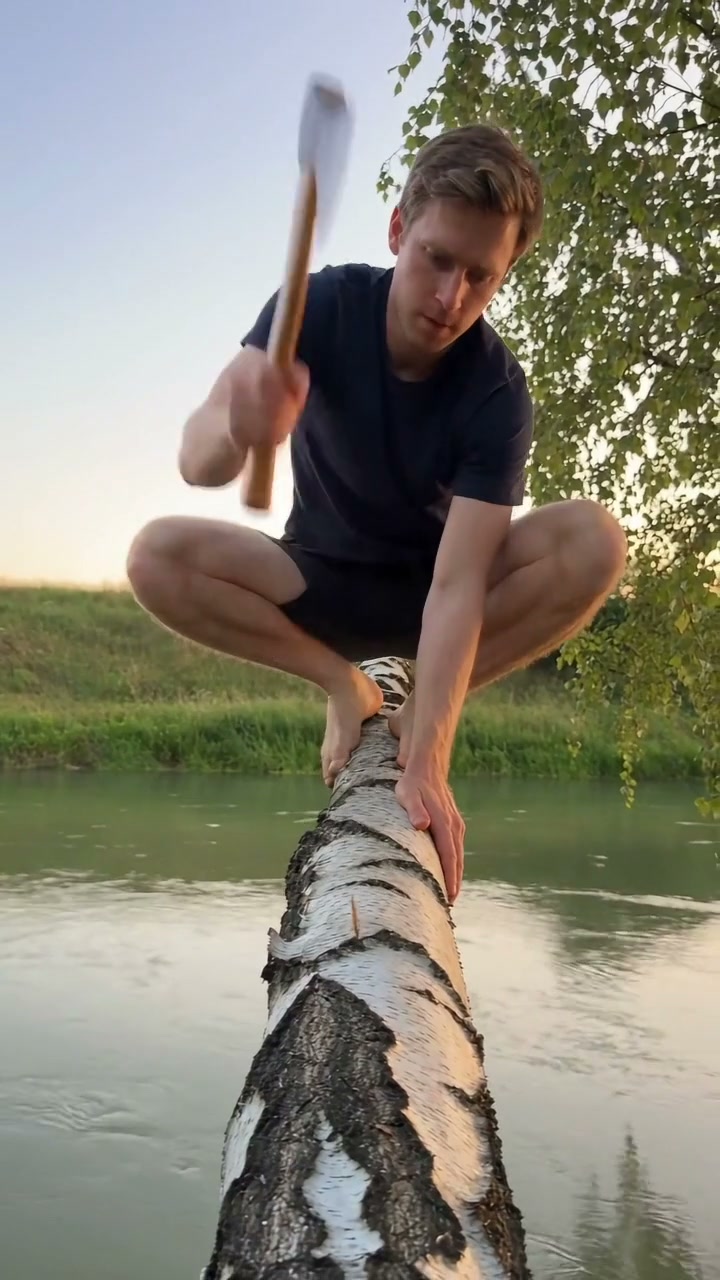
Cutting the Branch turns a familiar self-sabotage joke into a short slapstick scene: the character cuts the very support they are sitting on, notices too late and drops with it. The reference shows a man in a dark shirt crouched over a pale tree limb above green water. He lifts an axe to the limb, and the ending shows a large splash with his hands above the water. It is inspiration, not a verified ReelAI output. The humor comes from the clear cause and effect rather than a complicated camera move. Start with one prepared composition that makes the mistake understandable at a glance: a seated character, a visible branch extending over water and a small axe held clear of the body. The preset guides a compact sequence from the first chop through the break and splash.
Best for
- Self-sabotage reaction memes
- cartoon-like physical comedy
- staged outdoor scenes
Animate your prepared branch-cutting scene
Choose your photo
Use one prepared image with the character seated on the outer part of a branch above water. Show the cut point between the character and the trunk, with the axe and both hands visible. Leave space below the branch for the falling motion and splash. Keep the shot wide enough to explain the setup.
Generate with the template
Upload your prepared branch scene and select Generate video. The preset guides a few small chops, a break at the cut point and a brief fall into the water below.
Review and download
Check that the branch breaks at the visible cut, the character falls with the detached section and the water stays below them. Watch the hands, axe and seated posture for shape changes. Favor a short readable fall over a complicated tumble or a moving camera.
Make the chop, break and splash easy to follow
Use this reference direction as a starting point in custom-prompt mode. The template runs fixed instructions; remixing is a separate workflow, not an edit to the preset.
Animate the supplied prepared scene of one character sitting on a tree branch above water. Preserve the subject's identity, clothing, scene layout, tool and body proportions. With a fixed wide camera, show two small controlled axe chops at the existing cut point between the character and the trunk. The branch cracks at that point, the detached section tilts down and the character drops with it into the water below, ending in a comic splash and spreading ripples. Use a brief slapstick fall with no visible injury. Keep the tool in a consistent hand and the trunk stationary. Do not invent extra people, duplicate limbs, additional tools, blood, captions, logos or camera cuts.
Before you create
Can I start with an ordinary selfie for the branch meme?
A prepared scene is the better input here. Include the character, supporting branch, tool and water together in one image. A clear view of the cut point and the space below gives the chop, break and splash a readable sequence.
Can I change the creative direction?
The preset uses fixed instructions. Copy the reference direction into custom-prompt mode to adapt it; this does not change the preset itself.
What video output should I expect?
The default length is 12s (reference ratio 720/1280). The output follows your uploaded photo's aspect ratio and suits Self-sabotage reaction memes, cartoon-like physical comedy, staged outdoor scenes.
Turn a bad idea into a slapstick clip
Choose a clear setup, animate the comic mistake and download the take with the most readable sequence.