
Upload a photo
PNG, JPG or WebP · up to 10 MB
Choose a photo to generate a video.
A sideways portrait, a closer gaze
Make a Tus Ojos Me Reflejan AI video from one close portrait. Add a warm eye close-up, a gentle temple touch and a slow camera move toward the face on a pillow.
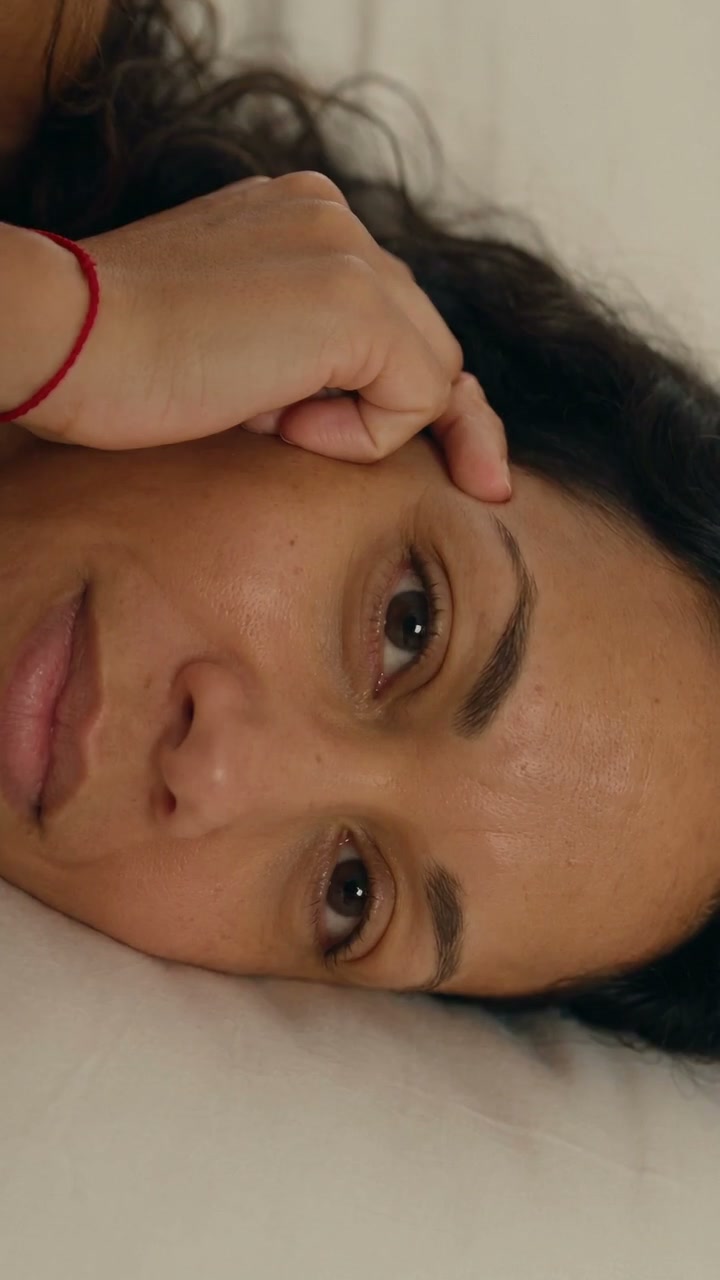
Tus Ojos Me Reflejan is a quiet eye-close-up portrait. The reference begins with a sideways face on a pillow and a hand at the temple, then moves closer through a blink. Its final view holds the eye in warm light. This direction keeps the existing pose and lets a slow camera move supply most of the change. The starting face, eye detail and hand placement matter more than a busy setting.
Best for
- A close personal portrait
- a soft dedication or an intimate eye-focused edit. Choose a relaxed pose that remains readable when the frame gets tighter.
Choose the eye-focused image
Choose your photo
Use one prepared close portrait with the subject lying sideways, face unobstructed and hand resting naturally beside the temple. Keep both eyes sharp at the start and include the existing fingers rather than asking for a new hand to enter.
Generate with the template
Keep the pillow pose and hand in place. Let one natural blink and a gentle camera approach create the eye-focused moment.
Review and download
Check the iris, eyelid and fingertips through the blink. The camera should approach without stretching the face or changing eye color. A small catchlight can move while the eye's shape remains consistent.
Direct the blink and slow approach
Use this reference direction as a starting point in custom-prompt mode. The template runs fixed instructions; remixing is a separate workflow, not an edit to the preset.
Animate the prepared sideways close portrait in the uploaded image. Preserve the person's recognizable face, eye color, eyebrow shape, hair, skin texture, pillow and existing hand at the temple. The subject looks softly toward the lens, closes and opens the eyes once in a natural blink, and relaxes the fingers by a very small amount. Make a slow continuous camera push toward the nearer eye, ending while the eye, eyebrow and fingertips remain coherent. Let warm light create a subtle catchlight without changing the iris. No new hands, reflected second person, face reshaping, rapid zoom, exact lyric synchronization, song request, captions or camera cuts.
Before you create
Can another person's face appear reflected in the eye?
This preset focuses on the uploaded portrait, its blink and a warm catchlight. It does not cast a second identity into the pupil; use an ordinary close portrait with clear eye detail.
Can I change the creative direction?
The preset uses fixed instructions. Copy the reference direction into custom-prompt mode to adapt it; this does not change the preset itself.
What video output should I expect?
The default length is 8s (reference ratio 720/1280). The output follows your uploaded photo's aspect ratio and suits A close personal portrait, a soft dedication or an intimate eye-focused edit. Choose a relaxed pose that remains readable when the frame gets tighter..
Bring your close portrait to life
Start with a sharp close portrait and build a small, warm movement around the eyes.