
Upload a photo
PNG, JPG or WebP · up to 10 MB
Choose a photo to generate a video.
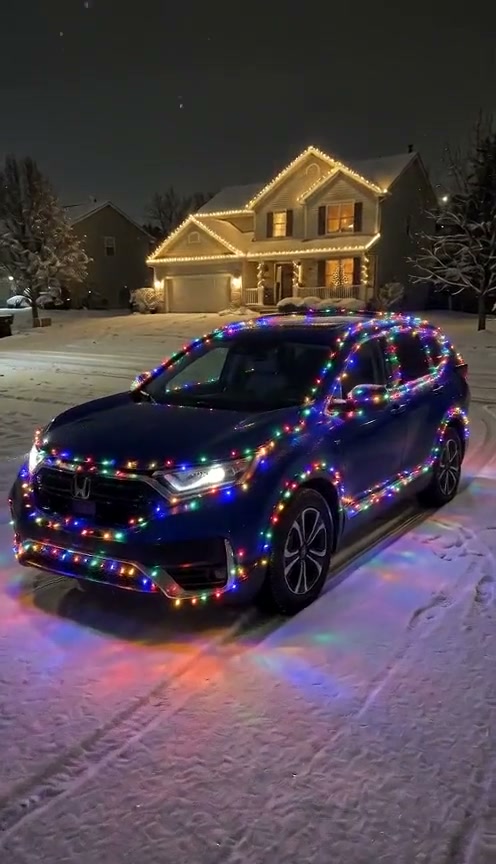
Bumper-to-roofline holiday LEDs on a snowy driveway
Make a Christmas Lights Car AI video from one car photo. Wrap your vehicle in glowing multicolor holiday string lights on a snowy night driveway and review it.
Christmas Lights Car turns an everyday vehicle image into a festive winter driveway showcase. In the OraClip video reference, a dark blue SUV parked on a snow-dusted suburban driveway in front of a warmly lit home illuminates from bumper to roofline with vibrant multicolor LED strands as the camera glides smoothly around the front fender. This preset wraps your uploaded sedan, coupe, truck or SUV in that glowing holiday display.
Best for
- Choose Christmas Lights Car for automotive enthusiasts
- winter garage reels and holiday driveway posts that show off your own ride wrapped in colorful seasonal LEDs.
Create your Christmas Lights Car video
Choose your photo
Upload one clear front-three-quarter or side-angle picture of your vehicle with the full body, grille, headlights and wheel rims visible so the generator preserves its exact model lines.
Generate with the template
Review the snowy suburban driveway, bumper-to-roofline LED wrap and smooth front-quarter camera glide before generating.
Review and download
Check that the hood, grille, paint finish and wheel rims stay true to your uploaded vehicle while the multicolor LED strands glow evenly and reflect across the snow.
Guide the multicolor LED wrap and smooth orbit
Use this reference direction as a starting point in custom-prompt mode. The template runs fixed instructions; remixing is a separate workflow, not an edit to the preset.
Create a Christmas Lights Car holiday showcase video using the vehicle in the uploaded image. Preserve the vehicle’s recognizable body silhouette, paint finish, grille, headlights and wheel rims. Park the vehicle on a snow-dusted evening driveway in front of a warmly lit suburban winter home. Animate glowing multicolor holiday LED strands illuminating smoothly along the bumper, hood, fenders and roofline while the camera makes a steady front-quarter glide, casting colorful reflections on the snow. Keep vehicle geometry coherent in one continuous shot without text or logos.
Before you create
Does my vehicle need festive strands on it before using Christmas Lights Car?
No. Start with a normal daytime or evening picture of your vehicle; the preset adds the snowy night driveway and glowing multicolor holiday strands.
Can I change the creative direction?
The preset uses fixed instructions. Copy the reference direction into custom-prompt mode to adapt it; this does not change the preset itself.
What video output should I expect?
The default length is 8s (reference ratio 496/864). The output follows your uploaded photo's aspect ratio and suits Choose Christmas Lights Car for automotive enthusiasts, winter garage reels and holiday driveway posts that show off your own ride wrapped in colorful seasonal LEDs..
Wrap your car in holiday lights
Upload one clear vehicle image to wrap your ride in glowing LEDs with Christmas Lights Car.