
Upload a photo
PNG, JPG or WebP · up to 10 MB
Choose a photo to generate a video.
One drink, one paw gesture and a deadpan stare
Create a Dog Bartender AI video from a prepared pet-at-the-counter photo. Animate one drink pour and a playful paw gesture, then review your scene in ReelAI.
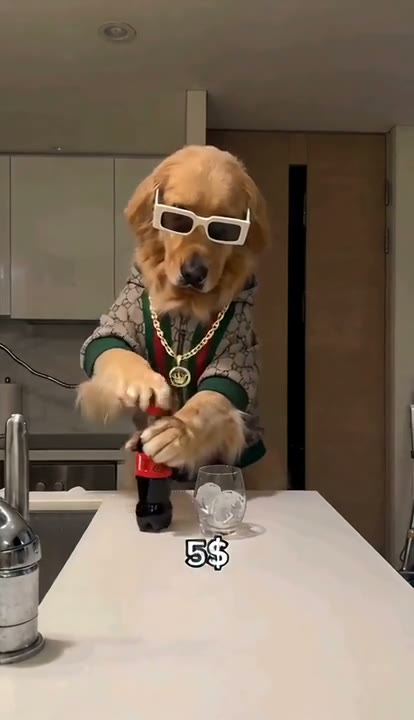
Dog Bartender makes the contrast between a serious pet and an elaborate drink service the joke. The third-party reference shows a golden dog in patterned clothing and white sunglasses behind a kitchen counter, with several drink preparations and price captions. This preset takes one drink-serving beat rather than rebuilding that whole sequence. A helper hand pours into the waiting glass while the dog watches, raises a paw and holds a deadpan expression. Prepare the dog, countertop, glass, pouring container and helper hands together in one image. The reference is inspiration, not a verified ReelAI output; this version does not include a three-price edit or a caption-making step.
Best for
- Pet reaction clips
- comic kitchen scenes
- playful drink-serving memes
Create your Dog Bartender scene from one image
Choose your photo
Use one prepared kitchen scene with your dog character behind a counter, an empty glass resting on it and a visible helper hand holding a small pouring container nearby. Include the dog's face, chest and forepaws. Put the clothing and glasses you want in the image before uploading.
Generate with the template
Upload your prepared dog-and-counter scene and select Generate video. The direction adds one short pour from the visible helper hand, a small paw gesture and a serious finishing look without switching scenes.
Review and download
Follow the helper's hand, the pouring stream and the glass rim. The drink should land inside the same glass without changing its shape. Check that the pet's muzzle and sunglasses stay recognizable, the paw remains separate from the glass and no extra hand or garnish appears.
A single pour at the pet's kitchen counter
Use this reference direction as a starting point in custom-prompt mode. The template runs fixed instructions; remixing is a separate workflow, not an edit to the preset.
Animate the dog character, countertop, glass and helper hands already arranged in the supplied kitchen scene. Preserve the dog's muzzle, ears, coat pattern, clothing and any sunglasses, keeping the dog behind the counter. The helper hand slowly tilts the small bottle or jug already held above the stationary glass, pours one short stream of dark soft drink, then returns it upright. The dog looks toward the glass, lifts one forepaw slightly beside it and finishes with a serious camera-facing expression. Keep the glass resting on the counter, the liquid inside its rim and the dog's body supported. Use a fixed medium shot with consistent kitchen light. One continuous drink-serving beat only; no cutting tools, fire, sparks, new garnishes, price labels, extra hands, fast montage or scene changes.
Before you create
Does Dog Bartender make the full $1, $5 and $50 drink sequence?
This preset animates one prepared drink-serving scene in a continuous shot. The inspiration uses several escalating preparations, but this direction focuses on one pour and the pet's serious reaction. Prepare any props beforehand; add price text or assemble several clips separately if that is part of your edit.
Can I change the creative direction?
The preset uses fixed instructions. Copy the reference direction into custom-prompt mode to adapt it; this does not change the preset itself.
What video output should I expect?
The default length is 12s (reference ratio 414/720). The output follows your uploaded photo's aspect ratio and suits Pet reaction clips, comic kitchen scenes, playful drink-serving memes.
Give your pet a moment behind the counter
Prepare your dog character, counter and glass, then create one comic serving moment. Review the hands, glass rim and pour before downloading your preferred take.