
Upload a photo
PNG, JPG or WebP · up to 10 MB
Choose a photo to generate a video.
A street-side shoulder groove
Make a Dame Hombro dance video from one photo with shoulder bounces, compact fist gestures and a street-side groove. Put your performer in the scene on ReelAI.
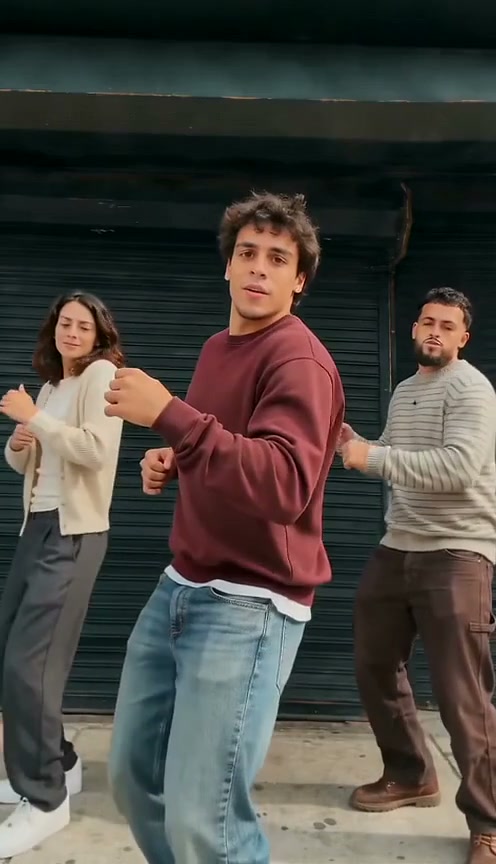
Dame Hombro is built around a loose shoulder groove and small hand accents. The source preview places a burgundy-shirted lead in front of dark shop shutters, with two supporting dancers behind. He leans toward the camera, pulses his shoulders and brings his forearms up beside his face. ReelAI gives your photo a simplified solo version of that street-side performance. Keeping one lead in view makes the face, outfit and shoulder rhythm easier to follow than a crowded group routine.
Best for
- Choose this effect for an easygoing street dance
- a casual outfit clip or a playful portrait that needs more movement than a head nod. The scene works with a relaxed stance and a few strong upper-body accents. A small step forward gives the routine a clear opening without needing a long run of footwork.
Create your Dame Hombro dance
Choose your photo
Upload one sharp full-body or knee-up photo with shoulders, elbows and hands visible. Keep the arms separated from the torso where possible. A relaxed standing picture gives the shoulders room to move. Use a prepared pavement or shutter-side scene if you want to keep that particular location.
Generate with the template
Keep one lead, compact shoulder bounces and two small hand accents so the routine stays readable in a short clip.
Review and download
Check that shoulder movement stays connected to the torso, fists remain distinct and the head does not change shape during the lean. Look at trouser edges and foot contact during the small steps. The camera should keep the performer centered instead of drifting between unrelated background faces.
Shoulder-dance direction
Use this reference direction as a starting point in custom-prompt mode. The template runs fixed instructions; remixing is a separate workflow, not an edit to the preset.
Use the uploaded image to preserve one person's recognizable face, hairstyle, clothing and body proportions. Establish an uncluttered sidewalk in front of dark closed shop shutters, retaining a compatible street setting if it is already in the photo. Keep one lead performer in a medium full-body view. Start with a gentle lean toward the camera and one compact fist gesture at waist height. Add alternating shoulder bounces, two small weight shifts and a forearm lift beside the face, then finish upright with a relaxed expression. Keep elbows, fingers and knees coherent and both feet in believable contact with the pavement. Use a mostly fixed camera and a continuous shot. No additional lead identities, complex group choreography, rapid cuts, captions, logos or requested dialogue.
Before you create
Do I need a group photo for the Dame Hombro scene?
No. This version is designed around one performer from one photo. The reference includes a lead and two supporting dancers, but the creative direction keeps the street setting and shoulder gestures in a solo routine. If a particular group arrangement matters, start with one already composed group image and describe which visible person should lead.
Can I change the creative direction?
The preset uses fixed instructions. Copy the reference direction into custom-prompt mode to adapt it; this does not change the preset itself.
What video output should I expect?
The default length is 12s (reference ratio 496/864). The output follows your uploaded photo's aspect ratio and suits Choose this effect for an easygoing street dance, a casual outfit clip or a playful portrait that needs more movement than a head nod. The scene works with a relaxed stance and a few strong upper-body accents. A small step forward gives the routine a clear opening without needing a long run of footwork..
Give your portrait a street groove
Choose a clear standing photo and make a relaxed street performance centered on your own appearance.