
Upload a photo
PNG, JPG or WebP · up to 10 MB
Choose a photo to generate a video.
Hide the reveal behind a card wipe
Make an Unforgettable Car inspired AI video from one prepared image. Explore a card wipe and a vehicle reveal, then review your short car scene on ReelAI.
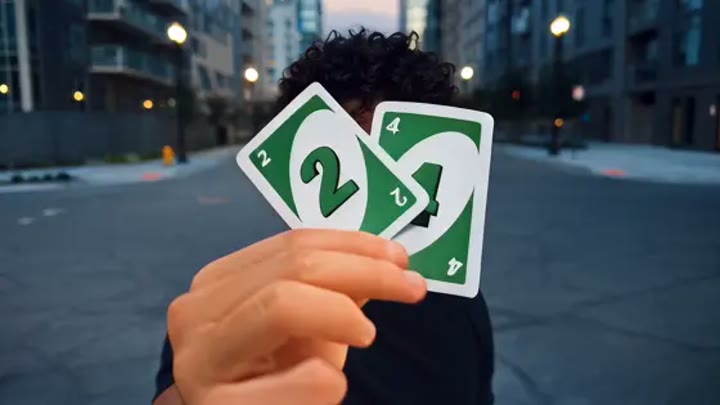
The Unforgettable Car idea hides a vehicle reveal inside a foreground card movement. A person lifts the cards toward the viewer, briefly covers the lens, and steps aside as the car takes more of the frame. This direction starts with a single prepared image that already contains both the subject and vehicle, rather than trying to cast them from separate uploads. Plain cards keep the focus on the transition instead of generated numbers. Use it for a car announcement concept, a garage reveal, or a playful before-and-after edit with your own finishing graphics.
Best for
- Car reveal concepts
- Card-wipe transitions
- Garage announcement edits
Create an Unforgettable Car reveal
Choose your photo
Prepare one image with the person in front and the complete car visible behind. Leave space around the hands and keep the vehicle's wheels inside the frame. Avoid reflections that resemble extra people or overlapping cars in the background.
Generate with the template
Generate one clip with the prepared reveal direction. It uses a short foreground cover and a step aside to emphasize the car, while avoiding a complicated series of camera cuts or numbered-card tricks.
Review and download
Watch the card edges during the lens cover and check the car immediately afterward. Look for stable wheels, grille geometry, and paint color. Add exact numbers or labels in your editor if they are important to the final reveal.
Direct the cover, reveal, and reaction
Use this reference direction as a starting point in custom-prompt mode. The template runs fixed instructions; remixing is a separate workflow, not an edit to the preset.
Animate the single prepared image showing a person with a car behind them. Keep the vehicle's body shape, paint color, and wheel positions consistent. Begin in a medium view as the person raises two plain colored cards toward the lens. Let the cards briefly cover the foreground, then lower them to reveal the car more prominently. Ask for a surprised glance back at the vehicle and a small step aside. Use a gentle camera push, soft evening light, and one continuous shot. Avoid readable card numbers, new vehicles, logos, and captions.
Before you create
Can Unforgettable Car combine my selfie with a separate car photo?
Not in this single-image preset. Prepare a complete scene with the person and car already together, then upload that image for animation. The direction asks for a card wipe and a new reveal moment, not a copy of a reference clip. Check the vehicle geometry and use editing for exact card lettering.
Can I change the creative direction?
The preset uses fixed instructions. Copy the reference direction into custom-prompt mode to adapt it; this does not change the preset itself.
What video output should I expect?
The default length is 11s (reference ratio 720/406). The output follows your uploaded photo's aspect ratio and suits Car reveal concepts, Card-wipe transitions, Garage announcement edits.
Give your car a visual entrance
Start with your person and car together in one image, then explore a short card-wipe transition that leaves the vehicle as the final focus.