
Upload a photo
PNG, JPG or WebP · up to 10 MB
Choose a photo to generate a video.
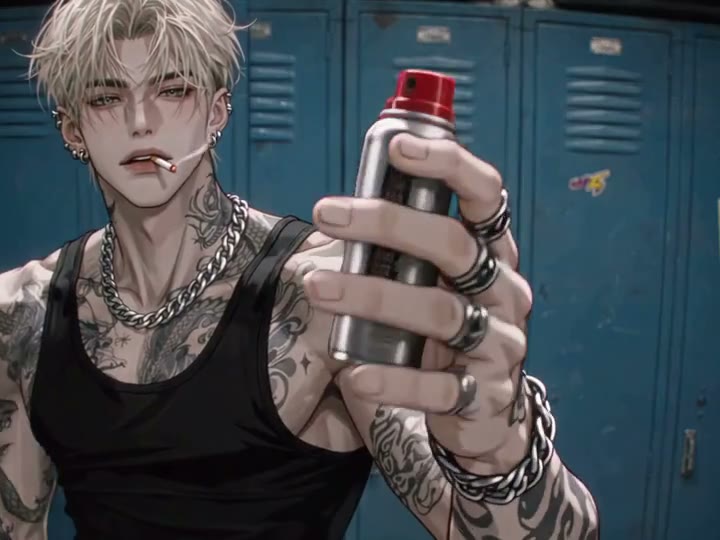
One small canister shown against the blue lockers
Create an End of Watch AI video from a prepared locker-room character image. Animate one small equipment canister lift, a gentle turn and a glance in ReelAI.
End of Watch brings a close character moment into a blue-locker setting. The third-party reference shows an illustrated adult in a black tank top presenting several equipment props toward the camera. This version selects one small canister from that sequence: lift it, turn it slightly to show its shape and finish with a brief side glance. Begin with the adult character, canister and locker room already arranged in your image. The preview is inspiration, not a verified ReelAI output or a recreation of a particular actor. Keeping one object in the same hand gives the short scene a clear focal point without cycling through the original's other props or dialogue.
Best for
- Illustrated character Reels
- locker-room scene inserts
- quiet prop-reveal clips
Create your End of Watch character moment
Choose your photo
Prepare one image of a single adult illustrated character in front of lockers, holding one clearly visible small cylindrical equipment canister. Include the face, shoulders, both hands and room around the object. Put the clothing and drawing style you want in the starting image; this preset is not a separate portrait-to-character conversion step.
Generate with the template
Upload your prepared character-and-canister image and select Generate video. The direction raises the existing object, turns it slightly to show its shape and finishes with a brief sideways glance without spraying.
Review and download
Check the hand around the canister and the shape of its colored top during the lift and turn. The cylinder should stay rigid, with reflections that follow the same object. Watch for extra fingers, a changing nozzle or unwanted spray, and keep the character's tattoos, clothing and locker doors consistent.
A controlled canister lift, a gentle turn and a side glance
Use this reference direction as a starting point in custom-prompt mode. The template runs fixed instructions; remixing is a separate workflow, not an edit to the preset.
Animate the single adult illustrated character already standing before the blue locker cabinets in the supplied scene. Preserve the face, hairstyle, tattoos, clothing, drawing style and locker arrangement. Keep the small cylindrical equipment canister already present in the same hand. The character raises the canister slowly to chest level, rotates it slightly to show its shape and colored top, then draws it a little closer to the body and gives a brief sideways glance. Keep the other hand relaxed and separate from the object. Use a steady waist-up shot with cool locker-room light and restrained expression changes. Maintain the canister's cylindrical shape, metal reflections and consistent fingers. Do not press the nozzle or release any spray. No extra equipment, weapon props, costume changes, realistic-photo transformation, dialogue, sudden camera cuts, captions or on-screen text.
Before you create
Does End of Watch recreate the entire equipment scene?
This version animates one small equipment canister already visible in your prepared adult-character image. It does not cycle through the reference's other props, add dialogue or rebuild a film scene around an uploaded face. The direction lifts and lightly turns the canister without pressing its nozzle or spraying.
Can I change the creative direction?
The preset uses fixed instructions. Copy the reference direction into custom-prompt mode to adapt it; this does not change the preset itself.
What video output should I expect?
The default length is 11s (reference ratio 720/540). The output follows your uploaded photo's aspect ratio and suits Illustrated character Reels, locker-room scene inserts, quiet prop-reveal clips.
Give your locker-room character a focused moment
Prepare your character and small canister in the locker-room scene. Review the fingers, object shape and gentle turn before downloading the clearest take.