
Upload a photo
PNG, JPG or WebP · up to 10 MB
Choose a photo to generate a video.
Let one blade wipe hide the outfit switch
Create an Under the Fan AI video from a prepared overhead portrait. Use one ceiling-fan blade wipe to reveal a new outfit while the pose and room stay in place.
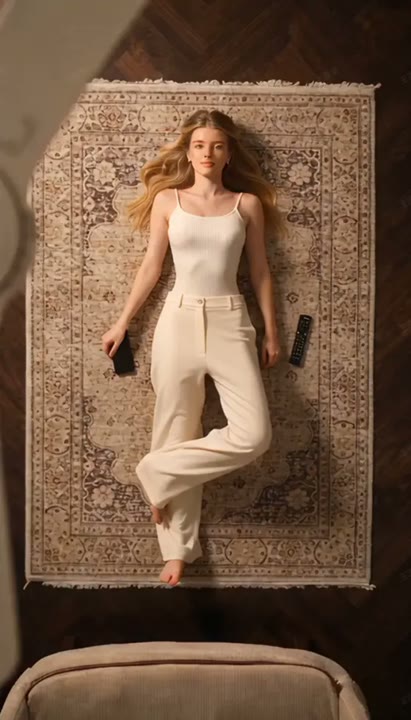
Under the Fan uses a passing ceiling-fan blade as the transition rather than a visible costume-change action. The overhead view disappears for a moment, then clears on the same person in a different fully clothed look. This preset makes one switch into an evening outfit, with the body position and room kept as visual anchors. Prepare the overhead scene before uploading so the fan, subject, and camera already have a clear relationship. The single wipe gives a fashion reveal a readable structure without repeating several wardrobe cycles or moving between unrelated camera angles.
Best for
- Overhead outfit transitions
- Ceiling-fan wipe reveals
- Single-look fashion clips
Create your Under the Fan reveal
Choose your photo
Prepare one overhead image showing a fully clothed adult in a relaxed pose beneath a ceiling fan. Keep the face and body outline visible, with the fan separate from the subject. A tight upright selfie is not the intended opening view.
Generate with the template
Add the prepared overhead scene and select Generate video. The preset uses one brief blade wipe to reveal a different fully clothed look, keeping the room, pose, and camera aligned rather than creating repeated outfit cycles.
Review and download
Check the new outfit appears only after the blade hides the view. The face, body position, floor, and room should line up on both sides of the wipe. Watch the fan geometry and reject a take that introduces an extra person or a new location.
Direction for the overhead wardrobe transition
Use this reference direction as a starting point in custom-prompt mode. The template runs fixed instructions; remixing is a separate workflow, not an edit to the preset.
Animate the prepared overhead portrait of one fully clothed adult lying beneath a ceiling fan. Preserve the face, hair, body position, and room. A single fan blade passes close to the camera and briefly fills the frame as a soft visual wipe. When the view clears, reveal the same person in a modest tailored evening outfit, still in the original pose. Finish with a calm look toward the overhead camera. Keep the camera locked, the fan distant from the body, and the clothing transition hidden by the wipe. No undressing, body reshaping, extra people, repeated wardrobe cycles, captions, or added text.
Before you create
Can Under the Fan reveal several custom outfits in one submission?
The fixed direction makes one switch from the uploaded look to a tailored evening outfit. It does not include separate clothing-image uploads or a list of wardrobe choices. For more looks, plan additional shots or copy the direction into custom-prompt mode, then assemble the completed takes into a longer fashion edit.
Can I change the creative direction?
The preset uses fixed instructions. Copy the reference direction into custom-prompt mode to adapt it; this does not change the preset itself.
What video output should I expect?
The default length is 12s (reference ratio 414/720). The output follows your uploaded photo's aspect ratio and suits Overhead outfit transitions, Ceiling-fan wipe reveals, Single-look fashion clips.
Turn your overhead portrait into a fashion reveal
Prepare a clear overhead portrait with the fan separate from the subject, then create a single wardrobe reveal and review the alignment before and after the wipe.