
Upload a photo
PNG, JPG or WebP · up to 10 MB
Choose a photo to generate a video.
A secret between two tiny forest friends
Create a Laughing Fairy AI video from one portrait: become a tiny winged character, share a secret on a mossy branch and laugh with a forest friend on ReelAI.
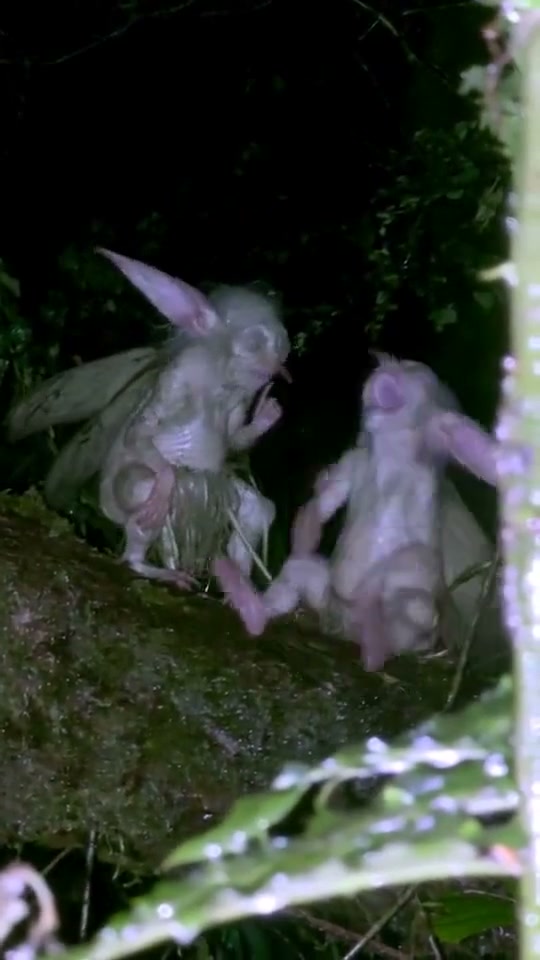
Turn a quiet forest perch into a tiny gossip scene. The selected reference has two pale, long-eared winged figures on a mossy branch at night; one becomes animated with its hands and the pair lean toward each other. ReelAI uses your portrait for a miniature lead and introduces one imaginary companion. A whispered-looking gesture, a surprised pause and a shared laugh give the short clip a readable arc, with the leafy night setting holding it together.
Best for
- A best-friend reaction
- an inside-joke reveal or a mischievous fantasy portrait. Choose a close two-character composition if the expressions matter most. Large leaves
- bark and soft background darkness establish scale more clearly than adding a busy forest full of extra creatures.
Create your fairy gossip scene
Choose your photo
Use one sharp portrait with the eyes, mouth and hair visible. An even expression gives the scene room to change from listening to laughter. The second fairy is an imagined supporting character. If two particular people must appear, upload one already composed two-person fantasy image instead of separate portraits.
Generate with the template
Keep the miniature scale, one forest companion and the whisper-to-laughter reaction, or make the mood gentler and more playful.
Review and download
Follow the lead's face through the lean and laugh. Check that the ears, wings and hands remain distinct, both bodies stay on the branch and the companion does not acquire the lead's face. The camera should keep the miniature pair framed without abrupt changes of scale.
Forest gossip direction
Use this reference direction as a starting point in custom-prompt mode. The template runs fixed instructions; remixing is a separate workflow, not an edit to the preset.
Use the uploaded portrait for one recognizable miniature fairy, preserving the face, hair and expression while adding delicate wings, long pointed ears and a simple leafy outfit. Place the lead on a moss-covered branch in a dark garden, with broad leaves around it to show the tiny scale. Add one distinct imaginary fairy companion beside the lead unless the input already contains both figures. The companion leans close with one hand beside its mouth as if sharing a secret. The lead pauses, raises one hand in surprise, then both make small laughing shoulder movements and lean back toward each other. Keep the camera close and steady with soft night-time illumination. Preserve separate faces, coherent wings and hand shapes, and stable contact with the branch. No additional characters, written dialogue, specified words or sudden cuts.
Before you create
Can I choose the words in the Prilili gossip scene?
The creative direction focuses on a secret-sharing gesture and a visible laughing reaction. It is not a scripted voice or exact Prilili soundtrack tool. You can adjust the mood and expressions in the prompt while keeping the scene to two tiny characters and one clear exchange.
Can I change the creative direction?
The preset uses fixed instructions. Copy the reference direction into custom-prompt mode to adapt it; this does not change the preset itself.
What video output should I expect?
The default length is 11s (reference ratio 540/960). The output follows your uploaded photo's aspect ratio and suits A best-friend reaction, an inside-joke reveal or a mischievous fantasy portrait. Choose a close two-character composition if the expressions matter most. Large leaves, bark and soft background darkness establish scale more clearly than adding a busy forest full of extra creatures..
Put your portrait on the mossy branch
Choose a clear portrait and make a tiny woodland conversation with an expressive, recognizable lead.