
Upload a photo
PNG, JPG or WebP · up to 10 MB
Choose a photo to generate a video.
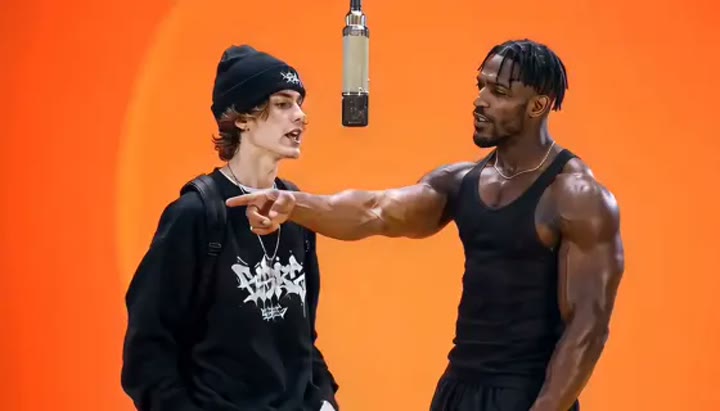
Two performers and one shared microphone
Create a Migos Hotel Lobby inspired AI video from one prepared duo image. Explore an orange studio and microphone gestures, then review your clip on ReelAI.
Migos Hotel Lobby suggests a recognizable studio composition: two performers sharing a warm orange room with one microphone between them. This preset works from a single image that already places both subjects in the scene. A small hand movement, a weight shift, and a glance between the pair provide performance energy without requiring a complete rap routine. The microphone stays fixed while the camera holds a medium-wide view. Use the result for a duo introduction, a character-performance concept, or a short studio insert that you later arrange around music in your own editor.
Best for
- Duo studio introductions
- Rap-performance concepts
- Character pair edits
Create a Migos Hotel Lobby interpretation
Choose your photo
Prepare one image containing both performers with clear space between their bodies. Place the microphone between them and show both sets of hands. Distinct clothing and even facial lighting make the two roles easier to follow during animation.
Generate with the template
Generate one studio clip from the complete duo image. The direction alternates a small hand gesture with a nod and glance, keeping the microphone and each performer's position stable throughout the shot.
Review and download
Watch each performer separately before judging the whole shot. Check that faces do not blend, left and right positions stay consistent, and hands avoid the microphone. Add your chosen audio afterward if the edit requires specific lyrics or timing.
Direct the orange-room performance
Use this reference direction as a starting point in custom-prompt mode. The template runs fixed instructions; remixing is a separate workflow, not an edit to the preset.
Animate the two performers already arranged in the single uploaded scene image. Keep their left and right positions, faces, hairstyles, and clothing distinct. Use a warm orange studio backdrop with one suspended microphone between them. Give the left performer a small hand gesture toward the microphone while the right performer nods and shifts weight. Let them exchange a quick glance before returning their attention forward. Keep the microphone stationary and use one steady medium-wide shot. Do not add new people, exchange identities, create song lyrics, or introduce captions and logos.
Before you create
Does Migos Hotel Lobby accept two separate portraits?
This template uses one prepared scene image, so both performers must already appear together in that image. It does not combine separate portraits or assign identities to two upload slots. Keep the pair visually distinct and use modest movement; exact mouth shapes, synchronized gestures, and a source soundtrack are not part of this direction.
Can I change the creative direction?
The preset uses fixed instructions. Copy the reference direction into custom-prompt mode to adapt it; this does not change the preset itself.
What video output should I expect?
The default length is 10s (reference ratio 720/414). The output follows your uploaded photo's aspect ratio and suits Duo studio introductions, Rap-performance concepts, Character pair edits.
Bring your prepared duo scene to life
Arrange both performers in one clear image, then explore a warm studio performance with a hanging microphone, small gestures, and an exchanged glance between them.