
Upload a photo
PNG, JPG or WebP · up to 10 MB
Choose a photo to generate a video.
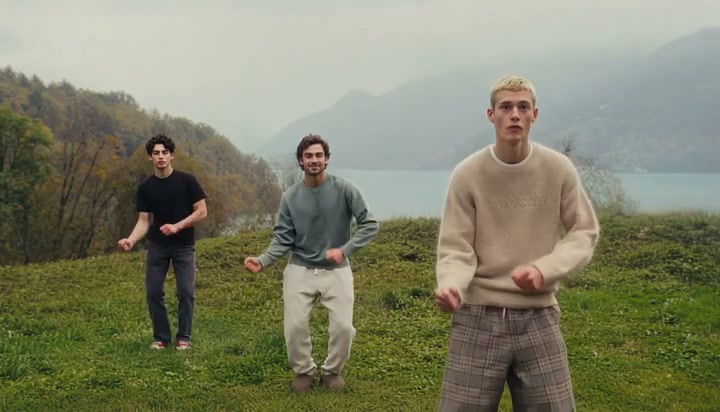
A loose trio groove on a misty hill
Make a Wassup in a Minute AI dance from one prepared photo. Animate a relaxed hilltop walk-in, head sway and chest-level gestures with your existing subjects.
Wassup in a Minute combines a relaxed arrival with small synchronized gestures on an open grassy hill. The reference begins with three men walking toward the camera against misty mountains and a lake, moves into a closer front-facing formation, then returns to a wider spaced lineup. The center performer makes small hand accents near his chest while the group sways and shifts posture. Use a single prepared trio image to keep all three appearances together, or choose a solo variation with one person. The gentle head-and-shoulder rhythm matters more than a complicated footwork sequence, and the broad landscape gives each silhouette room to remain distinct.
Best for
- A friends' challenge
- a casual outdoor group portrait or a solo reaction with a loose hilltop groove. The reference's muted sweaters and cool landscape create an unhurried mood. A short walk-in followed by a held gesture makes a clearer clip than an attempt to fit several unrelated dance sections into one shot.
Create your hilltop walk-in dance
Choose your photo
For a trio, upload one picture that already contains all three people with separate faces and bodies. Use a full-body or knee-up composition with space between arms. For a solo version, use one standing subject and keep the same low-key movement. Open grass or another uncluttered ground plane helps the step remain legible.
Generate with the template
Review the short walk-in, relaxed head sway and hand accents while keeping the existing subjects separate and recognizable.
Review and download
Check that each person keeps their place in the formation and that no face transfers onto a neighboring body. Watch the joined rhythm of the head sway, the chest-level hand shapes and contact between shoes and grass. The distant ridge and lake should remain steady as the view moves.
Guide the head sway and chest-level accents
Use this reference direction as a starting point in custom-prompt mode. The template runs fixed instructions; remixing is a separate workflow, not an edit to the preset.
Animate the person or trio already present in the uploaded image. Preserve each recognizable face, hairstyle, sweater or outfit, proportions and left-to-right position. Keep an open grassy hill with misty distant mountains as the setting. Begin with one relaxed step toward the camera, then a gentle side-to-side head and shoulder sway with compact chest-level hand gestures. For a trio, keep the movement loosely synchronized and each body separate; for one person, retain a solo performance. Settle into a relaxed final stance. Keep feet on the ground and horizon stable, with no new people, captions or rapid cuts.
Before you create
Can I add three separate friends' photos to this preset?
The existing workflow takes one image. Use a single photo with the three friends already together when you want a trio, or upload a solo portrait for one dancer. The direction preserves the subjects in that image instead of assigning separate uploads to three roles.
Can I change the creative direction?
The preset uses fixed instructions. Copy the reference direction into custom-prompt mode to adapt it; this does not change the preset itself.
What video output should I expect?
The default length is 12s (reference ratio 720/412). The output follows your uploaded photo's aspect ratio and suits A friends' challenge, a casual outdoor group portrait or a solo reaction with a loose hilltop groove. The reference's muted sweaters and cool landscape create an unhurried mood. A short walk-in followed by a held gesture makes a clearer clip than an attempt to fit several unrelated dance sections into one shot..
Start your Wassup in a Minute dance
Upload one prepared trio or solo standing photo to create a relaxed outdoor dance with a clear group formation.