
Upload a photo
PNG, JPG or WebP · up to 10 MB
Choose a photo to generate a video.
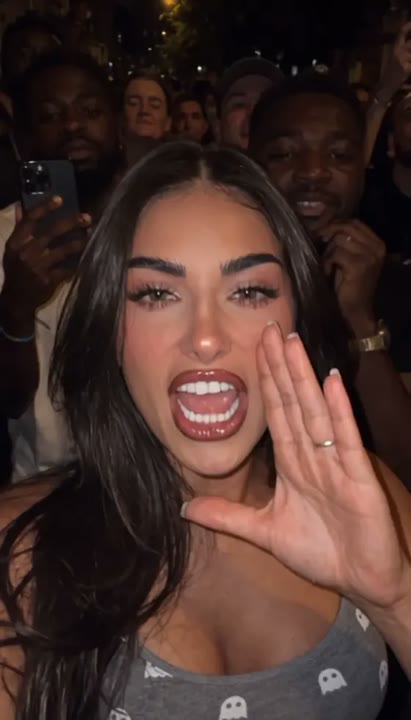
A close night-street performance with your face
Try the JME Check One Check Two AI Video Generator from one photo. Create a low-angle night-street performance with a confident lean-in, head nod and gesture.
The JME Check One Check Two AI Video Generator gives a portrait the energy of a nighttime freestyle performance. A low phone-camera angle, street lighting and soft crowd silhouettes frame a short lean-in, head nod and open-handed gesture. The action stays close enough for the face to remain the focus, with only a small amount of handheld-style movement. This one-photo interpretation creates a new performance scene rather than replacing a rapper inside an existing clip or matching words to a soundtrack. Use it for a confident introduction, street-style reaction or music-themed portrait edit.
Best for
- Night-street performance introductions
- freestyle-style reactions
- music portrait edits
Create your freestyle-style portrait clip
Choose your photo
Choose one adult in a sharp waist-up portrait with clear eyes and visible hands. Keep the chin and hairline inside the frame. Avoid heavy face filters, a microphone covering the mouth or a group photo with competing faces.
Generate with the template
Add your portrait and generate the night-street scene. The preset guides a subtle lean toward the lens, a head nod and an open-handed gesture, keeping the face clear rather than attempting exact rap lip-sync.
Review and download
Watch the lean-in for a stable face and natural neck movement. Check that the open hand stays coherent and does not cover the eyes. Street lights and background silhouettes should remain separate from the featured subject.
Low camera, lean-in and a confident nod
Use this reference direction as a starting point in custom-prompt mode. The template runs fixed instructions; remixing is a separate workflow, not an edit to the preset.
Animate the single adult in the uploaded portrait into a confident nighttime freestyle-style performance. Preserve their recognizable face, hairstyle, clothing and body proportions. Use a low phone-camera angle on a softly lit street with anonymous crowd silhouettes far behind. The subject leans slightly toward the lens, makes a small head nod and one open-handed rhythmic gesture, then settles back into a composed stance. Keep the face clear and the camera movement subtle. Suggest UK grime energy without matching lyrics or imitating another person's face. No precise lip-sync, extra featured performers, added text or abrupt cuts.
Before you create
Does the JME Check One Check Two effect rap the original lyrics?
The JME Check One Check Two effect creates a visual freestyle-style performance with a lean, nod and hand gesture. It does not include the original audio or generate word-matched lip-sync. After downloading, choose your own sound and use the clearest gesture or expression as the focus of your short edit.
Can I change the creative direction?
The preset uses fixed instructions. Copy the reference direction into custom-prompt mode to adapt it; this does not change the preset itself.
What video output should I expect?
The default length is 12s (reference ratio 412/720). The output follows your uploaded photo's aspect ratio and suits Night-street performance introductions, freestyle-style reactions, music portrait edits.
Give your portrait night-street energy
Choose a clear portrait and create your freestyle-style moment. Review the lean and hand gesture, then download a take with a confident expression and readable street atmosphere.