
Upload a photo
PNG, JPG or WebP · up to 10 MB
Choose a photo to generate a video.
The Distracted Boyfriend glance and three reactions
Create a Distracted Boyfriend AI video from one prepared three-person photo. Animate a small glance, your partner’s reaction and a familiar meme ending.
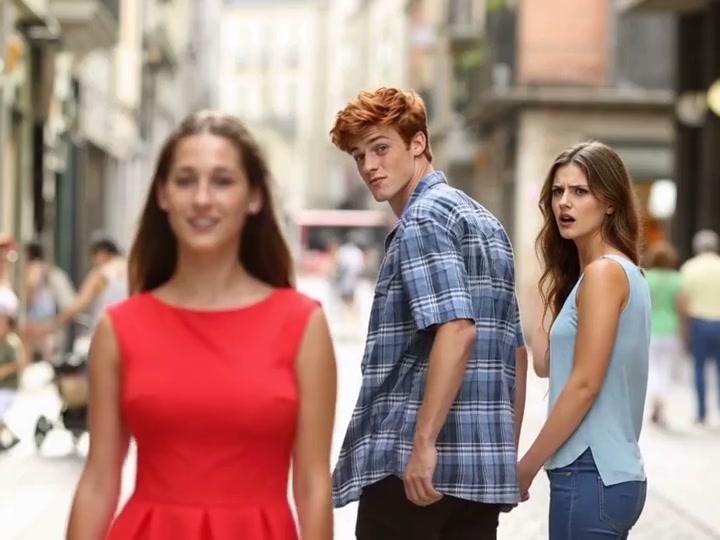
Distracted Boyfriend turns a familiar three-person composition into a short reaction scene. In the reference, a woman in red crosses the near foreground while a man in a blue checked shirt looks back at her. The woman beside him notices his glance and holds an unimpressed expression; the man ends with an awkward smile. The humor comes from the relationship between those three reactions, so this preset keeps the camera fixed and the movement small. Start with a scene that already contains all three people. The reference provides inspiration rather than a verified ReelAI output.
Best for
- Build a reaction about a tempting new purchase
- a fresh project or a distraction from unfinished work. This direction suits an already-composed meme image better than a solo selfie. The passing person
- central glance and partner response should be legible before you add any explanatory caption in your own editor.
Animate your prepared three-person scene
Choose your photo
Prepare one image with the passerby on the left, the distracted person near the center and the partner on the right. Keep their faces separate, their shoulders visible and the central neck angle comfortable. If the image already captures the backward glance, animate an eyebrow lift and the partner’s reaction instead of asking for another full turn. A solo portrait will not supply the complete three-person setup.
Generate with the template
Preserve the left-center-right composition and select a small glance or eyebrow lift that fits the existing head position.
Review and download
Check each person independently at the beginning and end. The central face should stay recognizable during the small glance, the partner should keep the same side of the frame, and the passerby should move forward without crossing through either person. Stop the action before the head rotation becomes exaggerated. Inspect hands or joined arms if they are visible in your starting image.
Guide the glance and awkward final smile
Use this reference direction as a starting point in custom-prompt mode. The template runs fixed instructions; remixing is a separate workflow, not an edit to the preset.
Animate the prepared three-person Distracted Boyfriend scene in the supplied image. Preserve all three identities, outfits and their existing left-center-right positions. Keep a fixed medium-wide camera. The central person makes a small glance toward the passerby on the left, or only raises the eyebrows if the image already shows that glance. The partner on the right notices and gives an unimpressed look. Let the passerby take one small forward step while the central person settles into an awkward smile. Keep the neck angle natural and faces separate. End on the recognizable composition without extra people, role swaps, generated labels, physical confrontation or scene cuts.
Before you create
Can I upload a selfie and have three people assembled here?
This preset takes one starting image. Prepare the three-person scene first, including any personalized central character, then upload that complete image for animation. Separate identity photos are not combined by this preset form. You can use the classic distracted pose or a neutral walking setup, but a small reaction is easier to keep readable than a long walk, turn and confrontation.
Can I change the creative direction?
The preset uses fixed instructions. Copy the reference direction into custom-prompt mode to adapt it; this does not change the preset itself.
What video output should I expect?
The default length is 5s (reference ratio 720/540). The output follows your uploaded photo's aspect ratio and suits Build a reaction about a tempting new purchase, a fresh project or a distraction from unfinished work. This direction suits an already-composed meme image better than a solo selfie. The passing person, central glance and partner response should be legible before you add any explanatory caption in your own editor..
Bring your distracted-boyfriend scene to life
Start with one complete three-person image and give the familiar reaction a short, readable ending.