
Upload a photo
PNG, JPG or WebP · up to 10 MB
Choose a photo to generate a video.
Two people, headphones and a sideways glance
Make an I Love the Smiths video from one shared photo: headphones, a sideways glance and a brief elevator encounter. Create your own scene here on ReelAI.
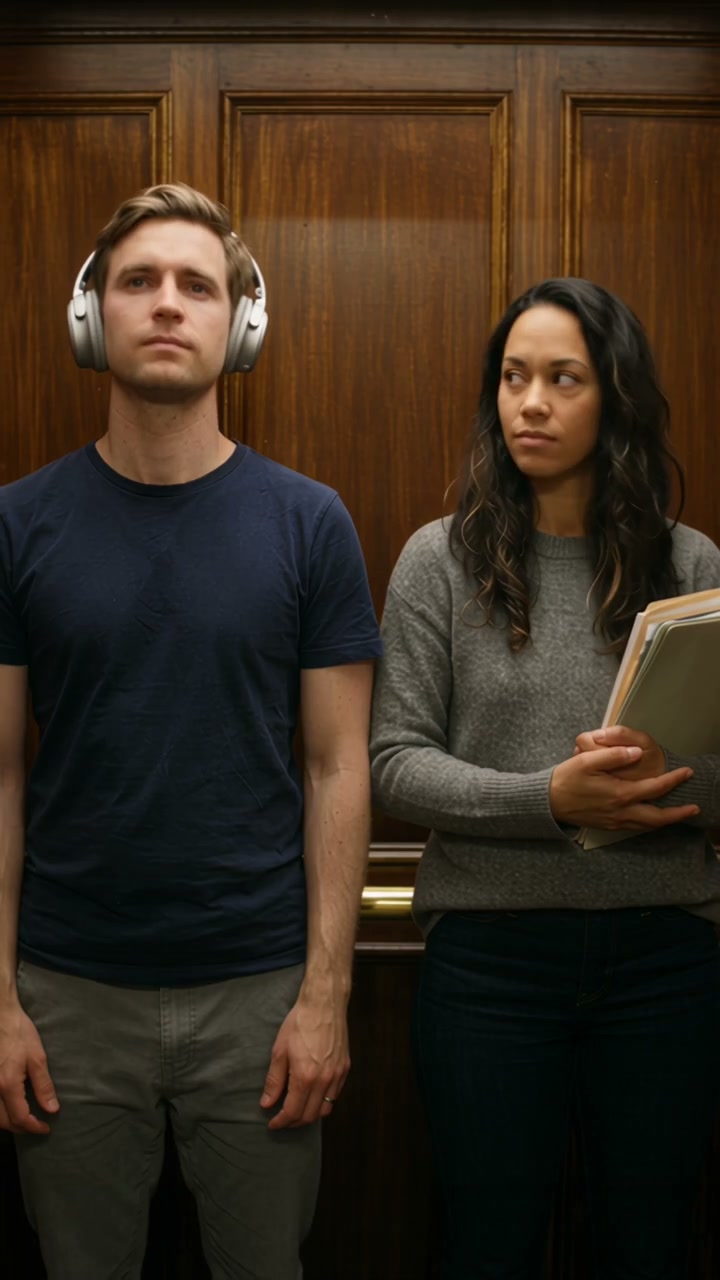
The I Love the Smiths elevator scene is a small missed connection: one person wears headphones while the other tries to get their attention. This version keeps the two roles together in one prepared image and focuses on the reaction rather than exact dialogue. The speaker turns and makes a brief conversational gesture; the listener notices, moves one earcup and looks over as the doors begin to open. A short pause between those actions gives the encounter its awkward charm without reconstructing every beat of the film scene.
Best for
- Use the effect for a shy-crush reaction
- a music-fan encounter or a lighthearted scene with a friend. Choose an input where the two people already have distinct positions and enough space to turn slightly. The headphones are the central prop
- so keep them easy to see. A simple metallic elevator and a steady chest-up view leave room for both expressions.
Make your elevator encounter
Choose your photo
Prepare one image with both adults standing side by side in an elevator, the listener on the left wearing over-ear headphones and the speaker on the right. Keep each face, both shoulders and the listener's hand visible. This preset does not assemble two separate portraits. A single already composed scene gives the model the role placement and prop details it needs from the start.
Generate with the template
Keep the listener on the left and the speaker on the right, with one conversational gesture and one delayed reaction.
Review and download
Check each face independently through the sideways glance. The headphone band and earcups should remain attached to the same listener, and the moving hand should not pass through the head. Watch that the door panels slide behind the people and do not cut across their bodies. One clear exchange and a small smile are preferable to extra gestures or an unsteady attempt to lip-sync a long line.
Headphone reaction direction
Use this reference direction as a starting point in custom-prompt mode. The template runs fixed instructions; remixing is a separate workflow, not an edit to the preset.
Animate the single prepared image of two adults standing side by side in a small metallic elevator. Preserve each person's distinct recognizable face, hair, outfit, body proportions and left-right position. The listener on the left wears the existing over-ear headphones; the speaker on the right has free space to turn toward them. Use one fixed chest-up or waist-up camera. The speaker glances toward the listener, gives one small friendly conversational hand gesture and pauses. After a short beat, the listener notices, moves one earcup a little away from the ear and turns toward the speaker. Let the doors begin to open behind them while both hold a small smile, ending before anyone needs to cross the doorway. Keep headphone parts, hands, faces, door panels and lighting coherent. No identity swaps, extra passengers, film footage, actor replacement, specified spoken lines, precise lip synchronization, original song request, captions or cuts.
Before you create
Can I use separate photos and the original I Love the Smiths dialogue?
This direction uses one prepared image containing both people. It creates a new headphone-and-elevator encounter, with the listener and speaker roles kept distinct. Separate-photo casting, the film soundtrack, exact spoken lines and precise lip synchronization are not supplied by this preset. You can keep the scene's visual reaction and add your preferred sound later.
Can I change the creative direction?
The preset uses fixed instructions. Copy the reference direction into custom-prompt mode to adapt it; this does not change the preset itself.
What video output should I expect?
The default length is 12s (reference ratio 720/1280). The output follows your uploaded photo's aspect ratio and suits Use the effect for a shy-crush reaction, a music-fan encounter or a lighthearted scene with a friend. Choose an input where the two people already have distinct positions and enough space to turn slightly. The headphones are the central prop, so keep them easy to see. A simple metallic elevator and a steady chest-up view leave room for both expressions..
Give your shared photo an elevator moment
Prepare one clear image of the two people together and animate a brief, awkwardly charming exchange.