
Upload a photo
PNG, JPG or WebP · up to 10 MB
Choose a photo to generate a video.
The flower-field hill opens its eye
Upload one prepared dinosaur scene for an I Thought It Was a Mountain AI video. Guide an eye opening, a slow head lift and a wide 12-second scale reveal.
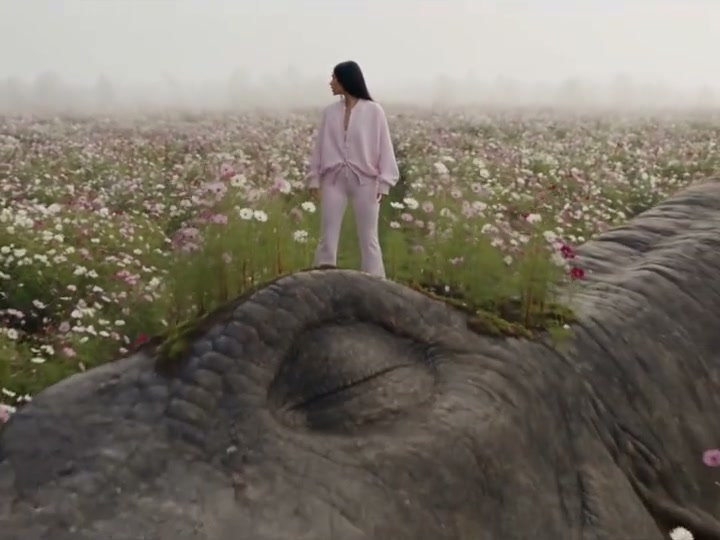
I Thought It Was a Mountain reveals that an ordinary-looking rise in a flower field belongs to a giant dinosaur. The reference follows a woman through the flowers, places her on a huge closed-eyed head and ends with the creature's long neck extending across the landscape. Her small figure makes the scale legible before the camera pulls farther back. This direction begins with the person already placed securely on the dinosaur's head. A slow eye opening and gentle lift can then reveal the creature without needing to fit a long walk, climb and landscape transformation into one generation. Keep the flowers, head shape and person arranged in a single coherent starting image.
Best for
- A fantasy travel portrait
- an enormous-creature reveal or a quiet adventure scene where scale supplies the surprise. A broad meadow and distant horizon make the creature feel larger than the subject. Leave room in the composition for the head and neck to move upward. Muted daylight works well when both the tiny person and textured dinosaur skin need to stay readable.
Prepare your giant-dinosaur reveal scene
Choose your photo
Upload one prepared scene with the person already standing or sitting safely on a broad dinosaur head in a flower meadow. Show a clear contact point under the shoes and include the closed eye, some neck and open sky. The pose should be balanced from the start. An ordinary portrait without the creature and scene cannot provide the same fixed structure for this reveal.
Generate with the template
Keep the person supported on the existing head while one eye opens and the view slowly reveals the creature's scale.
Review and download
Watch the feet against the creature's skin during the lift and make sure the person stays at the same relative scale. The eye should open within the existing head rather than becoming a new face or extra eye. Check that the flower line and horizon stay steady during the pullback. A gradual reveal gives more room to inspect the neck, shadows and contact than a sudden upward launch.
Guide the eye, head lift and scale reveal
Use this reference direction as a starting point in custom-prompt mode. The template runs fixed instructions; remixing is a separate workflow, not an edit to the preset.
Animate the prepared meadow scene with the person already balanced on the giant dinosaur's broad head. Preserve the person's face, clothes, proportions and exact contact with the creature. Keep the dinosaur's skin texture, head shape and existing eye position consistent. Begin with the eye closed, open it slowly, then lift the head in a gentle controlled movement while the person makes a small balancing adjustment without moving their feet. Pull the camera back smoothly to reveal more of the long neck, flower meadow and distant horizon. Retain the original sense of scale and lighting. One continuous shot; no falling, sudden launch, extra creatures, changing identity, captions or new lettering.
Before you create
Does the preset turn any hill in my photo into a dinosaur?
Prepare the creature-and-person composition before uploading. This direction animates that one scene, using the eye opening, head movement and pullback to explain the reveal. It does not include a separate image-compositing step. The inspiration shows a longer approach and climb, while the requested short clip focuses on the moment when the enormous animal becomes recognizable.
Can I change the creative direction?
The preset uses fixed instructions. Copy the reference direction into custom-prompt mode to adapt it; this does not change the preset itself.
What video output should I expect?
The default length is 12s (reference ratio 720/540). The output follows your uploaded photo's aspect ratio and suits A fantasy travel portrait, an enormous-creature reveal or a quiet adventure scene where scale supplies the surprise. A broad meadow and distant horizon make the creature feel larger than the subject. Leave room in the composition for the head and neck to move upward. Muted daylight works well when both the tiny person and textured dinosaur skin need to stay readable..
Create your mountain-to-dinosaur video
Upload one prepared meadow-and-dinosaur composition and build a short reveal around the scene's enormous hidden creature.