
Upload a photo
PNG, JPG or WebP · up to 10 MB
Choose a photo to generate a video.
The skeptical pickup-window reaction
Make a Hit The Road Dude inspired video from one photo. Put a skeptical character at a pickup window and review your short roadside reaction clip on ReelAI.
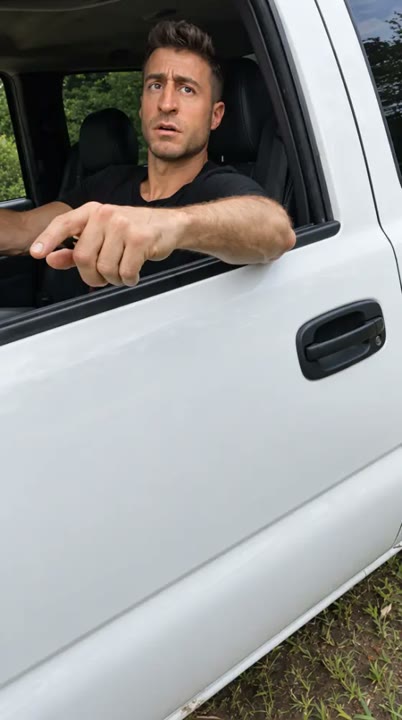
An open pickup window, a quiet pond, and one unimpressed driver are enough to suggest the private-property meme. The direction puts your uploaded subject in a newly generated roadside scene and concentrates on a skeptical glance followed by a firm look toward someone off camera. No second foreground character is needed to set up the exchange. A person can carry the joke with an eyebrow lift, while a pet makes the driver's seriousness more absurd. The short result works as a reaction insert or a visual setup for your own caption.
Best for
- Roadside meme edits
- Grumpy pet reactions
- Private-property captions
- Comedy scene cutaways
Create a Hit The Road Dude inspired scene
Choose your photo
Use a clear face-and-shoulders photo with the eyes unobstructed. A slight sideways angle can suit the open-window framing. For a pet, include the full muzzle and both ears so the driver's reaction has a recognizable silhouette.
Generate with the template
Generate one roadside reaction with the preset selected. The prepared direction keeps the camera outside the pickup window and asks for a small head movement rather than a full dialogue performance.
Review and download
Look at the face against the pickup window and check that the door edge does not cut through the subject. Review any outward gesture for clean anatomy. Add your own caption or audio separately if you want a specific exchange.
Direct the roadside attitude
Use this reference direction as a starting point in custom-prompt mode. The template runs fixed instructions; remixing is a separate workflow, not an edit to the preset.
Place the single subject from the uploaded photo in the driver's seat of a white pickup parked beside a quiet pond. Frame a medium close-up through the open side window. Keep the subject's visible face or pet markings recognizable. Begin with a skeptical glance toward someone just outside the frame, then add a small eyebrow lift, a short head tilt, and a dismissive outward gesture where anatomically appropriate. End with a firm stare. Use daylight, a stationary camera, and subtle background movement without text or a second foreground character.
Before you create
Does the pickup video include the original private-property dialogue?
The preset supplies a visual scene and reaction direction, not the original recording or a dialogue track. Your photo guides a new driver character inside a generated pickup setting. Use the skeptical pause as a caption moment, or add your own audio in an editor after reviewing the face and gesture.
Can I change the creative direction?
The preset uses fixed instructions. Copy the reference direction into custom-prompt mode to adapt it; this does not change the preset itself.
What video output should I expect?
The default length is 12s (reference ratio 404/720). The output follows your uploaded photo's aspect ratio and suits Roadside meme edits, Grumpy pet reactions, Private-property captions, Comedy scene cutaways.
Cast your own unimpressed driver
Upload a portrait or pet photo and build a new pickup-window reaction, with a quiet setting and an unimpressed look carrying the joke.