
Upload a photo
PNG, JPG or WebP · up to 10 MB
Choose a photo to generate a video.
A calm chair in a very busy field
Turn one photo into a Car Jump video: sit calmly in a folding chair while an SUV flies behind you through a dusty field. Create your unbothered scene on ReelAI.
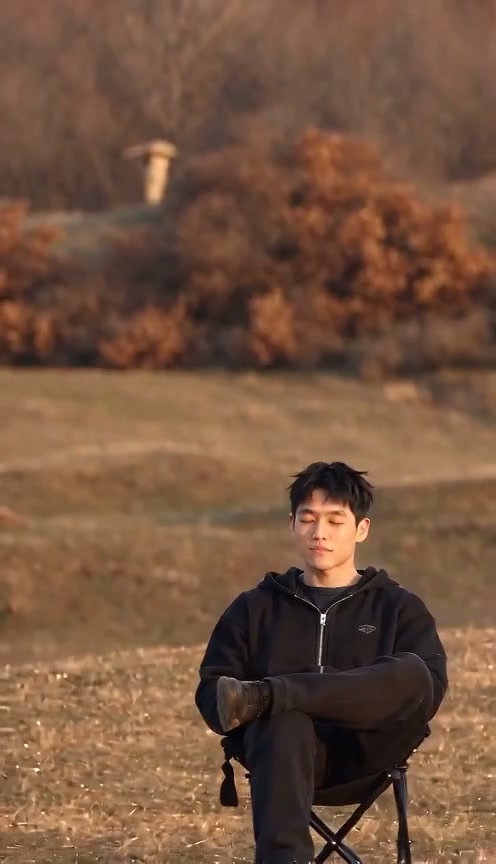
Car Jump is built around an unbothered reaction: one person sits still while a large vehicle makes an exaggerated leap behind them. The reference shows a black SUV in an autumn field, passing above a seated man with a plume of dust. It is a grassy location rather than a desert, so this direction keeps the warm field setting. Your photo supplies the calm character; the camera stays fixed as the single vehicle provides the movement and the contrast.
Best for
- Try this effect for a calm-in-the-chaos joke
- a dramatic profile clip or an action-poster-style entrance. A neutral expression makes the contrast clearer than a big startled reaction. One chair
- one seated subject and one background vehicle keep the short shot focused.
Create your unbothered Car Jump
Choose your photo
Use one sharp full-body photo, preferably already seated with the face and both legs clear. Leave room above and behind the subject for the vehicle path. A prepared chair-in-field image gives better control of the pose and horizon than a tight selfie. You do not need a separate car photo for this preset.
Generate with the template
Keep one calm seated lead and one clearly separated background vehicle, with a fixed camera and an open landing area.
Review and download
Watch the seated face and legs before checking the moving vehicle. The chair should remain planted and the SUV should stay behind the subject in depth, with consistent wheels and a readable jump path. Dust should build around the background landing rather than covering the lead's face.
Vehicle-over-chair direction
Use this reference direction as a starting point in custom-prompt mode. The template runs fixed instructions; remixing is a separate workflow, not an edit to the preset.
Use the uploaded image to retain one recognizable person's face, hairstyle, clothing and proportions. Place the person calmly in a folding camp chair in an open autumn field with warm light and a clear horizon, preserving this arrangement if already present. Keep the lead relaxed and almost still, with coherent crossed or naturally placed legs. Behind the chair, introduce one plain dark SUV that drives up a low rise, makes one exaggerated airborne leap visibly separated behind the subject, then lands farther back in a controlled cloud of dust. Use a fixed wide camera so the chair, jump path and landing remain readable in the same continuous shot. Keep vehicle wheels coherent and prevent any contact with the sitter or chair. No extra cars, flags, logos, text, close-up cutaways or sudden identity changes.
Before you create
Can I choose a different car or landscape?
You can edit the creative direction to describe a generic pickup, SUV or a different open setting. This preset still uses one photo for the seated lead; it does not accept a separate vehicle identity. A prepared scene offers firmer control of the chair, terrain and vehicle placement than a description alone.
Can I change the creative direction?
The preset uses fixed instructions. Copy the reference direction into custom-prompt mode to adapt it; this does not change the preset itself.
What video output should I expect?
The default length is 10s (reference ratio 496/864). The output follows your uploaded photo's aspect ratio and suits Try this effect for a calm-in-the-chaos joke, a dramatic profile clip or an action-poster-style entrance. A neutral expression makes the contrast clearer than a big startled reaction. One chair, one seated subject and one background vehicle keep the short shot focused..
Keep your cool in the action shot
Choose a seated portrait or a prepared field scene and make the background do the dramatic work.