
Upload a photo
PNG, JPG or WebP · up to 10 MB
Choose a photo to generate a video.
A living-doll jacket reveal
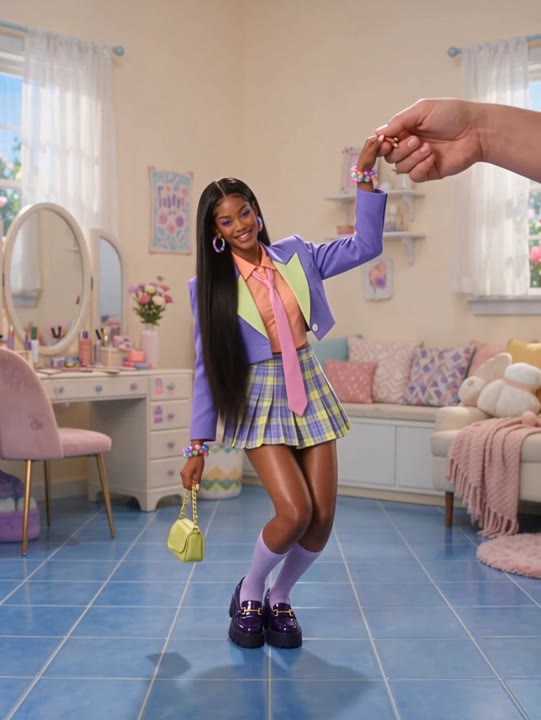
Use the Giant Hands Dress Up AI Video Generator for a living-doll fashion scene. Turn one full-body photo into a jacket reveal styled by oversized hands.
The Giant Hands Dress Up AI Video Generator turns a full-body portrait into a playful fashion-doll scene. Your subject stands on a clean studio platform while oversized hands enter from outside the frame, add a jacket and adjust the collar. A quiet camera and soft editorial light make the scale contrast the main attraction. The preset keeps the styling to one clear clothing reveal instead of replacing an entire wardrobe piece by piece. Use it for a fashion introduction, a new-look announcement or a surreal outfit post that ends with a small, confident pose.
Best for
- Fashion-doll edits
- outfit introductions
- surreal style announcements
Create your oversized-stylist scene
Choose your photo
Choose one standing person with the entire body visible and arms resting slightly away from the torso. Plain clothing provides a clean starting silhouette. Leave space around the shoulders and above the head for the oversized hands.
Generate with the template
Add your full-body portrait and generate the styling scene. The preset introduces two oversized hands for one jacket placement and collar adjustment, ending on a confident pose rather than repeated wardrobe changes.
Review and download
Check the jacket edges, shoulder placement and collar adjustment. The stylist hands should remain separate from the subject's own arms, and the person's face and body proportions should stay consistent through the reveal.
Giant hands, one clear outfit change
Use this reference direction as a starting point in custom-prompt mode. The template runs fixed instructions; remixing is a separate workflow, not an edit to the preset.
Turn the single full-body subject in the uploaded photo into a living fashion doll while preserving their recognizable face, hairstyle and proportions. Keep them standing still on a clean studio platform. Two oversized stylist hands enter gently from the frame edges and place a tailored jacket over the subject's simple starting outfit, then straighten the collar and withdraw. The subject gives a small confident pose at the end. Use a fixed front-facing camera and soft editorial light. Limit the transformation to one jacket reveal. No extra limbs on the subject, face changes, text or multiple costume cycles.
Before you create
Can Giant Hands Dress Up reproduce an exact outfit from another photo?
This Giant Hands Dress Up preset creates a generated jacket reveal from one full-body portrait. It does not accept a separate clothing reference or promise a precise garment copy. The effect focuses on the living-doll scale contrast and a readable styling action, with the finished jacket shaped by the creative direction.
Can I change the creative direction?
The preset uses fixed instructions. Copy the reference direction into custom-prompt mode to adapt it; this does not change the preset itself.
What video output should I expect?
The default length is 12s (reference ratio 540/720). The output follows your uploaded photo's aspect ratio and suits Fashion-doll edits, outfit introductions, surreal style announcements.
Step onto your fashion-doll platform
Choose a clear standing photo and create your living-doll reveal. Review the stylist hands and jacket, then download a take with a clean final silhouette.