
Upload a photo
PNG, JPG or WebP · up to 10 MB
Choose a photo to generate a video.
A compact solo with a rock-and-roll mood
Create a Runaround Sue AI dance from one full-body photo. Try compact side steps, a low kick and a relaxed solo finish, then review your video in ReelAI.
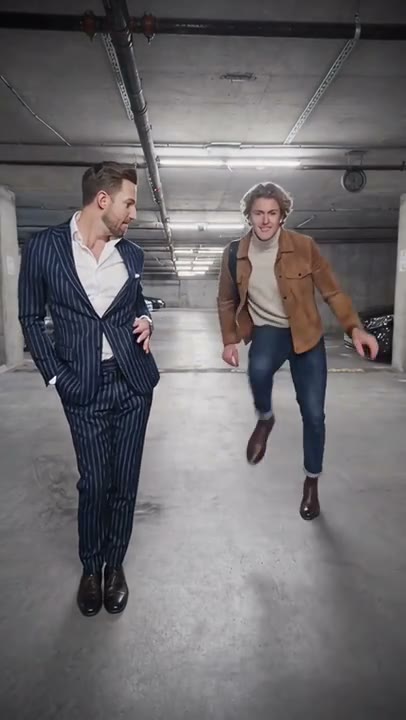
Runaround Sue brings a brisk rock-and-roll mood to a simple full-body portrait. The source reference shows two adults dancing in a parking garage; this preset is an independently written single-person interpretation. It combines small side steps, a heel-toe movement and one low kick rather than copying the pair's choreography. A fixed camera keeps attention on the dancer and makes shoes, knees and arm positions easier to inspect. Use a standing photo with enough floor space to create a playful solo insert for a retro-themed Reel or personal dance montage.
Best for
- Retro dance Reels
- single-person full-body portraits
- rock-and-roll montage inserts
Create your Runaround Sue dance video
Choose your photo
Choose one sharp standing photo of a single adult, with the face, both hands, knees and shoes visible. Leave space beside the elbows and around the feet. A simple floor and an uncluttered background make the small steps easier to follow; a parking garage is optional.
Generate with the template
Add your full-body photo and select Generate video. The prepared direction creates a short solo with side-to-side weight shifts, a heel-toe step and a low kick, using your existing outfit and setting as the visual guide.
Review and download
Watch both shoes through the side steps and low kick, checking that the legs stay separate and return to a balanced stance. Hands should remain connected to the same arms without changing size. Reject takes that introduce a second performer or make the background slide with the feet.
Small steps, one low kick and a relaxed finish
Use this reference direction as a starting point in custom-prompt mode. The template runs fixed instructions; remixing is a separate workflow, not an edit to the preset.
Animate the single adult in the uploaded full-body photo into a compact rock-and-roll-inspired solo. Preserve their recognizable face, hairstyle, outfit, shoes and body proportions, along with the main background layout. Keep a fixed front-facing camera with clear floor space around both feet. The dancer shifts weight twice from side to side, makes a small heel-toe step, gives one low forward kick and returns to a relaxed upright pose with a brief smile. Keep the knees softly bent and the hands near the waist with modest alternating arm swings. Use a new short movement sequence rather than the exact timing of an existing recording. Maintain stable shoe contact and one continuous shot. No second dancer, identity duplication, large jumps, spinning camera, lyrics, captions or outfit changes.
Before you create
Will Runaround Sue reproduce the two-person reference dance?
No. The preview is a paired parking-garage reference, while this direction creates a compact solo from one person's photo. It does not combine two uploaded identities, follow exact reference choreography or provide the original song. Add any chosen soundtrack and precise beat edits separately after reviewing the generated movement.
Can I change the creative direction?
The preset uses fixed instructions. Copy the reference direction into custom-prompt mode to adapt it; this does not change the preset itself.
What video output should I expect?
The default length is 12s (reference ratio 406/720). The output follows your uploaded photo's aspect ratio and suits Retro dance Reels, single-person full-body portraits, rock-and-roll montage inserts.
Put your standing portrait in motion
Choose a clear single-person photo with both shoes in view. Review the steps and final balance, then download your preferred take for a retro dance post.